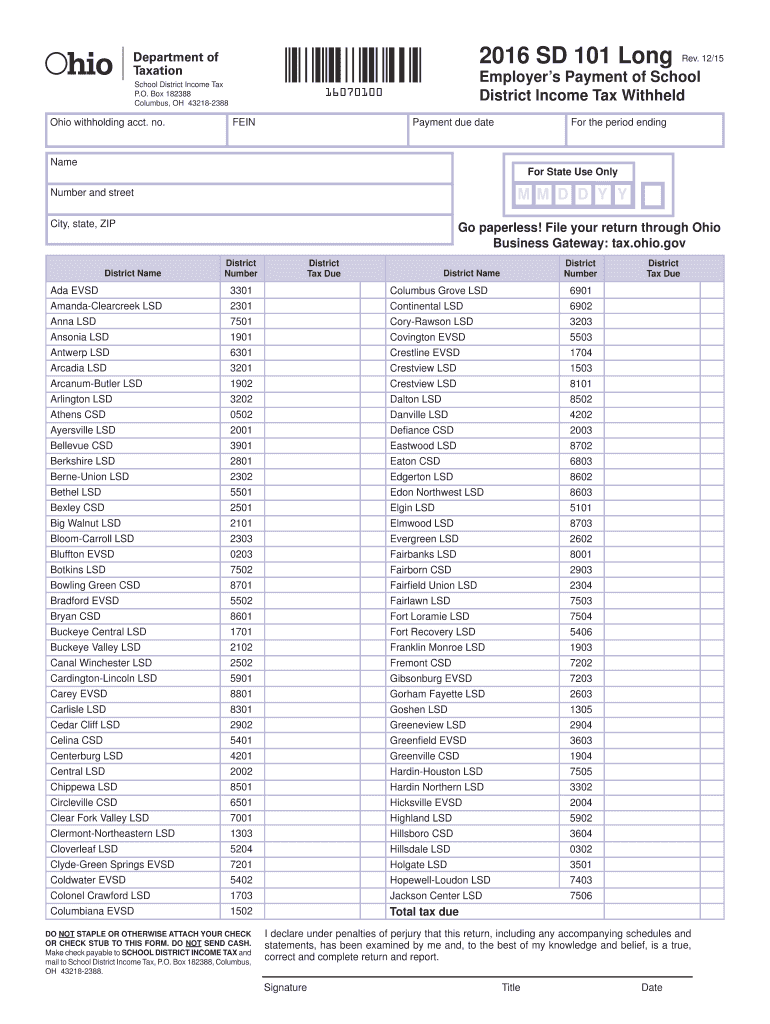
Wood LSD Norwalk CSD Norwayne LSD Oberlin CSD Old Fort LSD Otsego LSD Ottawa-Glandorf LSD Ottoville LSD Pandora-Gilboa LSD 7612 1204 8505 8706 3904 8504 4712 7405 8707 6907 6908 6909 District Tax Due District Name District Number Parkway LSD Patrick Henry LSD Paulding EVSD Perrysburg EVSD Pettisville LSD 5405 3504 6302 8708 2604 Pickerington LSD Piqua CSD Plymouth-Shiloh LSD Preble Shawnee LSD Reynoldsburg CSD Ridgemont LSD Riverdale LSD Riverside LSD Ross LSD Russia LSD Sebring LSD Senec.
Loading

Open form follow the instructions

Easily sign the form with your finger

Send filled & signed form or save
How to fill out the OH ODT SD 101 Long online
Completing the OH ODT SD 101 Long form online can streamline your filing process for school district income tax in Ohio. This guide will provide clear, step-by-step instructions to help you accurately complete the form with confidence.
Follow the steps to complete the OH ODT SD 101 Long online.
- Click the ‘Get Form’ button to access the form and open it in your preferred online editor.
- Complete the section for the Ohio withholding account number and the employer’s federal employer identification number (FEIN). Ensure these numbers are accurate as they are crucial for processing your submission.
- Enter the payment due date and the period ending date in the specified format (MM DD YYYY) to ensure timely filing.
- Provide the name of the school district where the tax is being withheld, selecting from the list provided on the form.
- Fill out the district number and total tax due. It is essential to calculate the tax amount based on your withholdings accurately.
- Sign the document to declare the information is true and complete, including your title and the date of signing.
- Review all entered information for accuracy, then proceed to save changes, download the document, print it, or share it as needed.
Start completing your OH ODT SD 101 Long form online today for a smooth filing experience.
Experience a faster way to fill out and sign forms on the web. Access the most extensive library of templates available.
Related content
Aug 7, 2020 — Overview. A file upload option is available to facilitate data entry of...
May 18, 2007 — ODT's annual report is designed to provide a greater understanding of the...
This data sheet contains specifications for the i.MX 8DualX processor, which, along with...
Get answers to your most pressing questions about US Legal Forms API.
Is an employer required to withhold Ohio school district tax?
Yes, employers are required to withhold Ohio school district tax from employees' wages if they reside in a district that imposes this tax. Employers must ensure that they comply with withholding regulations to avoid penalties for both the employer and employees. Understanding your duties in regard to school district tax is essential to navigating the OH ODT SD 101 Long landscape successfully.
What do I need to do to get a tax ID number?
To obtain a tax ID number, you need to complete an application form relevant to your business structure. This application can often be done online through the IRS or state tax authority websites. Having the correct tax ID number is pivotal for managing your tax responsibilities effectively, including those accompanying the OH ODT SD 101 Long guidelines.
How do I get an Ohio withholding account number?
To get an Ohio withholding account number, you can register with the Ohio Department of Taxation online. This process involves providing relevant information about your business and the number of employees you plan to hire. Securing this number is vital for withholding the appropriate taxes from employee paychecks, ensuring alignment with OH ODT SD 101 Long regulations.
What is Ohio State tax number?
The Ohio state tax number is a unique identifier assigned to businesses and individuals for tax purposes. This number is essential for managing state tax obligations, including income tax, sales tax, and employment tax. Obtaining your state tax number allows you to file returns accurately and comply with the laws in Ohio, particularly fulfilling the guidelines related to OH ODT SD 101 Long.
What is ODT in Ohio?
ODT stands for the Ohio Department of Taxation, which oversees tax collection and administration in the state. The department provides resources and guidelines for taxpayers, ensuring compliance with state tax regulations. Familiarizing yourself with ODT helps streamline your tax responsibilities, particularly when addressing requirements like those in OH ODT SD 101 Long.
Who must file Ohio SD100?
Ohio residents who earn income subject to the school district income tax must file the Ohio SD100 form. This tax is required whether you are an employee or self-employed in a district that imposes this tax. Your compliance with submitting the SD100 contributes to funding local schools, a vital aspect of community support. Check the specific requirements that relate to OH ODT SD 101 Long, as they can vary by district.
Who is required to file an Ohio state tax return?
Individuals who earn income in Ohio must file an Ohio state tax return, regardless of where they reside. This requirement applies even if you work for an employer outside the state. Be attentive to the filing rules, particularly for your residents in school districts requiring additional forms like the OH ODT SD 101 Long. It helps to stay informed to avoid unnecessary penalties.
How do I get an Ohio state tax ID number?
To obtain an Ohio state tax ID number, you can apply through the Ohio Department of Taxation's website. The application process involves providing basic information about your business and its structure. Once you complete the application, you will receive your Ohio tax ID, enabling you to meet your tax obligations with confidence, including those required for OH ODT SD 101 Long.
Who needs to file SD 100 in Ohio?
The Ohio SD 100 form must be filed by individuals and entities that owe school district income tax. This includes residents of certain Ohio school districts, regardless of where they work. If you work or receive income from a taxing district, you likely need to file the SD 100, especially to comply with OH ODT SD 101 Long requirements. Ensure you know your school district's tax regulations to fulfill your obligations.
Is an EIN the same as a tax ID?
An Employer Identification Number (EIN) functions as a tax ID for businesses. It is essential for various tax-related purposes, including filing payroll taxes and opening a business bank account. While all EINs serve as tax IDs, not all tax IDs are EINs; individuals typically use their Social Security Numbers (SSNs) as tax IDs. Understanding this distinction is crucial for effectively managing your business's financial duties, especially regarding OH ODT SD 101 Long.
Use professional pre-built templates to fill in and sign documents online faster. Get access to thousands of forms.
If you believe that this page should be taken down, please follow our DMCA take down process here.