Thheld by others, refundable credits and overpayment credit carryover from 2014 (do not include estimated tax payments on this line).1 Note: For Ohio IT 1140, there are no taxes withheld by others and no refundable credits other than last year s tax overpayment credited to this year ................................................................................................................................................2. 00 3. Line 1 minus the amount on line 2 (if less than zero, enter.
Open form follow the instructions
Easily sign the form with your finger
Send filled & signed form or save
How to fill out the OH ODT IT/SD 2210 Long online
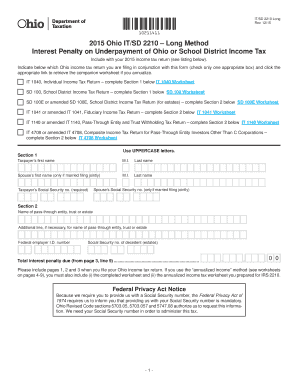
The OH ODT IT/SD 2210 Long form is used to calculate any interest penalties due to underpayment of Ohio or school district income tax. This guide provides a step-by-step approach to help you accurately fill out the form online, ensuring that you meet your tax obligations efficiently.
Follow the steps to successfully complete the form online.
- Click the ‘Get Form’ button to obtain the OH ODT IT/SD 2210 Long form and open it in the editor.
- Identify the Ohio income tax return you are filing. Check only one of the boxes provided in the section indicating which return corresponds with the form: IT 1040, SD 100, SD 100E, IT 1041, IT 1140, or IT 4708.
- In Section 1, enter the tax filer’s first name, middle initial, last name, and social security number as required. If filing jointly, also include the spouse’s information.
- Move to Section 2 to input data regarding the pass-through entity, trust, or estate. This includes the name, federal employer identification number, and, if applicable, the social security number of the decedent.
- Proceed to Part I, which calculates the required annual payment using the long method. Follow the provided lines to detail your Ohio income tax after credits, withholding amounts, and additional necessary calculations.
- Check the results from Part I to determine if the interest penalty applies. Validate whether your calculated amounts meet the conditions set forth within the form.
- In Part II, calculate the interest penalty due based on the previously determined annual payment. Fill in additional fields regarding payment due dates and computed ratios provided.
- Complete the annualized income worksheets if you are using the annualized income method. Ensure to gather appropriate data for each period and include necessary credits and deductions.
- After completing the form, review all entered information for accuracy and completeness.
- Once satisfied with the form, you can save changes, download, print it, or share as needed.
Complete your OH ODT IT/SD 2210 Long form online today to fulfill your tax responsibilities.
Experience a faster way to fill out and sign forms on the web. Access the most extensive library of templates available.
Related content
The long-form used for the annualized calculation of the interest penalty is no longer...
by KA Ryan · Cited by 17 — Economic Growth and Tax Relief Reconciliation Act of 2001...
long-term stability ±O.OOOI %/wk; temp. coefficient ±0.0002%/oC. Period Measurements...
Get answers to your most pressing questions about US Legal Forms API.
How much is the Ohio tax penalty?
The Ohio tax penalty varies based on the amount of tax due and the period of delay in payment. Generally, the penalty can be calculated based on percentage rates for both late payment and underpayment. To ensure you are accurate with your calculations, consider using the OH ODT IT/SD 2210 Long form, which outlines the specific requirements to help you manage your tax responsibilities effectively.
What is the penalty for paying Ohio state taxes late?
Paying Ohio state taxes late can result in significant penalties, which are typically a percentage of the unpaid tax amount. Understanding these penalties can help you avoid contributing to your tax burden. If you find yourself in this predicament, using the OH ODT IT/SD 2210 Long form can assist in resolving issues and progressing towards compliance.
Why is TurboTax asking me for form 2210?
TurboTax may request the OH ODT IT/SD 2210 Long form to assess your situation regarding estimated tax payments. This form helps in determining if you owe any penalties due to underpayment. By inputting accurate information, you can clarify your tax standing and ensure compliance with state regulations.
How do I know if I'm exempt from Ohio or school district income tax?
To determine if you're exempt from Ohio or school district income tax, start by reviewing your income sources. Various exemptions apply, typically based on your income level and residence. If you qualify for the OH ODT IT/SD 2210 Long form, it can be beneficial to clarify your tax status effectively. Additionally, consider consulting tax resources or professionals to guide you through your specific situation.
How to fill out a withholding exemption form?
Filling out a withholding exemption form requires you to provide personal information, including your filing status and number of exemptions claimed. Make sure to follow guidelines set by the IRS to ensure correct documentation. By accurately completing this form, you can optimize your tax withholdings, thus preventing issues with the OH ODT IT/SD 2210 Long.
How do I calculate my underpayment penalty?
To calculate your underpayment penalty, first determine the total amount you owe and compare it to your total payments made throughout the year. You can use IRS tables or formulas to assess what part of your tax is subject to penalties. This calculation provides insights into how the OH ODT IT/SD 2210 Long impacts your overall tax standing.
How to fill out a withholding allowance form?
To fill out a withholding allowance form, start by accurately completing the personal information section, such as your name, address, and Social Security number. Next, complete the allowances section based on your tax situation, like marital status and number of dependents. Reviewing the IRS guidelines ensures you provide the correct details, which helps you avoid issues with your taxes, including those related to the OH ODT IT/SD 2210 Long.
Why am I getting form 2210?
You are receiving form 2210 because the IRS recognizes potential underpayment in your tax contributions during the past year. This form assesses whether you owe any penalties that need addressing under the OH ODT IT/SD 2210 Long. If you receive this form, review your tax payments, and consider consulting TurboTax or a tax professional for assistance.
What is the form 2210 for 2022?
Form 2210 for 2022 is used to determine if you owe a penalty for underpaying your taxes throughout the year. It analyzes your withholding and estimated tax payments against your total tax liability. This form is very relevant under the OH ODT IT/SD 2210 Long considerations, so it is essential to fill it out accurately or use TurboTax for guidance.
Why do I need form 2210 TurboTax?
You need form 2210 in TurboTax to address underpayment penalties related to your federal taxes. This form helps you calculate and justify any underpayment penalties under the OH ODT IT/SD 2210 Long. By using TurboTax, you simplify the process, ensuring your tax return is accurate and compliant with IRS standards.
Use professional pre-built templates to fill in and sign documents online faster. Get access to thousands of forms.
If you believe that this page should be taken down, please follow our DMCA take down process here.
This form is available in several versions. Select the version you need from the drop-down list below.