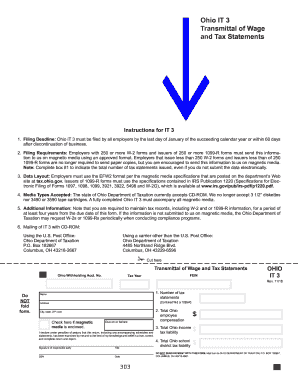
Ohio IT 3 Transmittal of Wage and Tax Statements Instructions for IT 3 1. Filing Deadline Ohio IT 3 must be filed by all employers by the last day of January of the succeeding calendar year or within 60 days after discontinuation of business. 6. Mailing of IT 3 with CD-ROM Using the U.S. Post Office Ohio Department of Taxation P. O. Box 182667 Columbus OH 43218-2667 Using a carrier other than the U.S. Post Office 4485 Northland Ridge Blvd. A fully completed Ohio IT 3 must accompany all magnetic .
Open form follow the instructions
Easily sign the form with your finger
Send filled & signed form or save
How to fill out the OH ODT IT 3 online
The Ohio IT 3 form is essential for employers to report wage and tax information in compliance with state regulations. This guide provides clear, step-by-step instructions to help you navigate the online filing process smoothly.
Follow the steps to complete your OH ODT IT 3 form online.
- Click the ‘Get Form’ button to obtain the form and open it in your editor.
- Enter your Ohio withholding account number in the designated field.
- Input your Federal Employer Identification Number (FEIN) accurately.
- Specify the tax year for which you are submitting the form.
- Fill in the name and address of your business, including city, state, and ZIP code.
- Indicate the total number of tax statements issued by entering the number in the provided box.
- If you are sending magnetic media, check the box provided to indicate its enclosure.
- Enter the total Ohio employee compensation in the appropriate field.
- Fill in the total Ohio income tax liability that is applicable.
- Enter the total Ohio school district tax liability amount.
- Do not include any payments with your form. Review all information for accuracy.
- Sign and date the form, ensuring the signature belongs to a responsible party.
- Once completed, save changes, download the form, and prepare to mail it to the Ohio Department of Taxation.
Complete your tax documents online for a more efficient filing process.
Experience a faster way to fill out and sign forms on the web. Access the most extensive library of templates available.
Related content
Ohio Department of Taxation Scannable Tax Forms. 1. Introduction: The Ohio Department of...
The State of Ohio does not issue a sales tax exemption number. A vendor's license number...
The XR724 Touchscreen Comfort Control, model TCONT724AS42DA, requires a 24V common and hot...
Get answers to your most pressing questions about US Legal Forms API.
What is Ohio IT 3?
Ohio IT 3 refers to the state tax form for part-year residents and non-residents filing income taxes in Ohio. This form, also known as the OH ODT IT 3, captures essential information about your income source and helps determine your tax liability. Submitting the IT 3 allows the Ohio Department of Taxation to assess your income properly, ensuring you remain compliant with state tax laws. Use reputable services, like USLegalForms, to assist with your filing.
What is Ohio tax form IT 4?
Ohio tax Form IT 4 is the Employee’s Withholding Exemption Certificate, which allows employees to determine their state income tax withholding. This form is crucial for individuals starting new employment or reviewing their withholding status. Completing the IT 4 accurately ensures that the correct amount of taxes is withheld from your paycheck, thus influencing your overall tax liability. You can find guidance on this form through resources like USLegalForms.
Why would the Ohio Attorney General offset my taxes?
The Ohio Attorney General may offset your taxes to retrieve funds owed to the state, typically due to unpaid debts or obligations. This process helps the state collect taxes, child support, or other debts owed. If you receive a notice regarding an offset, it's essential to address it promptly and review your financial obligations. Understanding how offsets work can help you manage your tax responsibilities more effectively.
Who needs to file an Ohio State tax return?
Any individual who earns income in Ohio must file a state tax return, including residents and non-residents. If your income level exceeds the minimum threshold set by the Ohio Department of Taxation, you are required to file. This includes those who may need to submit the OH ODT IT 3 form, ensuring that you meet your tax obligations accurately. Review your financial situation each year to determine your filing requirements.
What is ODT in Ohio?
ODT stands for the Ohio Department of Taxation, which is responsible for collecting state taxes and administering tax laws in Ohio. The ODT oversees various tax forms, including the OH ODT IT 3, to ensure residents and non-residents meet their obligations. Understanding the role of the ODT can help you navigate your tax responsibilities more effectively. It’s your go-to resource for accurate tax information in Ohio.
Where to mail Form Ohio IT 3?
You can mail Form Ohio IT 3 to the Ohio Department of Taxation at the designated address specified in the form instructions. It’s important to send it to the correct location to avoid delays in processing. Don’t forget to check for any updates on mailing addresses to ensure your OH ODT IT 3 reaches the right department promptly. Using the right mailing method can also help safeguard your tax information.
What is Ohio Form IT 3?
Ohio Form IT 3 is a state tax form used for reporting income for the Ohio Department of Taxation. This form is primarily designed for individuals who are part-year residents or non-residents of Ohio, allowing them to declare their Ohio income. By filing the OH ODT IT 3, you ensure compliance with state tax laws and receive necessary credits or refunds. This form is essential for accurate financial documentation in Ohio.
What states have mandatory withholding?
Several states, including Ohio, require mandatory tax withholding for employee wages. This ensures that employees meet their tax obligations throughout the year. If you are looking for more information on state-specific requirements, OH ODT IT 3 can provide detailed insights on withholding obligations across states.
Is Ohio a mandatory withholding state?
Yes, Ohio is categorized as a mandatory withholding state, requiring employers to withhold state income tax on employee wages. This obligation applies to various forms of income, including salaries and bonuses. By utilizing OH ODT IT 3, you can easily comply with these mandatory requirements.
How do I apply for Ohio withholding tax?
To apply for Ohio withholding tax, you must complete an application through the Ohio Department of Taxation. This can be done online, and you will need to provide relevant business information. Using OH ODT IT 3 can help guide you through this application process efficiently and ensure accuracy.
Use professional pre-built templates to fill in and sign documents online faster. Get access to thousands of forms.
If you believe that this page should be taken down, please follow our DMCA take down process here.
This form is available in several versions. Select the version you need from the drop-down list below.