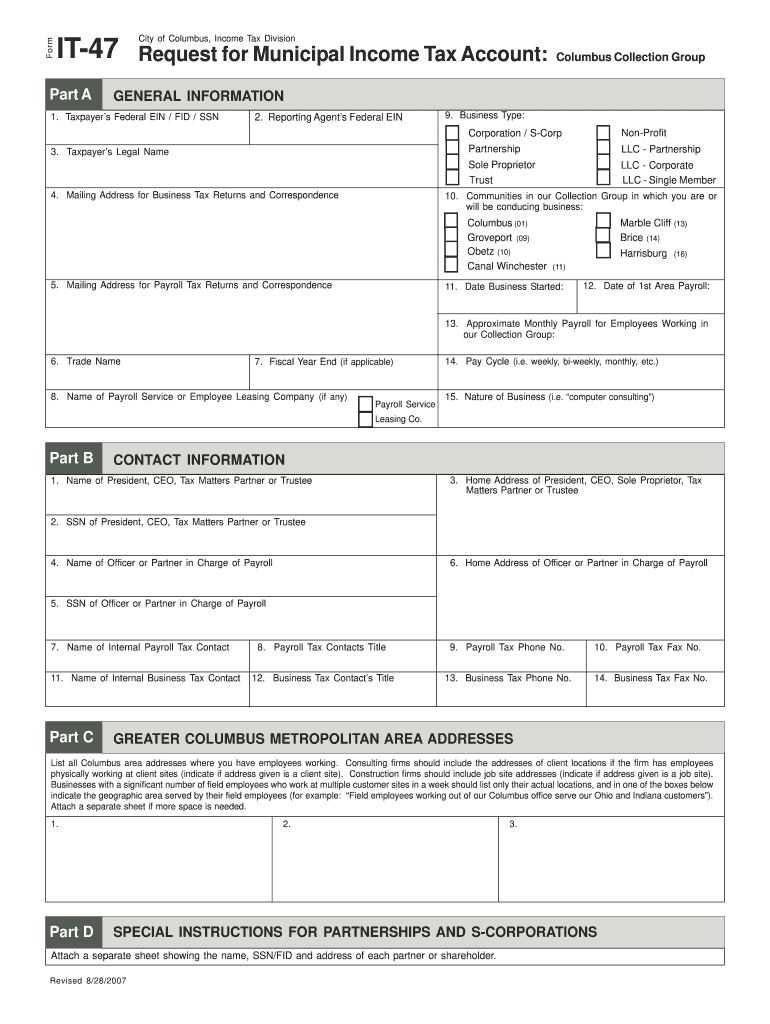
Ting Agent s Federal EIN 9. Business Type: Non-Profit Corporation / S-Corp 3. Taxpayer s Legal Name 4. Mailing Address for Business Tax Returns and Correspondence Partnership LLC - Partnership Sole Proprietor Trust LLC - Corporate LLC - Single Member 10. Communities in our Collection Group in which you are or will be conducing business: Columbus (01) Groveport (09) Obetz (10) Canal Winchester 5. Mailing Address for Payroll Tax Returns and Correspondence Marble Cliff (13) Brice (14.
Loading

Open form follow the instructions

Easily sign the form with your finger

Send filled & signed form or save
How to fill out the OH IT-47 - Columbus City online
This guide provides comprehensive instructions on filling out the OH IT-47 - Columbus City form online. It is designed to support users of all experience levels, ensuring the process is straightforward and efficient.
Follow the steps to complete the OH IT-47 - Columbus City form online.
- Click ‘Get Form’ button to obtain the form and open it in the editor.
- Fill in the Taxpayer’s Federal EIN / FID / SSN in the designated field. This information is essential for the identification of your tax account.
- Enter the Reporting Agent’s Federal EIN if applicable; this is important if you are using a reporting agent for tax matters.
- In the Business Type section, select the appropriate business structure from the options provided, such as Non-Profit, Corporation, or Sole Proprietor.
- Complete the Taxpayer’s Legal Name and Mailing Address for Business Tax Returns. Ensure that these details are accurate to avoid any issues with tax correspondence.
- Provide the Mailing Address for Payroll Tax Returns, which may differ from the business mailing address.
- Input the Trade Name of your business, if applicable.
- If applicable, specify the Fiscal Year End date for your business operations.
- In the section for the Name of Payroll Service or Employee Leasing Company, fill in the company name if you are utilizing one.
- Indicate the Date Business Started and the Date of 1st Area Payroll, providing relevant dates for your records.
- Fill in the Approximate Monthly Payroll for Employees Working in the Collection Group; this helps assess your tax obligations.
- Specify the Pay Cycle (i.e., weekly, bi-weekly, or monthly) that your payroll follows.
- Describe the Nature of Business briefly, such as 'computer consulting' or 'retail sales'.
- In the Contact Information section, provide the Name and SSN of the President, CEO, or Tax Matters Partner, along with their Home Address.
- List the Name of Officer or Partner in Charge of Payroll and their SSN, as well as their Home Address.
- Identify the Name of Internal Payroll Tax Contact and Business Tax Contact, with relevant titles and phone numbers.
- For businesses with multiple addresses, list all Columbus area addresses where you have employees working. If necessary, attach a separate sheet for additional addresses.
- Complete the Special Instructions for Partnerships and S-Corporations by attaching a list of each partner's or shareholder's name, SSN/FID, and address if applicable.
- Once all information has been accurately filled out, proceed to save changes, download, print, or share the completed form as needed.
Start completing your OH IT-47 - Columbus City form online today.
Experience a faster way to fill out and sign forms on the web. Access the most extensive library of templates available.
Related content
You do this by filing a Form IT-47, which is a simple questionnaire. Employers are liable...
For state purposes, an individual may claim only natural de- pendency exemptions. This...
Apr 30, 2021 — American Municipal Power - Ohio. 2600 Airport Dr. Columbus, OH 43219:...
Get answers to your most pressing questions about US Legal Forms API.
Do I need to file a city tax return in Ohio?
You need to file a city tax return in Ohio if you reside or work in a municipality that has a city tax requirement. In Columbus, for instance, you would use the OH IT-47 - Columbus City form. Keeping up with your filing helps maintain good standing with the city tax authorities.
Who has to file a city of Columbus tax return?
Anyone who earns income in Columbus or is a resident of the city is required to file a city tax return using the OH IT-47 - Columbus City form. This includes employees and self-employed individuals. Be proactive about your tax obligations to ensure you're meeting all requirements.
Do I have to file an Ohio City tax return?
If you earn income in a city that collects city taxes, you must file an Ohio City tax return. This includes using the OH IT-47 - Columbus City form for those living or working in Columbus. Filing accurately and on time helps you avoid penalties or interest charges.
Who is subject to Ohio City tax?
Individuals who work or reside in a municipality that levies a city tax, including Columbus, are subject to the Ohio City tax. This applies to both employees earning wages and self-employed individuals. Understanding your tax responsibilities, including the need for the OH IT-47 - Columbus City form, is crucial for compliance.
Do I have to file school district taxes in Ohio?
Yes, if you reside in an area that imposes school district taxes, you must file them accordingly. The laws vary by district, so it's essential to check local regulations. Be sure to include any relevant forms, such as the OH IT-47 - Columbus City, as part of your submission.
How do I apply for an Ohio withholding account number?
To apply for an Ohio withholding account number, you can complete an application online through the Ohio Department of Taxation's website. The process typically requires basic information about your business and its tax obligations. Once you submit your application, you will receive your account number, which is essential for tax reporting purposes, particularly for the OH IT-47 - Columbus City tax.
Do I have to file an Ohio CCA city tax form?
Yes, if you work or live in a city that levies a tax, you are required to file an Ohio CCA city tax form. This includes cities like Columbus, where the OH IT-47 - Columbus City form is necessary. Make sure to check for any local regulations to ensure compliance.
How to file Columbus city tax?
To file your Columbus city tax, you need to complete the OH IT-47 - Columbus City form. You can easily obtain this form online or through the Columbus city tax office. Once you fill it out, submit it along with any required documentation to the appropriate local tax authority.
Can you file Columbus city taxes online?
Yes, you can file Columbus city taxes online, making the process more convenient for residents. Many taxpayers choose online platforms, which often simplify data entry and submission. Using the OH IT-47 - Columbus City form online can streamline your filing and ensure you meet all local tax obligations efficiently.
Are employers required to withhold local resident taxes in Ohio?
Yes, employers in Ohio must withhold local taxes from their employees’ wages if the employee resides in a locality that imposes such taxes. This applies specifically to cities like Columbus that have their own tax systems. If you have questions about your employer's withholding practices, reviewing the OH IT-47 - Columbus City can provide clarity.
Use professional pre-built templates to fill in and sign documents online faster. Get access to thousands of forms.
If you believe that this page should be taken down, please follow our DMCA take down process here.
This form is available in several versions. Select the version you need from the drop-down list below.