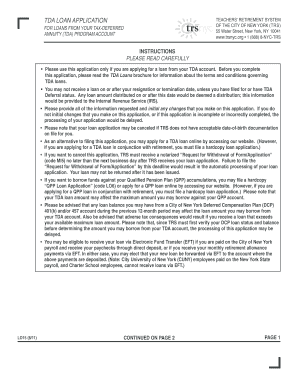
EFT to the account where the above payments are deposited. (Note: City University of New York (CUNY) employees paid on the New York State payroll, and Charter School employees, cannot receive loans via EFT.) LO15 (8/11) CONTINUED ON PAGE 2 PAGE 1 CONTINUED FROM PAGE 1 In Part A: All information must be provided. In Part B: 1) lease indicate the amount you want to borrow. You may specify a dollar amount or write maximum to borrow the maximum loan P amount available to you. If you.
Open form follow the instructions
Easily sign the form with your finger
Send filled & signed form or save
How to fill out the NYC TRS LO15 online
The NYC TRS LO15 is a loan application for the tax-deferred annuity (TDA) program. This guide will walk you through the process of filling out the form online, ensuring you provide all necessary information accurately and completely.
Follow the steps to successfully complete the NYC TRS LO15 application online.
- Click ‘Get Form’ button to obtain the form and open it in the editor.
- In Part A, provide your first name, middle initial, last name, and contact information, including permanent home address and TRS membership number.
- In Part B, specify the amount you wish to borrow. You can choose a specific dollar amount or select 'maximum' to request the highest loan available based on your TDA account.
- Indicate the TDA loan repayment period. Remember, this cannot exceed 60 months.
- Select your preferred method for receiving the TDA loan: either by mail or via electronic fund transfer (EFT), if eligible.
- If applicable, complete Part C by indicating if you are on a leave of absence without pay.
- For Part D, provide information only if you are applying for a TDA loan alongside a TDA annuitization election.
- In Part E, specify how your account should be debited to provide funds for your TDA loan from the listed Passport Funds.
- Complete Part F only if you have TDA Deferral status, indicating how loan payments should be credited to your account.
- In Part G, sign and date the application in the presence of a notary public.
- In Part H, ensure the notarization is completed.
- Once completed, save the document, download, print, or share as needed.
Take the next step and complete your NYC TRS LO15 application online today!
Experience a faster way to fill out and sign forms on the web. Access the most extensive library of templates available.
Related content
This form is for members whose bank account information is not already on file with TRS...
You may apply for a TDA loan by accessing our website (see page 7) or by filing a “TDA...
this TV CEIVE - worldradiohistory.com · 1-A MIXER, such as the Shure M267, allows you to...
Get answers to your most pressing questions about US Legal Forms API.
How do I upload documents to TRS NYC?
Uploading documents to TRS NYC is a straightforward process. You can log into your TRS account and navigate to the document upload section. Simply follow the prompts to upload your files related to the NYC TRS LO15. If you encounter any difficulties, US Legal Forms offers helpful templates and guidance to streamline the process.
What happens to my TRS if I quit NYC?
If you decide to quit your job in NYC, your TRS benefits will remain intact. However, you may need to file for a refund or decide whether to leave your contributions with the NYC TRS LO15 plan. It's essential to review your options carefully to ensure you make the best decision for your future. Consulting the resources provided by US Legal Forms can guide you through the necessary steps.
What is the fixed rate for TRS NYC?
The fixed rate for NYC TRS LO15 can vary based on the specific benefits structure you're enrolled in. Generally, NYC TRS aims to provide a competitive fixed return on your contributions, ensuring that you have resources during retirement. It is advisable to check with NYC's TRS resources or their official website for the most current rates. This will help you understand how your retirement funds can grow over time.
What is Qpp TRS?
TRS' Qualified Pension Plan (QPP) is a retirement plan administered under Section 401(a) of the Internal Revenue Code. ... Members become eligible to receive a service retirement allowance upon meeting requirements for service credit and age.
What is Qpp NYC TRS?
TRS' Qualified Pension Plan (QPP) is a retirement plan administered under Section 401(a) of the Internal Revenue Code. ... Members become eligible to receive a service retirement allowance upon meeting requirements for service credit and age.
What is a TDA withdrawal?
Under the Internal Revenue Code (IRC), Tax-Deferred Annuity (TDA) Program participants who are under age 59½ may withdraw their post-1988 TDA contributions if they have a sudden and heavy financial need that they are unable to reasonably meet through other financial resources.
What is a TDA?
A tax-deferred annuity (TDA), commonly referred to as a tax-sheltered annuity (TSA) plan or a 403(b) retirement plan, is a retirement savings plan available to employees of certain public education organizations, non-profit organizations, cooperative hospital service organizations and self-employed ministers.
How does a TDA work?
Pre-tax contributions Your TDA contributions are taken from your pay before taxes are deducted, thereby reducing the amount of your gross taxable income. Tax-deferred earnings You do not pay taxes on the money your TDA investments earn until you actually receive the funds from your account.
What is TDA deferral status?
TDA Deferral status is an option available to retiring members who wish to delay the distribution of their TDA funds past the initial payability date of their retirement allowance under the Qualified Pension Plan (QPP).
What type of retirement plan is a 403b?
A 403(b) plan, also known as a tax-sheltered annuity (TSA) plan, is a retirement plan for certain employees of public schools, employees of certain tax-exempt organizations, and certain ministers. Individual accounts in a 403(b) plan can be any of the following types.
Use professional pre-built templates to fill in and sign documents online faster. Get access to thousands of forms.
If you believe that this page should be taken down, please follow our DMCA take down process here.
This form is available in several versions. Select the version you need from the drop-down list below.