Loading
Form preview
  • US Legal Forms
  • Other Templates
  • Tax Forms
  • New York Tax Forms
  • Nyc Trs Lo15 2014

Get Nyc Trs Lo15 2014

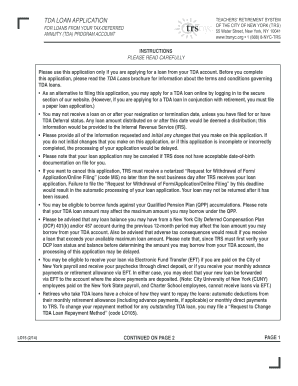
Have a choice of how they want to repay the loans: automatic deductions from their monthly retirement allowance (including advance payments, if applicable) or monthly direct payments to TRS. To change your repayment method for any outstanding TDA loan, you may file a Request to Change TDA Loan Repayment Method (code LO105). LO15 (2/14) CONTINUED ON PAGE 2 PAGE 1 CONTINUED FROM PAGE 1 In Part A: All information must be provided. In Part B: 1) Please indicate the amount you want to.

How it works

  1. Open form

    Open form follow the instructions

  2. Easily sign form

    Easily sign the form with your finger

  3. Share form

    Send filled & signed form or save

How to fill out the NYC TRS LO15 online

This guide provides a comprehensive overview of how to complete the NYC TRS LO15 form for loans from your tax-deferred annuity (TDA) program account. Follow the instructions closely to ensure successful submission without delays.

Follow the steps to effectively complete your loan application.

  1. Click ‘Get Form’ button to obtain the form and open it in the editor.
  2. Begin by filling out Part A with your personal information, including your first name, last name, and contact details. Ensure that you provide your Social Security Number and TRS Membership Number.
  3. In Part B, specify the amount you wish to borrow. You can either write a specific dollar amount or indicate 'maximum' to borrow the maximum available. If necessary, initial your selection.
  4. Indicate your repayment period in months in Part B. Remember that this period cannot exceed 60 months.
  5. If you are a retiree and prefer to mail your loan payments, indicate this in Part B. If not specified, deductions will be automatic from your retirement allowance.
  6. Select how you would like to receive your TDA loan in Part B, either via mail or Electronic Fund Transfer (EFT). If opting for EFT, ensure you are eligible.
  7. Complete Part C only if you are an in-service member. Indicate if you are on a leave of absence without pay and provide the start date if applicable.
  8. Part D is for those applying for a loan in conjunction with a TDA annuitization. Complete only if this applies to you.
  9. In Part E, choose how your account should be debited to provide funds for your TDA loan. Designate percentages in 5% increments totaling 100% across the available funds.
  10. If applicable, fill out Part F regarding TDA Deferral status, indicating how your loan payments will be credited.
  11. Sign and date the application in Part G, confirming your understanding of the loan terms in the presence of a notary.
  12. Finally, have Part H completed by a notary, ensuring all legal requirements are met before submission.

Take the next step in your financial planning and fill out your NYC TRS LO15 application online today.

Get form

Experience a faster way to fill out and sign forms on the web. Access the most extensive library of templates available.

Related content

Electronic Forms
This form is for members whose bank account information is not already on file with TRS...
Learn more
TDA Program Summary
You may apply for a TDA loan by accessing our website (see page 7) or by filing a “TDA...
Learn more
this TV CEIVE - worldradiohistory.com
this TV CEIVE - worldradiohistory.com · 1-A MIXER, such as the Shure M267, allows you to...
Learn more

Related links form

SC DoR SC1040 2019 NC DoR NC-478G 2019 PA BIRT Schedule SC 2019 AR AR3 2019

Questions & Answers

Get answers to your most pressing questions about US Legal Forms API.

Contact support

Uploading documents to TRS NYC is a straightforward process. You can access the TRS portal where you'll find clear instructions for document submission. Ensure your documents are scanned and formatted correctly, as this will streamline the upload. If you encounter any challenges, the US Legal platform provides guidance to simplify this process related to your NYC TRS LO15 needs.

If you decide to quit your job in NYC, your TRS benefits might be affected. Typically, you can either keep your accumulated benefits or withdraw your funds. It’s essential to understand the implications on your retirement savings. For personalized advice, you may want to check the resources available on the US Legal platform regarding NYC TRS LO15.

Withdrawing from TRS NYC involves completing specific forms and submitting them through the proper channels. Make sure to understand the potential impacts on your retirement benefits before proceeding. For guidance on the withdrawal process, NYC TRS LO15 can serve as an excellent tool to provide clarity and detailed steps.

The TDA 7% interest rate refers to the rate applied to your tax-deferred annuity contributions, helping to grow your savings over time. This rate can significantly enhance your retirement savings if managed properly. To fully understand your options, consider checking out NYC TRS LO15, where detailed information is readily available.

To upload documents to NYSOh, you should first log into your account and look for the designated upload area. Follow the prompts to attach and submit your documents successfully. If you run into any issues, exploring NYC TRS LO15 can provide additional support and clarity regarding document submissions.

Uploading documents to TMS involves logging into your account and accessing the document section. Simply follow the instructions provided on the site to ensure a smooth upload process. Should you need further assistance, NYC TRS LO15 is available to help you navigate these requirements effortlessly.

A good TDA contribution rate often falls between 5% to 10% of your salary, enabling you to maximize tax advantages while saving for retirement. However, your individual circumstances may determine the best rate for you. By researching NYC TRS LO15 resources, you can tailor your contributions to fit your financial goals effectively.

The fixed rate for TRS NYC can fluctuate based on economic conditions and investment performance. Typically, the fixed return is adjusted annually but provides stability for your contributions. It’s important to stay updated on these rates, and NYC TRS LO15 can offer the latest information for your peace of mind.

If you leave teaching, your TRS benefits will depend on your service and contributions. Generally, you can either withdraw your contributions or leave them in the fund for future retirement benefits. Understanding your options is vital, and seeking advice on NYC TRS LO15 can clarify what actions to take based on your career plans.

To upload documents to Carta, you must first log into your account and navigate to the document upload section. Ensure that the documents are in the correct format before initiating the upload. If you find yourself needing assistance, NYC TRS LO15 offers various support options that can guide you through this process step by step.

Get This Form Now!

Use professional pre-built templates to fill in and sign documents online faster. Get access to thousands of forms.
If you believe that this page should be taken down, please follow our DMCA take down processhere.
Get NYC TRS LO15
  • Adoption
  • Bankruptcy
  • Contractors
  • Divorce
  • Home Sales
  • Employment
  • Identity Theft
  • Incorporation
  • Landlord Tenant
  • Living Trust
  • Name Change
  • Personal Planning
  • Small Business
  • Wills & Estates
  • Packages A-Z
  • Affidavits
  • Bankruptcy
  • Bill of Sale
  • Corporate - LLC
  • Divorce
  • Employment
  • Identity Theft
  • Internet Technology
  • Landlord Tenant
  • Living Wills
  • Name Change
  • Power of Attorney
  • Real Estate
  • Small Estates
  • Wills
  • All Forms
  • Forms A-Z
  • Other Templates
  • Legal Hub
  • About Us
  • Help Portal
  • Legal Resources
  • Blog
  • Affiliates
  • Contact Us
  • Delete My Account
  • Site Map
  • Industries
  • Forms in Spanish
  • Localized Forms
  • State-specific Forms
  • Forms Kit
  • Real Estate Handbook
  • All Guides
  • Notarize
  • Incorporation services
  • For Consumers
  • For Small Business
  • For Attorneys
  • USLegal
  • FormsPass
  • pdfFiller
  • signNow
  • altaFlow
  • DocHub
  • Instapage
Form Packages
  • Adoption
  • Bankruptcy
  • Contractors
  • Divorce
  • Home Sales
  • Employment
  • Identity Theft
  • Incorporation
  • Landlord Tenant
  • Living Trust
  • Name Change
  • Personal Planning
  • Small Business
  • Wills & Estates
  • Packages A-Z
Form Categories
  • Affidavits
  • Bankruptcy
  • Bill of Sale
  • Corporate - LLC
  • Divorce
  • Employment
  • Identity Theft
  • Internet Technology
  • Landlord Tenant
  • Living Wills
  • Name Change
  • Power of Attorney
  • Real Estate
  • Small Estates
  • Wills
  • All Forms
  • Forms A-Z
  • Other Templates
Customer Service
  • Legal Hub
  • About Us
  • Help Portal
  • Legal Resources
  • Blog
  • Affiliates
  • Contact Us
  • Delete My Account
  • Site Map
  • Industries
  • Forms in Spanish
  • Localized Forms
  • State-specific Forms
  • Forms Kit
Legal Guides
  • Real Estate Handbook
  • All Guides
Prepared for you
  • Notarize
  • Incorporation services
Our Customers
  • For Consumers
  • For Small Business
  • For Attorneys
Our Sites
  • USLegal
  • FormsPass
  • pdfFiller
  • signNow
  • altaFlow
  • DocHub
  • Instapage
Social Media
Call us now toll free:
+1 833 426 79 33
As seen in:
© Copyright 1999-2026 airSlate Legal Forms, Inc. 17 Station Street, Ste. 203, Brookline, MA 02445
  • Your Privacy Choices
  • Terms of Service
  • Privacy Notice
  • Content Takedown Policy
  • Bug Bounty Program
NYC TRS LO15
This form is available in several versions.
Select the version you need from the drop-down list below.
2019 NYC TRS LO15
Select form
  • 2019 NYC TRS LO15
  • 2014 NYC TRS LO15
  • 2011 NYC TRS LO15
Select form