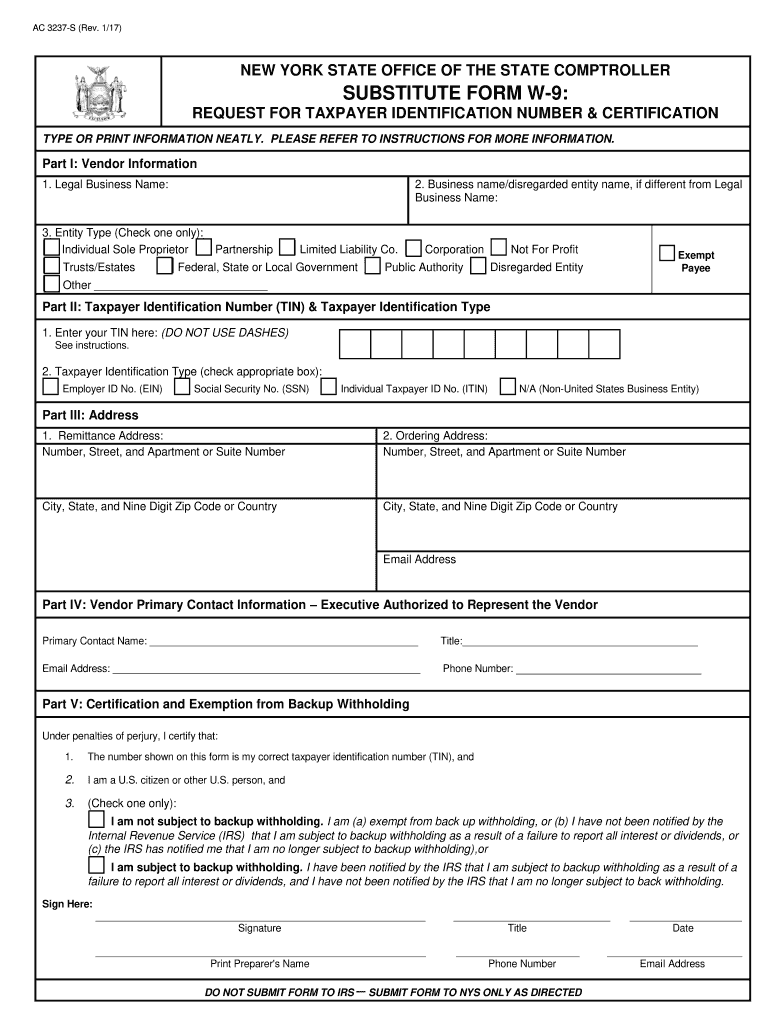
CTIONS FOR MORE INFORMATION. Part I: Vendor Information 1. Legal Business Name: 2. Business name/disregarded entity name, if different from Legal Business Name: 3. Entity Type (Check one only): Individual Sole Proprietor Trusts/Estates Partnership Limited Liability Co. Federal, State or Local Government Corporation Public Authority Not For Profit Exempt .Payee Disregarded Entity Other Part II: Taxpayer Identification Number (TIN) & Taxpayer Iden.
Loading

Open form follow the instructions

Easily sign the form with your finger

Send filled & signed form or save
How to fill out the NY Substitute W-9 online
Filling out the NY Substitute W-9 online is an essential step for individuals or organizations wishing to do business with New York State. This guide provides clear and supportive instructions to help you complete the form accurately and efficiently.
Follow the steps to complete the NY Substitute W-9 form online.
- Click ‘Get Form’ button to access the NY Substitute W-9 form, opening it in the online editor.
- In Part I, enter the vendor information. Start with the legal business name, ensuring it matches your official documents. Include a business name or disregarded entity name if applicable.
- In Part I, select the entity type that best describes your organization by checking one of the provided boxes.
- Move to Part II to provide your Taxpayer Identification Number (TIN). Enter it without dashes, matching the legal name. Indicate the type of TIN by selecting the appropriate option.
- Proceed to Part III to fill out your addresses. Include the remittance address where payments will be sent and the ordering address for purchase orders.
- In Part IV, enter the primary contact information for an executive who can represent your organization, including their name, title, email address, and phone number.
- Complete Part V by certifying your TIN and indicating your exemption status from backup withholding. Sign the form, print the preparer's name, include their phone number, and date the form.
- Once all fields are accurately filled, save your changes, and choose whether to download, print, or share the completed form as needed.
Start completing your NY Substitute W-9 online today!
Experience a faster way to fill out and sign forms on the web. Access the most extensive library of templates available.
Related content
Any payee/vendor who wishes to do business with New York State must complete the...
Any payee/vendor who wishes to do business with New York State must complete the...
Jan 19, 2017 — This publication discusses common business expenses and explains what is...
Get answers to your most pressing questions about US Legal Forms API.
Is a W9 hard to fill out?
Filling out a W-9 form may seem challenging at first, but with platforms like uslegalforms, it becomes quite easy. The process is straightforward, and the online tools provide guidance through each step of the form completion. With clear instructions, most users can quickly and efficiently fill out a NY Substitute W-9.
Why do I need to fill out a W9 for reimbursement?
Filling out a NY Substitute W-9 for reimbursement is crucial, as it provides the necessary information for the payer to report the payments they make to you. Taxpayers must provide a W-9 to ensure accurate reporting to the IRS during tax season. This helps to facilitate smooth transactions and minimizes potential tax issues.
How to properly fill out a W9 form?
Properly filling out a NY Substitute W-9 form involves providing accurate personal information, including your name and taxpayer ID. Be sure to select the correct tax classification that applies to you, whether you're an individual, corporation, or other entity. A well-completed form ensures that you avoid delays and complications with tax reporting.
How to fill out a W-9 form online?
To fill out a NY Substitute W-9 form online, go to a reputable website such as uslegalforms. Follow the guided steps to enter your name, address, and taxpayer identification number. After filling out the required fields, double-check your entries, and then submit the form electronically.
Can you use for W9?
A NY Substitute W-9 can be used for various purposes, including tax reporting and identity verification. This form is essential when you need to provide your taxpayer identification information to an organization or individual who is required to report payments to the IRS. By properly filling out the form, you help ensure your compliance with tax regulations.
How do I electronically fill out a W9?
You can easily electronically fill out a NY Substitute W-9 using various online forms available on reputable platforms like uslegalforms. Simply access the form, enter your information, and follow the prompts for completion. Once completed, you can save the form and send it securely to the necessary recipient.
How to send W9 electronically safely?
To send your NY Substitute W-9 electronically and safely, use secure platforms that offer encryption. You can upload your completed form directly through these platforms, ensuring your personal information stays protected. Avoid sending it through unsecured email, as it can expose your information to unauthorized access.
At what point is a W9 required?
A W9 is typically required when you anticipate paying a vendor $600 or more during the year. This form helps you collect essential tax identification information which is crucial for reporting payments to the IRS. Additionally, a NY Substitute W-9 may be needed for various other purposes, such as when opening an account or establishing a business relationship. Understanding these requirements will help ensure smooth transactions.
What to do if a vendor will not provide a W9?
In cases where a vendor will not provide a W9, it's essential to communicate the necessity clearly. Explain that without the NY Substitute W-9, you may face challenges complying with tax regulations. If they continue to resist, you might need to seek alternate vendors or, if necessary, retain some or all payments until the situation is resolved. This step is important to protect your financial integrity.
What if a vendor refuses to provide W9?
If a vendor refuses to provide a W9, your next steps may include discussing the importance of the form with them. Explain how it allows you to meet IRS requirements regarding payment reporting. If they still refuse, consider the implications for your business and explore the option of withholding payments until you receive the necessary NY Substitute W-9. This can protect you from potential tax complications.
Use professional pre-built templates to fill in and sign documents online faster. Get access to thousands of forms.
If you believe that this page should be taken down, please follow our DMCA take down process here.