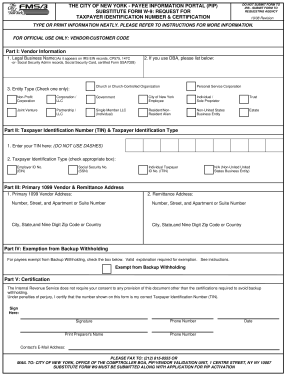
THE CITY OF NEW YORK - PAYEE INFORMATION PORTAL PIP SUBSTITUTE FORM W-9 REQUEST FOR TAXPAYER IDENTIFICATION NUMBER CERTIFICATION DO NOT SUBMIT FORM TO IRS - SUBMIT FORM TO REQUESTING AGENCY 10/08 Revision TYPE OR PRINT INFORMATION NEATLY. Under penalties of perjury I certify that the number shown on this form is my correct Taxpayer Identification Number TIN. Sign Here Signature Phone Number Print Preparer s Name Date Contact s E-Mail Address PLEASE FAX TO 212 815-8555 OR MAIL TO CITY OF NEW YORK.
Open form follow the instructions
Easily sign the form with your finger
Send filled & signed form or save
How to fill out the NY Substitute Form W-9 online
Filling out the NY Substitute Form W-9 online is an important step for individuals and organizations needing to provide taxpayer information. This guide offers clear, step-by-step instructions to help you complete the form accurately and efficiently.
Follow the steps to fill out the form correctly.
- Press the ‘Get Form’ button to access the NY Substitute Form W-9 and open it in your preferred editing tool.
- In Part I, Vendor Information, enter your legal business name as it appears on IRS records. If applicable, include your Doing Business As (DBA) name.
- Select your entity type by checking the appropriate box, such as Individual/Sole Proprietor, Corporation, Non-Profit, or Government.
- In Part II, Taxpayer Identification Number (TIN) & Taxpayer Identification Type, input your TIN without dashes and check the corresponding box for your identification type (EIN, SSN, or ITIN).
- Proceed to Part III to provide your Primary 1099 Vendor and Remittance Address. Ensure all address fields are filled in completely.
- If applicable, in Part IV, Exemption from Backup Withholding, check the box indicating you are exempt. A valid explanation for the exemption is required.
- In Part V, Certification, sign the form, add your phone number, date, and, if necessary, the name and contact details of the form preparer.
- After reviewing all information for accuracy, you can save your changes, download the completed form, print it, or share it as needed.
Complete your forms online today to ensure timely processing and compliance.
Experience a faster way to fill out and sign forms on the web. Access the most extensive library of templates available.
Related content
Any payee/vendor who wishes to do business with New York State must complete the...
Jan 19, 2017 — This publication discusses common business expenses and explains what is...
Get answers to your most pressing questions about US Legal Forms API.
What is the best way to send a W9?
The best way to send a W-9 is to use electronic submission for convenience and speed. Emailing a secured PDF version of your completed NY Substitute Form W-9 ensures that your information remains intact. U.S. Legal Forms can simplify this process and help you find the most reliable submission method.
How do I fill out a W9 as an employee?
As an employee, you will fill out the NY Substitute Form W-9 by entering your name, business name, and tax identification number. Follow the prompts carefully to ensure everything is accurate. If you're unsure, U.S. Legal Forms can provide assistance in navigating these requirements.
How do I submit a W9 form?
To submit a W-9 form, you need to fill it out accurately with your personal information. After completing the NY Substitute Form W-9, you can print it for physical submission, or you can use an electronic method for faster delivery. U.S. Legal Forms is here to guide you through this process seamlessly.
Can you send a W9 digitally?
Yes, sending a W-9 digitally is entirely feasible and often preferred. Digital submissions are faster and can make the process more efficient. U.S. Legal Forms offers tools to fill out and send your NY Substitute Form W-9 without any hassle.
Why do I need to fill out a W9 for reimbursement?
Filling out a NY Substitute Form W-9 is crucial for reimbursement because it provides the necessary tax information to the payor. It ensures that they have accurate details for reporting income to the IRS. Completing this form accurately helps to prevent any tax issues down the line.
Can you send W9 via email?
Yes, you can send your NY Substitute Form W-9 via email. Just ensure that you save the completed form as a PDF for better formatting. Platforms like U.S. Legal Forms make this process easier by providing a user-friendly interface for generating your form.
Can a W9 be submitted electronically?
Absolutely, a W-9 can be submitted electronically. This option is often preferred because it streamlines the process, allowing for quicker data transfer. By using U.S. Legal Forms, you can complete your NY Substitute Form W-9 and submit it electronically with confidence.
Can I submit a W-9 online?
Yes, you can submit a NY Substitute Form W-9 online. Many platforms, including U.S. Legal Forms, provide a straightforward process for completing and submitting your W-9 electronically. This makes it convenient, as you can easily upload the required documents directly from your device.
How do I get the W-9 form?
You can get a W-9 form through various means. A common option is to download the NY Substitute Form W-9 from trusted sites like US Legal Forms. This method ensures you receive a proper, fillable form that meets all requirements.
Can a W9 be filled out electronically?
Absolutely, you can fill out a W9 electronically. The NY Substitute Form W-9 can be completed on various platforms, including US Legal Forms. This feature not only saves time but also reduces the chances of errors associated with handwritten forms.
Use professional pre-built templates to fill in and sign documents online faster. Get access to thousands of forms.
If you believe that this page should be taken down, please follow our DMCA take down process here.
This form is available in several versions. Select the version you need from the drop-down list below.