Get Ca Ftb 540 2010
How it works
-

Open form follow the instructions
-

Easily sign the form with your finger
-

Send filled & signed form or save
How to fill out the CA FTB 540 online
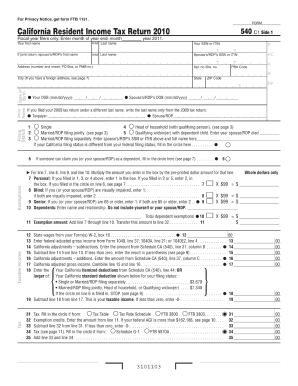
Filling out the CA FTB 540 online can seem daunting, but with the right guidance, you can navigate the form efficiently. This comprehensive guide will provide step-by-step instructions to help you complete your California Resident Income Tax return with confidence.
Follow the steps to complete your CA FTB 540 online seamlessly.
- Click the ‘Get Form’ button to access the CA FTB 540 form and begin your filing process.
- Enter your personal information in the provided fields. This includes your first name, last name, and either your Social Security Number (SSN) or Individual Taxpayer Identification Number (ITIN). If you are filing jointly, include your spouse’s name and respective number.
- Fill in your address accurately, including the city, state, and zip code. If you have a foreign address, follow the specific instructions mentioned in the form.
- Enter your date of birth and, if applicable, your spouse’s or Registered Domestic Partner's (RDP) date of birth as well.
- Choose your filing status by marking the appropriate box. Options include single, married filing jointly, head of household, and more. If needed, provide additional information about your dependents.
- Calculate and enter your exemptions based on your circumstances. This may include personal exemptions, blind status, age-related exemptions, and dependents.
- Proceed to report your total taxable income. This includes state wages from W-2 forms and federal adjusted gross income from your federal tax return.
- Complete adjustments for California that may increase or decrease your taxable income and provide the necessary amounts as instructed.
- Enter any credits you qualify for, such as the child and dependent care expenses credit, and ensure all fields are filled diligently.
- Review the full form for any additional taxes owed and enter applicable amounts, if necessary.
- Once you have filled out all the necessary fields, you can save your changes, download, print, or share the completed form as needed.
Start filling out your CA FTB 540 online today and ensure your tax return is submitted accurately.
Get form
Related links form
You should mail your amended CA FTB 540 return to the address specified by the Franchise Tax Board, which can vary based on whether you are enclosing a payment. Make sure to check their official website for the most current mailing address and guidelines. Properly address your envelope to avoid any processing delays. If you are using uslegalforms, they provide clear instructions for mailing your amended returns.