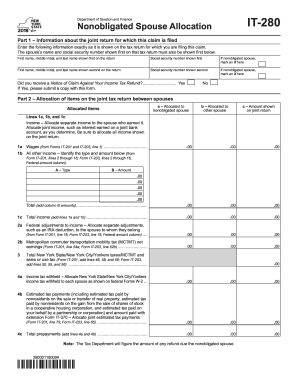
Is shown on the tax return for which you are filing this claim. The spouse s name and social security number shown first on that tax return must also be shown first below. First name, middle initial, and last name shown first on the return Social security number shown first If nonobligated spouse, mark an X here First name, middle initial, and last name shown second on the return Social security number shown second If nonobligated spouse, mark an X here Did you receive a Notice.
Open form follow the instructions
Easily sign the form with your finger
Send filled & signed form or save
How to fill out the NY DTF IT-280 online
This guide provides clear and supportive instructions for filling out the NY DTF IT-280 form online. Whether you are a beginner or need a refresher, this step-by-step approach will help streamline the process.
Follow the steps to accurately complete your NY DTF IT-280 form
- Press the ‘Get Form’ button to access the NY DTF IT-280 form and open it for editing.
- In Part 1, provide information regarding the joint return. Fill out the names and social security numbers of both spouses as shown on the tax return. Ensure that the spouse marked as nonobligated is correctly indicated.
- If applicable, indicate whether you have received a Notice of Claim Against Your Income Tax Refund by selecting 'Yes' or 'No'. If 'Yes', attach a copy of the notice.
- Move to Part 2 to allocate items from the joint tax return. Allocate income, adjustments, and tax payments between the spouses. Carefully enter amounts in the designated sections, ensuring accuracy in the figures.
- In Part 3, sign and date the form. If applicable, have the paid preparer complete their section, including the NYTPRIN and PTIN, if required. Everyone should review the form for completeness and correctness.
- Once all sections are filled, save the changes. You can download, print, or share the completed form as needed.
Complete your forms online to ensure timely processing and compliance.
Experience a faster way to fill out and sign forms on the web. Access the most extensive library of templates available.
Related content
Jul 2, 2025 — You will then have 10 days from the date of the notification to send the...
Oct 1, 2009 — The new law defines the ways in which tax fraud can be committed and is...
Foreword. G.A.L. has developed this manual with usability and safety in mind. General and...
Get answers to your most pressing questions about US Legal Forms API.
Who pays NY transit tax?
Typically, employees working in specific areas of New York City are responsible for paying the NY transit tax. Employers may also collect this tax from employees’ wages. Knowing your obligations regarding the transit tax can streamline the process of filling out the NY DTF IT-280 and ensure that you meet all requirements.
Who is subject to NY MTA surcharge?
Employees and employers located in the MTA region are subject to the NY MTA surcharge. This surcharge applies to certain payroll expenses, impacting both workers and employers. It is vital to understand whether you fall under this category when preparing your NY DTF IT-280 to avoid penalties.
What is the MTA tax rate in NY?
The MTA tax rate in New York varies based on the type of income and jurisdiction. Generally, it applies to wages and self-employment income. Familiarizing yourself with these rates is crucial for accurately completing your NY DTF IT-280 form and ensuring compliance.
What is a nonobligated spouse?
A nonobligated spouse is a spouse who is not responsible for a tax liability according to the tax code. This status can arise in cases of separate tax filings or divorce. Understanding this designation can help you correctly fill out your NY DTF IT-280 and avoid unnecessary payments.
What is NY throwback tax?
The NY throwback tax applies to income subject to taxation in New York but derived from out-of-state sales. This tax ensures that businesses cannot avoid paying taxes on income generated from New York residents by reporting that income elsewhere. Being aware of this can guide you in accurately reporting your income on the NY DTF IT-280.
What is NY transit tax?
The NY transit tax is a tax levied on certain wages earned by employees who work in New York City. It contributes to the Metropolitan Transportation Authority (MTA) funding for public transit services. Understanding how this affects your tax obligations can simplify your compliance when completing the NY DTF IT-280 form.
What is NYC Department of Finance transfer tax?
The NYC Department of Finance transfer tax applies to real estate transactions in New York City. This tax is imposed on the transfer of title to property and helps fund city services. When filling out the NY DTF IT-280 form, it is essential to understand the applicable rates and how they affect your transaction.
What is the meaning of NYS DTF pit tax payment?
The NYS DTF pit tax payment refers to a payment related to the New York State Department of Taxation and Finance, particularly focused on personal income tax liabilities. This payment is essential for individuals who owe taxes and want to remain compliant. If you have questions regarding this payment, consulting the resources provided by the NY DTF IT-280 can clarify your obligations.
What qualifies for innocent spouse relief?
Innocent spouse relief may apply if your spouse improperly reported income, leading to increased taxes you did not expect. To qualify, you must prove you did not know about the understatement and that it would be unfair to hold you accountable. If you're uncertain about your eligibility, the NY DTF IT-280 can offer valuable guidance in assessing your situation.
Do I need to fill out NY IT 2104?
Whether you need to fill out the NY IT 2104 form depends on your employment status and tax situation. This form allows you to report any additional withholding allowances. To ensure compliance with state tax laws and to navigate any complexities, the NY DTF IT-280 offers helpful insights and support for taxpayers.
Use professional pre-built templates to fill in and sign documents online faster. Get access to thousands of forms.
If you believe that this page should be taken down, please follow our DMCA take down process here.
This form is available in several versions. Select the version you need from the drop-down list below.