But you maintain a permanent place of abode within New York City and spend 184 days or more in New York City during the taxable year. This rule does not apply to members of the armed forces. You are a New York City nonresident if you do not meet the above definition of a resident. You are a part-year resident if you meet the definition of resident or nonresident for only part of the year. Percent of services The percent of services performed in New York City may be computed using days, mile.

Open form follow the instructions

Easily sign the form with your finger

Send filled & signed form or save
How to fill out the NY DTF IT-2104.2 online
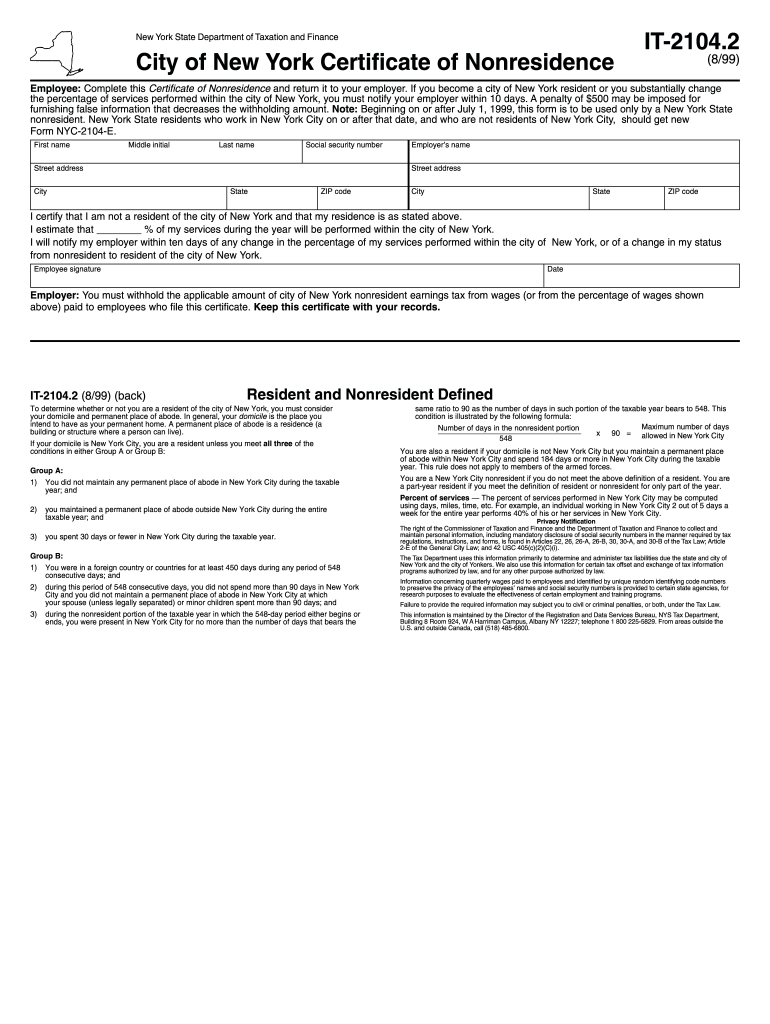
The NY DTF IT-2104.2 form is crucial for nonresidents working in New York City, enabling them to certify their status and determine appropriate tax withholding. Filling out this form accurately ensures compliance with tax regulations and avoids potential penalties.
Follow the steps to confidently complete the NY DTF IT-2104.2 form online.
- Click ‘Get Form’ button to obtain the form and open it in the online editor.
- Begin by entering your personal information. Fill in your first name, middle initial (if applicable), and last name in the appropriate fields.
- Next, provide your social security number in the designated space to ensure accurate identification.
- Enter your street address, followed by your city, state, and ZIP code in the respective fields.
- Complete the employer information section. Input your employer's name, their street address, city, state, and ZIP code.
- Certify your nonresidence by confirming the information provided is correct, and indicate the percentage of services you expect to perform in New York City during the year.
- Sign and date the form, confirming that you are aware of the requirement to notify your employer of any changes in your residency status.
- Finally, after reviewing your completed form for accuracy, save your changes, download, print, or share the document as needed.
Take the next step in your tax compliance by completing the NY DTF IT-2104.2 form online today.
Experience a faster way to fill out and sign forms on the web. Access the most extensive library of templates available.
Related content
state use Form IT-2104.1 to allocate. City of. New York nonresidents use Form IT-2104.2...
Get answers to your most pressing questions about US Legal Forms API.
Can I paper file NY state tax return?
Yes, you can paper file your NY state tax return, including the NY DTF IT-2104.2. However, be aware that electronic filing can expedite processing and might speed up your potential refund. Paper filing requires careful attention to detail to avoid mistakes that could delay your return. Consider using services like USLegalForms for guidance and to ensure your paperwork is completed correctly.
How many withholding allowances should I claim?
Determining the right number of withholding allowances on your NY DTF IT-2104.2 requires you to consider your overall tax picture, including your family situation and other income sources. A higher number of allowances means less tax is withheld from each paycheck, which may be beneficial for those who prefer immediate access to their earnings. However, too many allowances can lead to a tax bill at year-end. Using resources like USLegalForms can help clarify this process.
How do I respond to a notice of tax in NY?
If you receive a notice of tax from New York, it is crucial to respond promptly to avoid additional penalties. Review the notice carefully to understand the reason for the tax notice. You can provide the necessary documentation or explanation requested by the NY DTF, ensuring you include your NY DTF IT-2104.2 if it relates to your withholding allowances. Use the information from USLegalForms to guide you through the response process.
How to fill out a withholding allowance form?
Filling out a withholding allowance form requires attention to your financial situation and tax liability. The NY DTF IT-2104.2 form specifies how to declare your allowances accurately. Begin by analyzing your income, tax obligations, and any deductions you may qualify for. If you need step-by-step assistance, consider utilizing resources from US Legal Forms to help navigate the process.
How to avoid NYC city tax?
To avoid NYC city tax, it’s essential to understand the specific allowances that apply to your situation. Completing the NY DTF IT-2104.2 form accurately can help you claim the right number of allowances based on your deductions. By maximizing your allowances, you can reduce the amount withheld for city taxes. For tailored support, consider using platforms like US Legal Forms to guide you through the process.
What does NYS DTF tax payment mean?
The NYS DTF tax payment refers to the payment of taxes to the New York State Department of Taxation and Finance, which includes any local or state income taxes owed. It’s essential to ensure these payments are made accurately and on time. The NY DTF IT-2104.2 form plays an integral role in this process by helping you report your income correctly and calculate your appropriate tax payment obligations.
What is the 14 day tax rule in NY?
The 14-day tax rule in NY refers to a guideline that mandates employers to provide withholding forms like NY DTF IT-2104.2 within 14 days of an employee's request or upon hiring. This rule helps ensure that employees understand their tax obligations and allows for proper income tax withholding. Familiarizing yourself with this rule can streamline your tax preparation process.
Where can I get hard copies of tax forms?
You can obtain hard copies of tax forms from the New York State Department of Taxation and Finance. Additionally, various locations like public libraries or government offices may provide copies, including the NY DTF IT-2104.2. Ensure you check these resources periodically, especially before the tax season.
What is DTF payment NY?
DTF payment in NY refers to payments made to the New York State Department of Taxation and Finance. This can include tax payments related to forms like the NY DTF IT-2104.2, which is essential for withholding tax calculations. It's important to make these payments on time to avoid penalties and interest.
Where can I get New York state tax forms?
You can get New York state tax forms from the New York State Department of Taxation and Finance website, where forms like the NY DTF IT-2104.2 are available. You can download the necessary forms or order them to be sent via mail. This access allows you to stay organized as you prepare for tax season.
Use professional pre-built templates to fill in and sign documents online faster. Get access to thousands of forms.
If you believe that this page should be taken down, please follow our DMCA take down process here.
This form is available in several versions. Select the version you need from the drop-down list below.