Loading
Form preview
  • US Legal Forms
  • Other Templates
  • Tax Forms
  • New York Tax Forms
  • Ny Dtf It-201-d 2017

Get Ny Dtf It-201-d 2017-2026

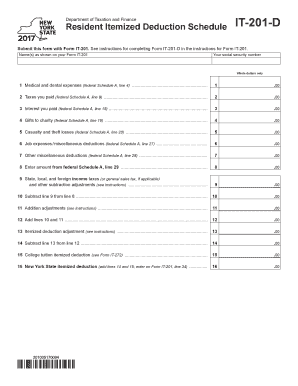
Department of Taxation and Finance Resident Itemized Deduction Schedule IT-201-D Submit this form with Form IT-201. See instructions for completing Form IT-201-D in the instructions for Form IT-201. Name s as shown on your Form IT-201 Your social security number Whole dollars only 1 Medical and dental expenses federal Schedule A line 4. 2 Taxes you paid federal Schedule A line 9. 3 Interest you paid federal Schedule A line 15. 4 Gifts to charity federal Schedule A line 19. 5 Casualty and theft l.

How it works

  1. Open form

    Open form follow the instructions

  2. Easily sign form

    Easily sign the form with your finger

  3. Share form

    Send filled & signed form or save

How to fill out the NY DTF IT-201-D online

The NY DTF IT-201-D is an important component for New York residents to itemize their deductions. This guide will walk you through the steps to complete this form online effectively.

Follow the steps to complete your form smoothly.

  1. Press the ‘Get Form’ button to obtain the form and open it in your preferred editor.
  2. Enter your name(s) as shown on Form IT-201 in the designated field.
  3. Input your social security number in the clearly labeled section.
  4. Provide the amount of medical and dental expenses from federal Schedule A, line 4 in the first section.
  5. In the second section, enter the total amount of taxes you paid as indicated on federal Schedule A, line 9.
  6. For interest paid, refer to federal Schedule A, line 15, and enter that figure in the third section.
  7. Document the total of any gifts to charity you made, as per federal Schedule A, line 19, in the fourth section.
  8. If applicable, record any casualty and theft losses on line 20 from federal Schedule A.
  9. List any job expenses and miscellaneous deductions from federal Schedule A, line 27 in the appropriate field.
  10. For other miscellaneous deductions, refer to federal Schedule A, line 28 and provide that amount.
  11. Refer to federal Schedule A, line 29 to enter the total amount in the next section.
  12. Perform the subtraction by taking line 9 from line 8 and record the result.
  13. Document any addition adjustments as instructed in the guidelines.
  14. Calculate the total by adding lines 10 and 11, and enter this amount accordingly.
  15. Reference line 13 to find your itemized deduction adjustment, and enter that number in the next section.
  16. Subtract line 13 from line 12 and enter the final figure in the appropriate space.
  17. If relevant, include any college tuition itemized deduction from Form IT-272 as indicated in line 15.
  18. Add lines 14 and 15 together to find your New York State itemized deduction and record it for Form IT-201, line 34.
  19. Once all fields are accurately filled out, you can review your entries, save any changes, download, print, or share the completed form.

Complete your NY DTF IT-201-D online with confidence and ensure your deductions are accurately submitted.

Get form

Experience a faster way to fill out and sign forms on the web. Access the most extensive library of templates available.
Get form

Related content

Form IT-201, Resident Income Tax Return
Jan 30, 2025 — Eligible New York taxpayers can use IRS Direct File to file their federal...
Learn more
2009 NEW YORK STATE REFERENCE MANUAL FOR ...
Oct 1, 2009 — IT-201. Resident Income Tax Return (for Full-Year State Residents Only)...
Learn more
ES 201 980 - V2.2.1 - Digital Radio Mondiale (DRM)
D. A and B provide English programmes while C and D carry German versions of the...
Learn more

Related links form

LA LSP Underground Utilities Complaint Form Disclosure Regarding Real Estate Agency Relationship Affidavit Of Parentage And Physical Presence Application Form - Bureau Of Immigration

Questions & Answers

Get answers to your most pressing questions about US Legal Forms API.

Contact support

To cancel your NYS estimated tax payment, you must contact the New York State Department of Taxation and Finance directly. They have procedures in place for processing cancellation requests and can guide you through the necessary steps. Keep in mind that timely communication is essential to avoid interest or penalties. Using resources like uslegalforms can streamline this process and help you stay organized.

Receiving mail from the NYS Department of Taxation and Finance usually indicates that they need additional information or clarification regarding your tax filings. This correspondence may relate to your NY DTF IT-201-D form or previous payments. It's important to respond promptly to any requests to keep your account in good standing. Additionally, managing your taxes through platforms like uslegalforms can provide clarity and assistance.

In the context of taxes, DTF stands for 'Department of Taxation and Finance.' This department oversees tax collection and regulation in New York State. They ensure compliance with tax laws and provide necessary forms and resources. Understanding the role of the DTF will help you navigate obligations like the NY DTF IT-201-D more effectively.

NYC 201 is a form used primarily for reporting income to the New York City Department of Finance. This form is significant for city residents as it pertains to local tax obligations. If you're filling out the NY DTF IT-201-D as a New York resident, you may need to reference NYC 201 for accurate reporting. This ensures you meet both state and city tax requirements.

DTF payment NY refers to payments made to the New York State Department of Taxation and Finance. These payments can include tax payments or estimates required by the state. It’s important to keep track of these payments to ensure compliance and avoid penalties. Understanding your DTF obligations will help streamline your completion of forms like the NY DTF IT-201-D.

Calculating your New York adjusted gross income involves starting with your federal adjusted gross income. Then, you need to account for New York-specific additions and subtractions. Make sure to consider items such as taxable interest, pensions, and any other relevant income. This process is important for accurately filling out your NY DTF IT-201-D form.

To obtain a NY withholding identification number, you need to apply through the New York State Department of Taxation and Finance. You can complete the application online, by phone, or via mail. Make sure to have your Social Security number and other relevant information ready. After processing, you will receive your number, which is essential, especially if you're filling out forms like the NY DTF IT-201-D.

NY Form IT-201 should be filed with the New York State Department of Taxation and Finance. You can submit this form either electronically or by mailing it to the designated address. If you prefer a structured approach throughout the filing process, including using the NY DTF IT-201-D, consider uslegalforms for streamlined assistance.

When mailing your New York state estimated taxes, you should send your payment to the address specified on the estimated tax payment voucher. Ensure you check if your payment method alters the mailing address. Utilizing platforms like uslegalforms can provide you with clear instructions for mailing estimated taxes in New York.

To file the New York Form IT-203, you should submit it to the New York State Department of Taxation and Finance. This can typically be done by mailing it to the address included in the form instructions. For assistance with your forms, including NY DTF IT-201-D, uslegalforms offers a reliable solution to ensure accuracy and compliance.

Get This Form Now!

Use professional pre-built templates to fill in and sign documents online faster. Get access to thousands of forms.
Get form
If you believe that this page should be taken down, please follow our DMCA take down processhere.
Get NY DTF IT-201-D
Get form
  • Adoption
  • Bankruptcy
  • Contractors
  • Divorce
  • Home Sales
  • Employment
  • Identity Theft
  • Incorporation
  • Landlord Tenant
  • Living Trust
  • Name Change
  • Personal Planning
  • Small Business
  • Wills & Estates
  • Packages A-Z
  • Affidavits
  • Bankruptcy
  • Bill of Sale
  • Corporate - LLC
  • Divorce
  • Employment
  • Identity Theft
  • Internet Technology
  • Landlord Tenant
  • Living Wills
  • Name Change
  • Power of Attorney
  • Real Estate
  • Small Estates
  • Wills
  • All Forms
  • Forms A-Z
  • Other Templates
  • Legal Hub
  • About Us
  • Help Portal
  • Legal Resources
  • Blog
  • Affiliates
  • Contact Us
  • Delete My Account
  • Site Map
  • Industries
  • Forms in Spanish
  • Localized Forms
  • State-specific Forms
  • Forms Kit
  • Real Estate Handbook
  • All Guides
  • Notarize
  • Incorporation services
  • For Consumers
  • For Small Business
  • For Attorneys
  • USLegal
  • FormsPass
  • pdfFiller
  • signNow
  • altaFlow
  • DocHub
  • Instapage
Form Packages
  • Adoption
  • Bankruptcy
  • Contractors
  • Divorce
  • Home Sales
  • Employment
  • Identity Theft
  • Incorporation
  • Landlord Tenant
  • Living Trust
  • Name Change
  • Personal Planning
  • Small Business
  • Wills & Estates
  • Packages A-Z
Form Categories
  • Affidavits
  • Bankruptcy
  • Bill of Sale
  • Corporate - LLC
  • Divorce
  • Employment
  • Identity Theft
  • Internet Technology
  • Landlord Tenant
  • Living Wills
  • Name Change
  • Power of Attorney
  • Real Estate
  • Small Estates
  • Wills
  • All Forms
  • Forms A-Z
  • Other Templates
Customer Service
  • Legal Hub
  • About Us
  • Help Portal
  • Legal Resources
  • Blog
  • Affiliates
  • Contact Us
  • Delete My Account
  • Site Map
  • Industries
  • Forms in Spanish
  • Localized Forms
  • State-specific Forms
  • Forms Kit
Legal Guides
  • Real Estate Handbook
  • All Guides
Prepared for you
  • Notarize
  • Incorporation services
Our Customers
  • For Consumers
  • For Small Business
  • For Attorneys
Our Sites
  • USLegal
  • FormsPass
  • pdfFiller
  • signNow
  • altaFlow
  • DocHub
  • Instapage
Social Media
Call us now toll free:
+1 833 426 79 33
As seen in:
© Copyright 1999-2026 airSlate Legal Forms, Inc. 17 Station Street, Suite 303, Brookline, MA 02445
  • Your Privacy Choices
  • Terms of Service
  • Privacy Notice
  • Content Takedown Policy
  • Bug Bounty Program