Loading
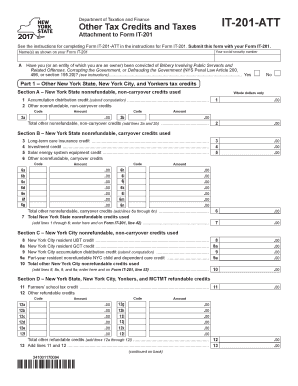
Get Ny Dtf It-201-att 2017
How it works
-

Open form follow the instructions
-

Easily sign the form with your finger
-

Send filled & signed form or save
How to fill out the NY DTF IT-201-ATT online
The NY DTF IT-201-ATT is an important attachment for filing additional tax credits and taxes in New York State. This guide will provide you with step-by-step instructions to efficiently complete the form online.
Follow the steps to successfully complete your NY DTF IT-201-ATT form
- Press the ‘Get Form’ button to access the NY DTF IT-201-ATT. This will allow you to download and open the form for editing.
- Enter your name(s) as shown on Form IT-201 in the designated field. Make sure to include both first and last names accurately.
- Provide your social security number in the appropriate field to ensure your tax information is correctly linked to your identity.
- In the section regarding convictions, answer whether you or an entity of which you are an owner has been convicted of specified offenses by selecting 'Yes' or 'No'.
- Proceed to Part 1 which covers other New York State, New York City, and Yonkers tax credits. Fill out Section A for nonrefundable, non-carryover credits used, including any amounts for accumulation distribution credit and other codes.
- Continue to complete Section B for nonrefundable carryover credits. Input data for long-term care insurance credits, investment credits, and solar energy credits as applicable.
- Next, report any New York City nonrefundable credits in Section C and ensure to sum the totals for Section D if applicable.
- Provide any other applicable New York State taxes in Part 2. Include required forms for capital gain taxes or any other taxes as needed.
- Complete Part 3 if there are any New York City taxes due, and ensure accuracy in entering sums for lines related to other taxes.
- Once all sections are filled, review your entries for accuracy. You can then save your changes, download, print, or share the completed form.
Take the necessary steps to file your NY DTF IT-201-ATT online today.
Get form
Experience a faster way to fill out and sign forms on the web. Access the most extensive library of templates available.
You can find your state adjusted gross income on your tax return. It typically appears on the New York form IT-201, where you report your total income and the adjustments that lead to your AGI. If you're unsure, reviewing past tax filings or checking online resources related to the NY DTF IT-201-ATT can provide clarity. This information is crucial when preparing for tax season.
Get This Form Now!
Use professional pre-built templates to fill in and sign documents online faster. Get access to thousands of forms.