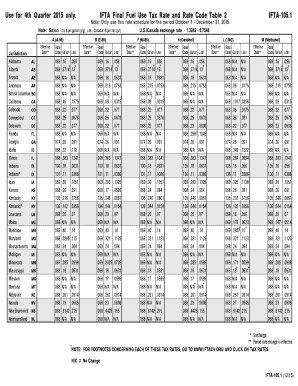
75 .26 .091 .22 .077 N/A N/A .26 .091 .349 .1222 .284 .0994 .16 .056 .11 .0386 .325 .1138 .26 .091 .216 .0756 .102 .0356 .16 .056 .178 .0623 .2857 .10 .321 .1123 .24 .084 N/A N/A .171 .0599 .18 .0631 N/A N/A N/A N/A .261 .0914 .27 .0945 .6142 .215 N/A N/A M (Methanol) Effective Date** Rate Code Gallon Liter 069 068 068 068 068 068 068 068 068 068 074 068 068 135 136 069 068 135 136 068 069 069 068 069 068 069 068 068 068 068 068 068 068 .16 .056 .3714 .13 N/A N/A .215 .075.
Open form follow the instructions
Easily sign the form with your finger
Send filled & signed form or save
How to fill out the NY DTF IFTA-105.1 online
This guide provides a clear and comprehensive approach to filling out the NY DTF IFTA-105.1 form online. Follow these steps to ensure that your form is completed accurately and effectively, carefully addressing each section as needed.
Follow the steps to successfully complete the NY DTF IFTA-105.1 form online.
- Press the ‘Get Form’ button to access the form and open it in the digital editor.
- Begin by entering the reporting period at the top of the form, ensuring that you specify the fourth quarter of 2015, as this form is specific to that time frame.
- Provide your business information, including the legal name and address of your business. Ensure that this matches your records to avoid discrepancies.
- Input your account number, which is crucial for processing your report accurately.
- Fill out the fuel type section by referencing the rate tables provided with the form, selecting the appropriate codes for the fuel types used during the reporting period.
- Enter the total gallons used for each jurisdiction, based on your records. Double-check these figures to ensure they reflect your actual usage.
- Calculate any tax that may be due using the rate codes and effective dates from the form. It may be necessary to refer back to the appropriate tables for accurate calculations.
- Review all completed sections for accuracy. Confirm that no fields are overlooked and all necessary information is included.
- Once you have ensured the form is complete, you can save your changes, download a copy, or print the form for your records.
- Finally, submit the completed form as per the established procedures for filing.
Start filling out your NY DTF IFTA-105.1 form online today to ensure timely and accurate submission.
Experience a faster way to fill out and sign forms on the web. Access the most extensive library of templates available.
Related content
Jun 25, 2025 — IFTA-105.1 (6/25), Instructions on form, IFTA Final Use Tax Rate and Rate...
Get answers to your most pressing questions about US Legal Forms API.
How do I get my IFTA report?
To get your IFTA report, you can apply directly through your state’s IFTA office or use an online service like uslegalforms. These platforms often provide templates like the NY DTF IFTA-105.1, making the process straightforward. Ensure you gather all necessary documentation to facilitate a smooth request.
What is the IFTA Fuel Tax Report Supplement?
The IFTA Fuel Tax Report Supplement is an additional form used to provide more detailed information to supplement your main report. It is important for ensuring accuracy in your reporting. Utilize the NY DTF IFTA-105.1 to include this information seamlessly, ensuring compliance and thorough record-keeping.
How to check IFTA status?
To check your IFTA status, reach out to your state’s IFTA enforcement agency or log into your online account. This will provide you with the latest updates on your IFTA compliance. For convenience, uslegalforms can assist in tracking your status and following up with necessary filings.
Where can I get IFTA reports?
IFTA reports can be obtained from your state's Department of Revenue or through various online tools. If you need a user-friendly experience, uslegalforms provides easy access to create and file your NY DTF IFTA-105.1. Look for reliable platforms to help simplify your reporting needs.
How do I check my IFTA status?
You can check your IFTA status by contacting your state's IFTA office or accessing your account online if the option is available. Regular status checks help you stay updated on compliance and any potential issues. For a more organized approach, consider using uslegalforms for ongoing monitoring and management.
How does the IFTA tax work?
The IFTA tax allows for a single fuel tax report to cover all jurisdictions where fuel is used by interstate vehicles. Each state collects its share based on the mileage driven and fuel purchased. By submitting the NY DTF IFTA-105.1, you ensure that each jurisdiction receives its fair share of fuel tax revenue.
How to calculate fuel tax for IFTA?
To calculate fuel tax for IFTA, you first need to total your mileage and the type of fuel purchased by state. Then, apply the respective tax rates for each jurisdiction. Utilizing the NY DTF IFTA-105.1 will assist you in consolidating your data for a clear, accurate calculation.
What is a fuel tax report?
A fuel tax report outlines the amount of fuel purchased and the taxes applicable to those purchases within the IFTA agreement. This report is vital for states to allocate revenues correctly. To simplify this process, you can use the NY DTF IFTA-105.1 for accurate calculations and submissions.
Where can I get my IFTA report?
You can obtain your IFTA report from your state's IFTA office or through various online services. If you prefer a comprehensive solution, platforms like uslegalforms provide tools for generating the NY DTF IFTA-105.1 efficiently. Check with your local authority or trusted online resources for accessibility.
What is an IFTA mileage report?
An IFTA mileage report is a document that tracks the miles driven in each state for vehicles involved in interstate commerce. This report is essential for determining fuel tax owed in each jurisdiction. When filing your NY DTF IFTA-105.1, accurate mileage reporting helps ensure compliance and avoids penalties.
Use professional pre-built templates to fill in and sign documents online faster. Get access to thousands of forms.
If you believe that this page should be taken down, please follow our DMCA take down process here.
This form is available in several versions. Select the version you need from the drop-down list below.