Loading
Form preview
  • US Legal Forms
  • Form Library
  • Tax Forms
  • California Tax Forms
  • Ca Ftb 3809 2016

Get Ca Ftb 3809 2016

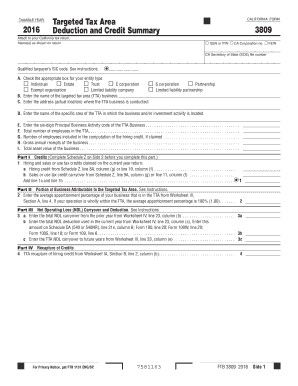
See instructions. Corporations which file a combined report enter the taxpayer s business income apportioned to California see instructions for form FTB 3809 Part II. TAXABLE YEAR Targeted Tax Area Deduction and Credit Summary Attach to your California tax return* Name s as shown on return CALIFORNIA FORM SSN or ITIN CA Corporation no. FEIN v CA Secretary of State SOS file number Qualified taxpayer s SIC code. See instructions. A. Check the appropriate box for your entity type Individual Estate .

How it works

  1. Open form

    Open form follow the instructions

  2. Easily sign form

    Easily sign the form with your finger

  3. Share form

    Send filled & signed form or save

How to fill out the CA FTB 3809 online

The CA FTB 3809 form is essential for taxpayers seeking deductions and credits for businesses located in targeted tax areas. This guide provides step-by-step instructions to assist users in smoothly completing the form online.

Follow the steps to effectively complete the form.

  1. Click ‘Get Form’ button to obtain the form and access it in the online interface.
  2. Fill in your name(s) as shown on your tax return at the designated field. Ensure accuracy to avoid processing issues.
  3. Select the appropriate boxes to indicate your entity type, such as 'Individual', 'C corporation', or 'Partnership'. This classification is vital for the correct application of tax benefits.
  4. Enter the full name of the targeted tax area (TTA) business in the provided field. This should correspond with your business operations.
  5. Provide the actual address where the TTA business is conducted. Ensure all details are correct to avoid misclassification.
  6. Specify the exact area of the TTA in which your business activities occur. This could be a specific neighborhood, district, or zone.
  7. Input the six-digit Principal Business Activity code associated with your TTA business. This code is critical for identifying your business sector.
  8. Record the total number of employees in the TTA. This count is needed for various tax credit calculations.
  9. If a hiring credit is claimed, enter the number of employees relevant to that computation.
  10. Indicate the gross annual receipts of your business. This figure will be used to assess various tax eligibility criteria.
  11. Document the total asset value of your business, as this is necessary for evaluating tax benefits you may be eligible for.
  12. Complete Part I Credits by referring to Schedule Z on Side 2 before filling this part of the form. Add any claimed hiring credits.
  13. Continue through the sections, ensuring all data is correctly entered, particularly in the parts concerning net operating loss carryovers and credit recaptures.
  14. Once all fields are completed, review your entries for accuracy, save your changes, and proceed to download, print, or share the completed form as necessary.

Take the next step in your financial management by completing your CA FTB 3809 online today.

Get form

Experience a faster way to fill out and sign forms on the web. Access the most extensive library of templates available.

Related content

2021 California Form 3809 Targeted Tax Area...
Corporations which file a combined report, enter the taxpayer's business income...
Learn more
2019 Schedule CA (540NR) California Adjustments
Complete all lines that apply to you and your spouse/RDP for taxable year 2019. During...
Learn more

Related links form

KY DoR 725 (41A725) 2006 KY DoR 740-ES 2018 KY DoR 740-ES 2016 KY DoR 740-ES 2015

Questions & Answers

Get answers to your most pressing questions about US Legal Forms API.

Contact support

To file a California exemption claim, you must submit the appropriate forms with detailed information regarding your circumstances. The CA FTB 3809 outlines the necessary steps and requirements to make this claim effectively. If needed, resources like USLegalForms can assist you in filing claims accurately.

Filing exempt in California generally requires you to fill out specific forms, indicating your exempt status. It is essential to include all relevant documentation to support your claim, referencing the CA FTB 3809 where necessary. Consider utilizing the tools available through USLegalForms to streamline this process.

When submitting your California tax return, it is advisable to paperclip the forms instead of stapling them. This practice ensures that your documents remain intact and can be processed efficiently by the tax office. Following these guidelines, including any mention of the CA FTB 3809, will help avoid complications with your filings.

Qualifying to file exempt typically depends on your income level and certain financial criteria established by state regulations. The CA FTB 3809 provides detailed guidance on the qualifications that must be met to file exempt. Always review these qualifications thoroughly to ensure compliance and proper filing.

Applying for tax exemption in California involves submitting specific forms outlining your eligibility. The CA FTB 3809 provides the necessary framework to help you comprehend which exemptions may apply to your situation. Utilizing resources from platforms such as USLegalForms can simplify your application process.

To file an exemption in California, you typically need to submit the relevant forms, including the CA FTB 3809 where applicable. It is crucial to ensure all documentation is accurate and comprehensively filled out to avoid delays. You can also opt for services like USLegalForms to navigate the process efficiently.

Yes, you must file Form 8958 in California if you received a specific type of income or if you have tax obligations that relate to carrying income forward. Completing this form helps clarify how you allocate your income based on various financial circumstances. If you're unsure about your requirements, consulting the CA FTB 3809 can provide more direction on specific filing needs.

The California tax return processing time can be affected by several factors, including the volume of returns and the complexity of your situation. If there are discrepancies or additional documentation needed related to your CA FTB 3809, this might cause delays. Regularly check the status of your return on the California Franchise Tax Board website to stay informed.

Getting through to the California Franchise Tax Board can be straightforward if you call their designated helpline during business hours. Be patient, as wait times can vary. Additionally, utilizing the online services offered can provide quick answers, especially regarding the CA FTB 3809.

To obtain a California Secretary of State entity number, you must first register your business with the Secretary of State. Once your registration is complete, you will receive your entity number, which is crucial for tax forms including the CA FTB 3809. Ensure all your paperwork is in order to expedite the process.

Get This Form Now!

Use professional pre-built templates to fill in and sign documents online faster. Get access to thousands of forms.
If you believe that this page should be taken down, please follow our DMCA take down processhere.

Industry-leading security and compliance

US Legal Forms protects your data by complying with industry-specific security standards.
  • In businnes since 1997
    25+ years providing professional legal documents.
  • Accredited business
    Guarantees that a business meets BBB accreditation standards in the US and Canada.
  • Secured by Braintree
    Validated Level 1 PCI DSS compliant payment gateway that accepts most major credit and debit card brands from across the globe.
Get CA FTB 3809
  • Adoption
  • Bankruptcy
  • Contractors
  • Divorce
  • Home Sales
  • Employment
  • Identity Theft
  • Incorporation
  • Landlord Tenant
  • Living Trust
  • Name Change
  • Personal Planning
  • Small Business
  • Wills & Estates
  • Packages A-Z
  • Affidavits
  • Bankruptcy
  • Bill of Sale
  • Corporate - LLC
  • Divorce
  • Employment
  • Identity Theft
  • Internet Technology
  • Landlord Tenant
  • Living Wills
  • Name Change
  • Power of Attorney
  • Real Estate
  • Small Estates
  • Wills
  • All Forms
  • Forms A-Z
  • Form Library
  • Legal Hub
  • About Us
  • Help Portal
  • Legal Resources
  • Blog
  • Affiliates
  • Contact Us
  • Delete My Account
  • Site Map
  • Industries
  • Forms in Spanish
  • Localized Forms
  • State-specific Forms
  • Forms Kit
  • Real Estate Handbook
  • All Guides
  • Notarize
  • Incorporation services
  • For Consumers
  • For Small Business
  • For Attorneys
  • USLegal
  • FormsPass
  • pdfFiller
  • signNow
  • altaFlow
  • DocHub
  • Instapage
Form Packages
  • Adoption
  • Bankruptcy
  • Contractors
  • Divorce
  • Home Sales
  • Employment
  • Identity Theft
  • Incorporation
  • Landlord Tenant
  • Living Trust
  • Name Change
  • Personal Planning
  • Small Business
  • Wills & Estates
  • Packages A-Z
Form Categories
  • Affidavits
  • Bankruptcy
  • Bill of Sale
  • Corporate - LLC
  • Divorce
  • Employment
  • Identity Theft
  • Internet Technology
  • Landlord Tenant
  • Living Wills
  • Name Change
  • Power of Attorney
  • Real Estate
  • Small Estates
  • Wills
  • All Forms
  • Forms A-Z
  • Form Library
Customer Service
  • Legal Hub
  • About Us
  • Help Portal
  • Legal Resources
  • Blog
  • Affiliates
  • Contact Us
  • Delete My Account
  • Site Map
  • Industries
  • Forms in Spanish
  • Localized Forms
  • State-specific Forms
  • Forms Kit
Legal Guides
  • Real Estate Handbook
  • All Guides
Prepared for you
  • Notarize
  • Incorporation services
Our Customers
  • For Consumers
  • For Small Business
  • For Attorneys
Our Sites
  • USLegal
  • FormsPass
  • pdfFiller
  • signNow
  • altaFlow
  • DocHub
  • Instapage
Social Media
Call us now toll free:
+1 833 426 79 33
As seen in:
© Copyright 1999-2026 airSlate Legal Forms, Inc. 3720 Flowood Dr, Flowood, Mississippi 39232
  • Your Privacy Choices
  • Terms of Service
  • Privacy Notice
  • Content Takedown Policy
  • Bug Bounty Program
CA FTB 3809
This form is available in several versions.
Select the version you need from the drop-down list below.
2020 CA FTB 3809
Select form
  • 2020 CA FTB 3809
  • 2019 CA FTB 3809
  • 2018 CA FTB 3809
  • 2017 CA FTB 3809
  • 2016 CA FTB 3809
  • 2012 CA FTB 3809
Select form