. . . . . . . . . . . . . . . . . . . . . . . . . . . . . . . . . . . . . . . . . . 13 00 14 Business capital gains . . . . . . . . . . . . . . . . . . . . . . . . . . . . . . . . . . . . . . . . . . . . 14 00 15 Add line 12 and line 14 . . . . . . . . . . . . . . . . . . . . . . . . . . . . . . . . . . . . . . . . . . . . . . . . . . . . . . . . . . . . . . 15 00 16 If line 13 is more than line 15, enter the difference; otherwise, enter -0- . . . . . . . . . . . . . . . . . . . . . .
Loading

Open form follow the instructions

Easily sign the form with your finger

Send filled & signed form or save
How to fill out the CA FTB 3805V online
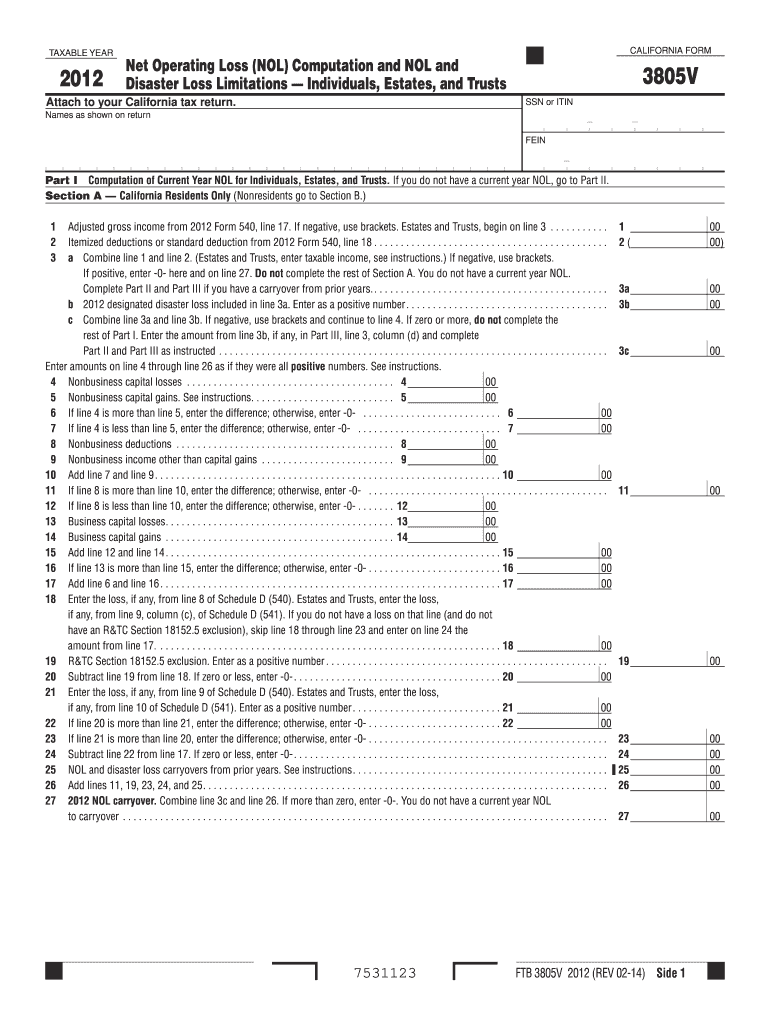
The CA FTB 3805V form is essential for individuals, estates, and trusts to compute their net operating loss (NOL) and disaster loss limitations. This guide will provide you with clear, step-by-step instructions on how to fill out this form online, ensuring accuracy and compliance with California tax requirements.
Follow the steps to fill out the CA FTB 3805V form online effectively.
- Click ‘Get Form’ button to obtain the form and open it in the editor.
- Enter your social security number (SSN) or individual taxpayer identification number (ITIN) in the designated field.
- Fill in your name as it appears on your California tax return, ensuring spelling and order are correct.
- For Part I, Section A, enter your adjusted gross income from your 2012 Form 540, line 17. If the amount is negative, make sure to use brackets.
- Input itemized deductions or the standard deduction from 2012 Form 540, line 18 in the respective line.
- Combine the values from steps 4 and 5 in line 3a. If the result is positive, enter -0- and skip to Part II.
- Complete the rest of Part I only if line 3a indicates a current year NOL. Follow the instructions for lines 4 through 26, entering values as instructed.
- In Part II, determine your modified taxable income (MTI) by following the prompts and ensuring all entries reflect positive numbers.
- Proceed to Part III to enter NOL carryovers and disaster loss limitations, making sure to read the provided instructions carefully.
- Review all entries for accuracy before saving your changes, or proceed to download, print, or share the form as needed.
Complete your CA FTB 3805V form online seamlessly.
Experience a faster way to fill out and sign forms on the web. Access the most extensive library of templates available.
Related content
2022 Instructions for Form FTB 3805V: Net Operating Loss (NOL) Computation and NOL and...
Important: Attach this schedule behind Form 540NR, Side 5 as a supporting California...
Get answers to your most pressing questions about US Legal Forms API.
How does net operating loss carryover work?
Net operating loss carryover allows you to apply your current year's losses to future tax years, potentially reducing your tax bill in those years. When filing your California state taxes, you can use the CA FTB 3805V to report and claim these losses. Understanding how this carryover works can significantly benefit your overall tax strategy.
Does the post office have state tax forms?
Yes, the post office typically carries state tax forms, including the CA FTB 3805V, especially during tax season. While visiting, you can find various tax forms available to the public. It's convenient for individuals who prefer hard copies instead of downloading forms from the internet.
What is FTB form 3805V ca?
FTB form 3805V CA is a tax form used to claim a net operating loss for individual taxpayers in California. This form helps you compute and carry over your net operating losses, providing potential tax benefits for future years. By filing the CA FTB 3805V, you can ensure that you're taking advantage of tax relief options available to you.
Where can I pick up California state tax forms?
To pick up California state tax forms, such as the CA FTB 3805V, visit places like post offices, libraries, or the nearest Franchise Tax Board office. Many community centers also offer these forms during tax season. If you prefer digital formats, you can find these forms available for download on the California FTB's website.
How do I get California state tax forms?
California state tax forms, including the CA FTB 3805V, can be obtained easily online via the California Franchise Tax Board's website. You can also request paper forms by calling their office, or visit a local IRS office for physical copies. Make sure to have the necessary forms handy when preparing your taxes to streamline the process.
Where can I pick up tax forms?
You can pick up tax forms, including the CA FTB 3805V, at various locations such as local libraries, post offices, and FTB offices. Additionally, many tax preparation services have physical copies available for their clients. If you're looking for convenience, online options also exist to download forms directly.
What is the tax form for seniors in California?
The tax form designed for seniors in California includes the CA FTB 3805V. This form allows seniors to benefit from specific tax relief options, especially concerning net operating losses. Utilizing this form may help you optimize your tax filing process. If you're a senior, make sure to consult the CA FTB 3805V for the best results.
How to fill out withholding allowance certificate California?
Start the process by entering your personal details on the California withholding allowance certificate. Then, your circumstances, such as dependents and any other deductions, will guide you in deciding the number of allowances to claim. By ensuring this document is filled out properly, you align with the requirements of the CA FTB 3805V.
How do I fill out an employee's withholding allowance certificate in California?
To fill out an employee's withholding allowance certificate, begin with the employee's personal information. They will indicate the number of allowances they wish to claim based on their tax situation. This certificate plays a key role in determining state and federal withholding amounts, and it's vital to ensure accuracy to align with the CA FTB 3805V.
How to calculate NOL deduction?
To calculate your Net Operating Loss (NOL) deduction, start by figuring your total business losses and subtracting any gains from earlier years. Use the NOL worksheet provided by the CA FTB to guide you through the process. This calculation can be essential for maximizing your benefits on the CA FTB 3805V, especially if you're claiming losses from previous tax years.
Use professional pre-built templates to fill in and sign documents online faster. Get access to thousands of forms.
If you believe that this page should be taken down, please follow our DMCA take down process here.
This form is available in several versions. Select the version you need from the drop-down list below.