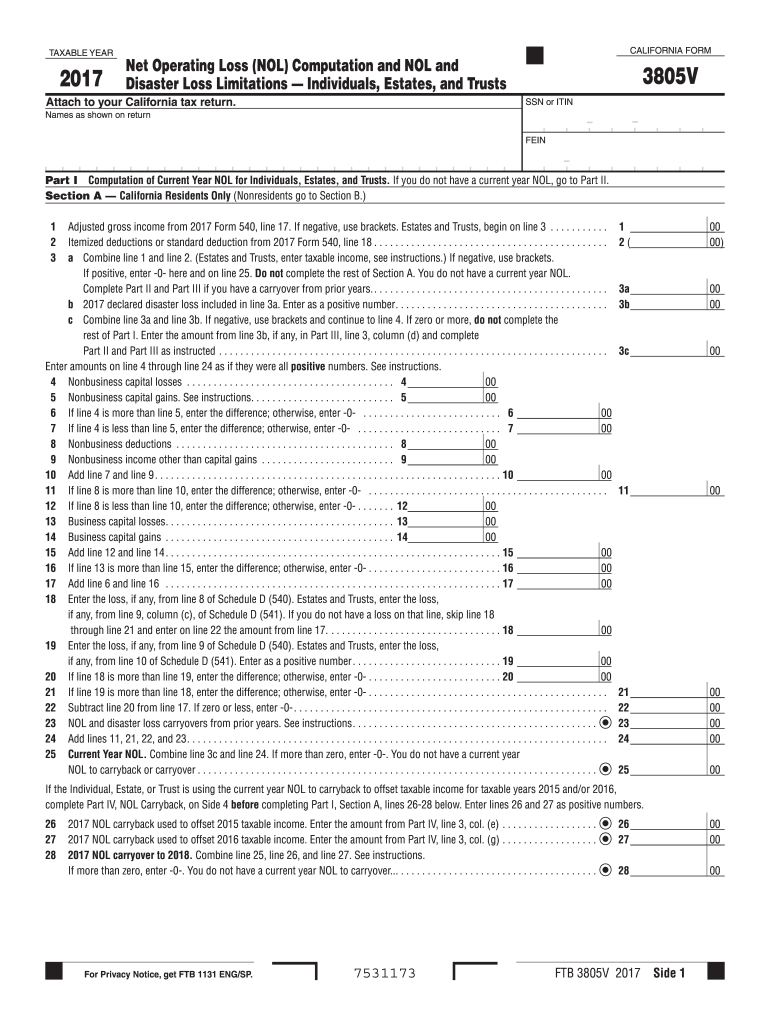
Ne 14 . . . . . . . . . . . . . . . . . . . . . . . . . . . . . . . . . . . . . . . . . . . . . . . . . . . . . . . . . . . . . . 15 00 16 If line 13 is more than line 15, enter the difference; otherwise, enter -0- . . . . . . . . . . . . . . . . . . . . . . . . 16 00 17 Add line 6 and line 16 . . . . . . . . . . . . . . . . . . . . . . . . . . . . . . . . . . . . . . . . . . . . . . . . . . . . . . . . . . . . . . . 17 00 18 Enter the loss, if any, from line 8 of Schedule D (540). Esta.

Open form follow the instructions

Easily sign the form with your finger

Send filled & signed form or save
How to fill out the CA FTB 3805V online
The CA FTB 3805V form is essential for individuals, estates, and trusts to compute and report net operating losses for the 2017 taxable year. This guide will provide you with clear, step-by-step instructions to efficiently complete the form online, ensuring compliance with California tax regulations.
Follow the steps to successfully complete the CA FTB 3805V.
- Click ‘Get Form’ button to access the CA FTB 3805V and open it in the editor.
- Begin by entering your social security number (SSN) or individual taxpayer identification number (ITIN) in the designated field at the top of the form.
- Next, fill out the names as they appear on your tax return. Ensure accuracy to avoid processing delays.
- Proceed to Part I, where you will compute the current year NOL. If you are a California resident, complete Section A. Start with line 1 where you will input your adjusted gross income from your 2017 Form 540.
- On line 2, enter your itemized deductions or standard deduction from your 2017 Form 540. If your adjusted gross income is negative, use brackets.
- Combine line 1 and line 2 on line 3a. If the result is negative, use brackets and continue to line 4. If positive, enter ‘-0-’ on line 3a and proceed to Part II.
- For line 3b, enter any declared disaster loss included in your taxable income. Ensure you enter it as a positive number.
- Continue to line 3c, where you will sum line 3a and line 3b, taking care to follow instructions if the total is negative or zero.
- Complete lines 4 through 24 as instructed, entering amounts as if they were all positive numbers.
- If you have carryovers from prior years, fill in the necessary fields in Part III and follow any additional instructions provided.
- Upon finishing the form, you can save your changes, download a copy, print, or share your completed CA FTB 3805V.
Start completing your CA FTB 3805V online today for efficient tax management.
Experience a faster way to fill out and sign forms on the web. Access the most extensive library of templates available.
Related content
2022 Instructions for Form FTB 3805V: Net Operating Loss (NOL) Computation and NOL and...
Important: Attach this schedule behind Form 540NR, Side 5 as a supporting California...
Get answers to your most pressing questions about US Legal Forms API.
How to fill California resale certificate form?
To fill out the California resale certificate form, start with your business’s name and address at the top. Enter your seller's permit number, detail the goods being purchased, and ensure you provide your signature and the date. This step is crucial as it verifies your eligibility to make tax-exempt purchases for resale, which streamlines your business finances.
How to fill out withholding allowance certificate California?
Filling out a withholding allowance certificate in California requires you to provide your personal information, such as name and Social Security number, along with your allowances. You can also indicate additional withholding amounts if necessary. This form is crucial for ensuring that the correct amount of taxes is withheld from your paycheck, making tax season less stressful.
What is FTB Form 3805V CA?
FTB Form 3805V CA is a tax form used for claiming a net operating loss deduction in California. This form allows individuals and businesses to offset taxable income with losses incurred in previous years. Properly completing this form can significantly reduce your tax burden, ensuring you leverage every available deduction to improve your financial standing.
How to calculate NOL deduction?
To calculate a Net Operating Loss (NOL) deduction, you first need to determine your taxable income for the year. If your allowable deductions exceed your income, you have an NOL. The CA FTB 3805V form helps you to apply the NOL against current or future tax obligations, allowing you to lower your taxable income strategically.
How to fill out California resale certificate?
To fill out a California resale certificate, include your business name, address, and seller's permit number at the top of the form. Specify the items you intend to resell and sign the document. This certificate serves as proof to your suppliers that you are purchasing items for resale, which avoids sales tax on those transactions.
How to fill out a sales tax exemption certificate?
To fill out a sales tax exemption certificate, start by gathering your business information, including your tax identification number. Next, indicate the type of exemption you are claiming, and ensure that the seller accepts the form. Finally, submit the completed form to your vendor, keeping a copy for your records. This process assures you can leverage exemptions appropriately, which is essential for effective tax management.
Do I need to attach 1040 to California tax return?
Generally, you do not need to attach your federal Form 1040 to your California tax return. However, if you're using the CA FTB 3805V form for reporting net operating losses, it's a good practice to have your federal return accessible for your records. Always ensure you follow California's specific filing requirements to avoid complications.
What forms do I need to submit with my tax return?
Along with your main tax form, you may need to submit additional forms relevant to your financial situation. If you are claiming losses, the CA FTB 3805V form is essential. Additionally, depending on your income sources and deductions, other schedules may be required, so reviewing your entire financial picture is beneficial.
What do I need to send with my California tax return?
When submitting your California tax return, you need to include all relevant forms, including the main form and any attachments, such as the CA FTB 3805V for net operating losses. In addition, don't forget to attach all necessary schedules, appropriate documentation, and payment if you owe taxes. Make sure that everything is organized to avoid delays.
What forms do I need to file California taxes?
Filing California taxes typically requires using Form 540 for residents or Form 540NR for non-residents. Depending on your specific tax situation, you may also need to include the CA FTB 3805V form if you are reporting a net operating loss. Always verify the forms needed based on your individual tax profile.
Use professional pre-built templates to fill in and sign documents online faster. Get access to thousands of forms.
If you believe that this page should be taken down, please follow our DMCA take down process here.
This form is available in several versions. Select the version you need from the drop-down list below.