Loading
Form preview
  • US Legal Forms
  • Other Templates
  • Tax Forms
  • New Jersey Tax Forms
  • Nj Ifta Quarterly Tax Return 2018

Get Nj Ifta Quarterly Tax Return 2018-2026

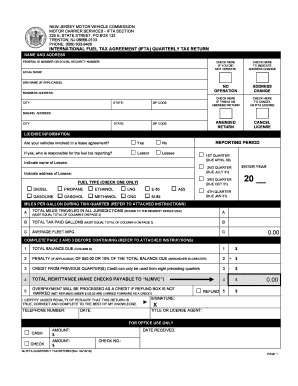
ILES (SEE INSTRUCTIONS) G H I J TAXABLE GALLONS TAX NET TAXABLE CONSUMED TAX PAID GALLONS GALLONS (COLUMN F RATE (SEE INSTRUCTIONS) (SEE INSTRUCTIONS) LINE C) YEAR: K TAX DUE/ CREDIT EARNED (SEE INSTRUCTIONS) 20 QTR: L INTEREST DUE M TOTAL BALANCE DUE (COLUMN K + COLUMN L) OK OR PA RI SC SD TN TX UT VA SUR SURCHARGE VT WA WI WV WY Use this space to report the second tax rate for jurisdictions with multiple tax rates. Enter the first tax rate in the standard table and write the.

How it works

  1. Open form

    Open form follow the instructions

  2. Easily sign form

    Easily sign the form with your finger

  3. Share form

    Send filled & signed form or save

How to fill out the NJ IFTA Quarterly Tax Return online

Filling out the New Jersey International Fuel Tax Agreement (IFTA) Quarterly Tax Return online can be a straightforward process when approached methodically. This guide provides step-by-step instructions to help you complete the form accurately and efficiently.

Follow the steps to complete your NJ IFTA Quarterly Tax Return online

  1. Press the ‘Get Form’ button to obtain the NJ IFTA Quarterly Tax Return form and open it in the editor.
  2. Enter your federal ID number or social security number in the designated field. This should match the number on your legal documents.
  3. Fill in your legal name exactly as it appears on your legal documents. If you have a ‘doing business as’ (DBA) name, include that next.
  4. Provide your business address, including the city, state, and zip code. Ensure this address is the primary location for your business as required by legal documentation.
  5. Mark the appropriate checkbox if you did not operate any qualified vehicles during the reporting period.
  6. If applicable, indicate if this is an amended return by checking the appropriate box and provide details of the quarter and year you are correcting.
  7. If you have changed your address, check the box provided and enter your new mailing address in the corresponding fields.
  8. Select whether your vehicles were involved in a lease agreement and specify who is responsible for fuel tax reporting.
  9. Choose the type of fuel you used during the reporting period by checking the corresponding box.
  10. Select the appropriate reporting period for your tax return and enter the year. Ensure that your selection aligns with the quarters due.
  11. Calculate and enter the total miles traveled during this quarter in the specified field, rounding to the nearest whole mile.
  12. Fill in the total tax paid gallons, ensuring it matches the total of the values from the later columns in this form.
  13. Calculate your average fleet miles per gallon (MPG) by dividing total miles traveled by total tax paid gallons, rounding to two decimal points.
  14. Complete the necessary calculations on pages 2 and 3, ensuring all figures align appropriately with the provided instructions.
  15. Review all entries for accuracy before submitting. Save any changes made in the form.
  16. Download and print the completed form or save it to share via email, if necessary.

Complete your NJ IFTA Quarterly Tax Return online today to ensure timely and accurate filing!

Get form

Experience a faster way to fill out and sign forms on the web. Access the most extensive library of templates available.
Get form

Related content

IFTA Quarterly Taxes - NJ MVC
Quarterly Tax Returns can be completed online; you can also print the tax form and the tax...
Learn more
N.J. Admin. Code § 13:18-3.10 - Credit; refunds
(d) A refund determined to be properly due shall be paid within 90 calendar days after...
Learn more
best practices audit guide
Every licensee shall maintain records to substantiate information reported on the...
Learn more

Related links form

Canada SC INS3280 E 2008 Canada SC ISP-3026 2012 Canada WorkSafeBC 55M60 2018 Canadian Imperial Bank of Commerce Resolution Plan 2015

Questions & Answers

Get answers to your most pressing questions about US Legal Forms API.

Contact support

Calculating IFTA fuel tax involves taking your total fuel consumption and the miles traveled, then applying the relevant tax rates for each jurisdiction. You can use a simple formula: total gallons purchased divided by total miles traveled, multiplied by the state tax rates. Utilizing services like US Legal Forms can help you ensure you calculate and report your NJ IFTA Quarterly Tax Return accurately.

Yes, IFTA payments can be tax deductible as they are considered business-related expenses. When you file your taxes, you can include these payments to reduce your taxable income. Keeping detailed records of your IFTA payments will support your deductions on your tax return.

To file your IFTA in NJ, start by gathering your mileage and fuel consumption data for the quarter. You can then complete the NJ IFTA Quarterly Tax Return form, which is available on the New Jersey Division of Taxation website. Additionally, using US Legal Forms can streamline your filing process and help ensure compliance.

IFTA miles are calculated by tracking the distance traveled in each state and province during your reporting period. You should keep precise records of your trips to ensure accurate reporting on your NJ IFTA Quarterly Tax Return. Using a mileage tracking tool can simplify this process and enhance accuracy.

Yes, if you operate heavy vehicles and travel across state lines, you must file a NJ IFTA Quarterly Tax Return. This requirement applies even if you have no fuel tax due. Filing consistently helps maintain good standing with tax authorities and avoids potential penalties.

Calculating the tax formula for the NJ IFTA Quarterly Tax Return involves determining the miles driven in each jurisdiction and the fuel consumed. First, you must track your total miles and the gallons of fuel used. Then, apply the specific tax rates for each area where you traveled. This systematic approach ensures accurate reporting and compliance.

IFTA fuel tax is calculated based on the distance traveled in each jurisdiction and the total fuel purchased. After tracking your mileage and fuel purchases, you report this data in your NJ IFTA Quarterly Tax Return. The rates vary among jurisdictions, and the tax owed is determined accordingly, making accurate record-keeping essential.

The best way to track IFTA miles is to use a dedicated mileage log or tracking software that collects data automatically. This can simplify your record-keeping process, ensuring you gather all necessary details for your NJ IFTA Quarterly Tax Return. Platforms like uslegalforms offer tools that help you stay organized and compliant.

To report mileage, collect details of your trips, including dates, routes, and distance traveled in each state. After gathering this data, fill out the NJ IFTA Quarterly Tax Return to summarize your mileage and fuel purchases. Accurate reporting ensures compliance and helps prevent any potential issues with tax authorities.

IFTA, or the International Fuel Tax Agreement, simplifies fuel tax reporting for commercial vehicle operators. Instead of filing separate fuel tax returns with each jurisdiction, you file one NJ IFTA Quarterly Tax Return that covers all areas traveled. The taxes are then distributed among the jurisdictions based on mileage, making it easier for you.

Get This Form Now!

Use professional pre-built templates to fill in and sign documents online faster. Get access to thousands of forms.
Get form
If you believe that this page should be taken down, please follow our DMCA take down processhere.
Get NJ IFTA Quarterly Tax Return
Get form
  • Adoption
  • Bankruptcy
  • Contractors
  • Divorce
  • Home Sales
  • Employment
  • Identity Theft
  • Incorporation
  • Landlord Tenant
  • Living Trust
  • Name Change
  • Personal Planning
  • Small Business
  • Wills & Estates
  • Packages A-Z
  • Affidavits
  • Bankruptcy
  • Bill of Sale
  • Corporate - LLC
  • Divorce
  • Employment
  • Identity Theft
  • Internet Technology
  • Landlord Tenant
  • Living Wills
  • Name Change
  • Power of Attorney
  • Real Estate
  • Small Estates
  • Wills
  • All Forms
  • Forms A-Z
  • Other Templates
  • Legal Hub
  • About Us
  • Help Portal
  • Legal Resources
  • Blog
  • Affiliates
  • Contact Us
  • Delete My Account
  • Site Map
  • Industries
  • Forms in Spanish
  • Localized Forms
  • State-specific Forms
  • Forms Kit
  • Real Estate Handbook
  • All Guides
  • Notarize
  • Incorporation services
  • For Consumers
  • For Small Business
  • For Attorneys
  • USLegal
  • FormsPass
  • pdfFiller
  • signNow
  • altaFlow
  • DocHub
  • Instapage
Form Packages
  • Adoption
  • Bankruptcy
  • Contractors
  • Divorce
  • Home Sales
  • Employment
  • Identity Theft
  • Incorporation
  • Landlord Tenant
  • Living Trust
  • Name Change
  • Personal Planning
  • Small Business
  • Wills & Estates
  • Packages A-Z
Form Categories
  • Affidavits
  • Bankruptcy
  • Bill of Sale
  • Corporate - LLC
  • Divorce
  • Employment
  • Identity Theft
  • Internet Technology
  • Landlord Tenant
  • Living Wills
  • Name Change
  • Power of Attorney
  • Real Estate
  • Small Estates
  • Wills
  • All Forms
  • Forms A-Z
  • Other Templates
Customer Service
  • Legal Hub
  • About Us
  • Help Portal
  • Legal Resources
  • Blog
  • Affiliates
  • Contact Us
  • Delete My Account
  • Site Map
  • Industries
  • Forms in Spanish
  • Localized Forms
  • State-specific Forms
  • Forms Kit
Legal Guides
  • Real Estate Handbook
  • All Guides
Prepared for you
  • Notarize
  • Incorporation services
Our Customers
  • For Consumers
  • For Small Business
  • For Attorneys
Our Sites
  • USLegal
  • FormsPass
  • pdfFiller
  • signNow
  • altaFlow
  • DocHub
  • Instapage
Social Media
Call us now toll free:
+1 833 426 79 33
As seen in:
© Copyright 1999-2026 airSlate Legal Forms, Inc. 17 Station Street, Ste. 203, Brookline, MA 02445
  • Your Privacy Choices
  • Terms of Service
  • Privacy Notice
  • Content Takedown Policy
  • Bug Bounty Program