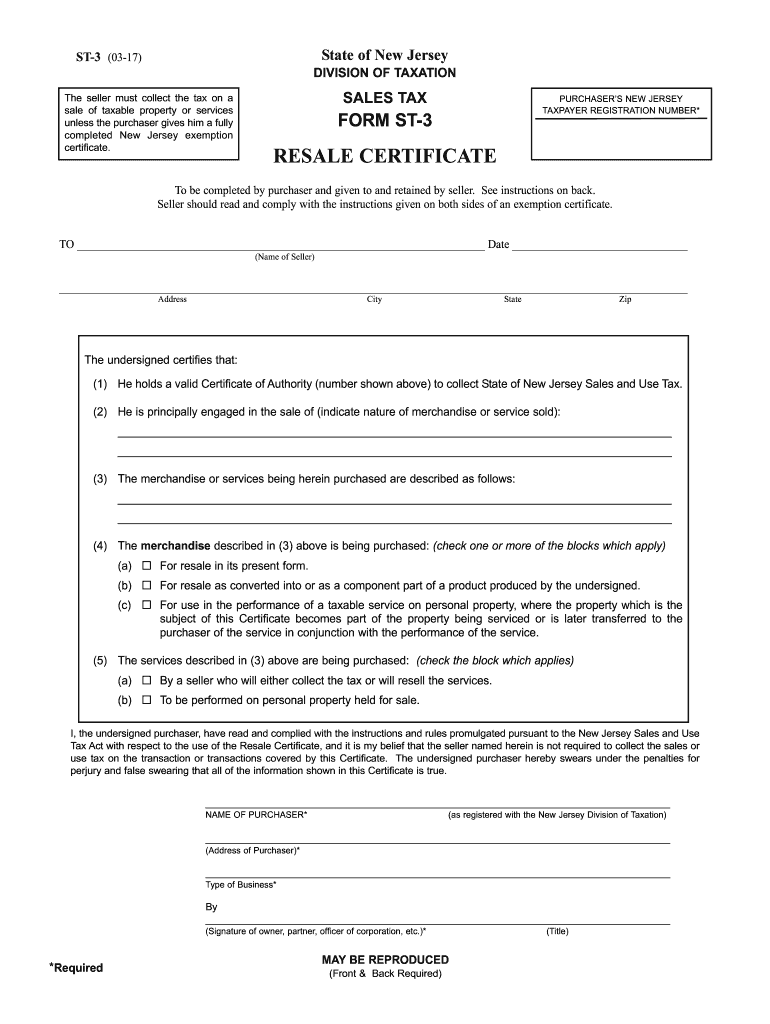
(Signature of owner, partner, officer of corporation, etc.) MAY BE REPRODUCED (Front & Back Required) (Title) INSTRUCTIONS FOR USE OF RESALE CERTIFICATES - ST-3 1. Good Faith - To act in good faith means to act in accordance with standards of honesty. In general, registered sellers who accept exemption certificates in good faith are relieved of liability for the collection and payment of sales tax on the transactions covered by.
Loading

Open form follow the instructions

Easily sign the form with your finger

Send filled & signed form or save
How to fill out the NJ DoT ST-3 online
The New Jersey Department of Taxation ST-3 form serves as a resale certificate, allowing purchasers to claim tax exemption on certain sales. This guide will help you navigate the process of completing the form accurately and efficiently online.
Follow the steps to successfully complete the NJ DoT ST-3 form.
- Click the ‘Get Form’ button to access the ST-3 resale certificate form and open it in your preferred online editor.
- Enter the name of the seller in the designated field, ensuring accurate spelling and details.
- Provide the seller's complete address, including city, state, and zip code.
- In the designated fields, certify that you hold a valid Certificate of Authority for collecting sales tax by entering the appropriate number.
- Indicate the nature of the merchandise or services you primarily sell. Provide a brief description that precisely conveys your business activities.
- Describe the merchandise or services you are purchasing. Ensure to give enough detail for clarity.
- Check one or more boxes to specify how the purchased merchandise will be used, such as for resale or as a component of a product.
- Indicate the applicable checkbox for the services you are purchasing, ensuring to match it with your intended use.
- Complete the purchaser's name, as registered with the New Jersey Division of Taxation.
- Fill out the address of the purchaser accurately to match the registration records.
- Sign the form in the appropriate field, ensuring the signature is from an authorized individual, and state their title.
- Review all entered information for accuracy before finalizing the document.
- Once satisfied with the form, you can save changes, download a copy for your records, print the form, or share it as needed.
Complete your New Jersey documents online efficiently and accurately.
Experience a faster way to fill out and sign forms on the web. Access the most extensive library of templates available.
Related content
Transportation in our State · New on our site · Quick Links · Public Meetings · Route...
"New Jersey Department of Transportation Bridges and Structures Design Manual," 6th...
All reportable crashes in the state are submitted to DOT for entry into the statewide...
Get answers to your most pressing questions about US Legal Forms API.
How to fill out an ST-4 form in NJ?
To fill out an ST-4 form in NJ, provide all requested information, including purchaser and seller details. Specify the items being purchased and ensure you adhere to the stated tax exemption requirements. Guidance from platforms like uslegalforms can help you navigate the filling of the ST-4 form while ensuring you maintain compliance with New Jersey tax regulations.
How do I fill out an exemption?
Filling out an exemption requires clear identification of your information and the exemption type you are claiming. You must also provide the basis for your claim clearly. The NJ DoT ST-3 can be an essential tool in this process, guiding you through the necessary steps to properly document your exemption claims with ease.
How to fill out a certificate of exemption?
Filling out a certificate of exemption involves clearly stating the buyer's information, the seller's information, and the details of the exemption. Make sure to include the reason for the exemption and reference any relevant law or statute. Using the NJ DoT ST-3 can help in crafting the necessary documentation accurately, making it easier for you to get the tax benefits you deserve.
How to fill out an ST-3 form?
To fill out an ST-3 form, begin by entering your name and address in the designated fields. Proceed to indicate the specific items or services that qualify for the exemption status, ensuring that you provide accurate details. The NJ DoT ST-3 requires careful documentation, and utilizing platforms like uslegalforms can simplify the process and help avoid common mistakes.
Can I file myself as an exemption?
Yes, you can file yourself for an exemption, provided you meet the eligibility criteria set by the New Jersey tax regulations. The NJ DoT ST-3 form allows individuals and organizations to declare their exempt status. However, consulting resources like uslegalforms could be beneficial in ensuring you have filled out all necessary information correctly.
How to apply for an exemption certificate?
To apply for an exemption certificate in New Jersey, you need to complete the appropriate forms, such as the NJ DoT ST-3, and submit them to the State Division of Taxation. This process often requires supporting documentation proving your eligibility for the exemption. Platforms like uslegalforms can guide you in gathering necessary details to accelerate your application.
What is an ST-3 form in NJ?
The ST-3 form in NJ is a Certificate of Exempt Use that certifies the use of goods exempt from sales tax. It is crucial for businesses and purchasers to understand its purpose, as it ensures compliance while enjoying tax benefits. Utilizing the NJ DoT ST-3 effectively can streamline your tax exemption requests and compliance.
What is an ST3 form in NJ?
The ST3 form in New Jersey is a critical document used by property owners to request property tax exemptions. This form serves as an official certification that validates the qualifications for an exemption. By understanding the NJ DoT ST-3, you enhance your knowledge about property tax benefits available to you. For efficient handling and processing, consider using uslegalforms.
How to fill out a ST3 form?
To fill out a ST3 form, begin by collecting all pertinent information about the property and its owner. Carefully follow the instructions provided for each section to ensure accuracy, particularly regarding property usage and exemption claims. The NJ DoT ST-3 is designed to be user-friendly, but consulting with platforms like uslegalforms can further clarify any uncertainties. Finally, submit the completed form to your local tax authority for processing.
What is form ST-3 used for?
Form ST-3 is primarily used to claim property tax exemption in New Jersey. It allows property owners to officially request exemptions based on established criteria, including property use and ownership. The NJ DoT ST-3 form helps ensure that eligible properties receive the financial relief they deserve. Be sure to complete it accurately to avoid any complications.
Use professional pre-built templates to fill in and sign documents online faster. Get access to thousands of forms.
If you believe that this page should be taken down, please follow our DMCA take down process here.
This form is available in several versions. Select the version you need from the drop-down list below.