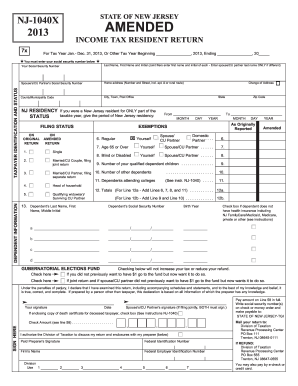
You must enter your social security number below Last Name, First Name and Initial (Joint filers enter first name and initial of each - Enter spouse/CU partner last name ONLY if different) Spouse s/CU Partner s Social Security Number TAXPAYER IDENTIFICATION AND STATUS Your Social Security Number Home address (Number and Street, incl. apt. # or rural route) County/Municipality Code City, Town, Post Office NJ RESIDENCY STATUS ON ORIGINAL RETURN State If you were a New Jersey residen.

How it works
  • Open form

    Open form follow the instructions

  • Easily sign form

    Easily sign the form with your finger

  • Share form

    Send filled & signed form or save

How to fill out the NJ DoT NJ-1040x online

Filling out the NJ DoT NJ-1040x form is a crucial step when you need to amend your New Jersey Income Tax Return. This guide provides a step-by-step approach to ensuring your form is completed accurately and efficiently in an online format.

Follow the steps to fill out the NJ DoT NJ-1040x form correctly.

  1. Press the ‘Get Form’ button to acquire the NJ-1040x form and open it in your editor.
  2. Enter your social security number at the top of the form, which is necessary for identification purposes.
  3. Fill in your last name, first name, and middle initial. If you are filing jointly, also include your spouse or civil union partner's information as directed.
  4. Indicate your residency status in New Jersey during the tax year by providing the relevant information on the original return section.
  5. Fill in your home address and the county or municipality code associated with it.
  6. Address the filing status on the amended return by marking the appropriate checkbox according to your situation, such as single, married filing jointly, or head of household.
  7. Complete the exemptions section by providing the number of dependents you are claiming, including children and other dependents.
  8. Move on to the income sections and report the amount of income for each category accurately, following the line numbers provided.
  9. Calculate your total income by adding all relevant lines. Be sure to exclude any tax-exempt income as instructed.
  10. Deduct applicable exclusions and calculate your taxable income by completing the deduction sections accurately.
  11. Complete the tax calculation section using the provided instructions to determine your overall tax liability.
  12. Review the pertinent line items regarding credits and payments that may reduce your overall tax, including any withholding or estimated payments.
  13. If you owe taxes, enter the amount on the specified line. If you expect a refund, fill out the necessary sections for overpayment.
  14. Finally, sign and date the form where required, and ensure that any joint filers provide their signatures too.
  15. You can now save your changes, download the completed form, and print or share it as needed.

Start filling out your NJ DoT NJ-1040x form online today to ensure your amendments are processed smoothly.

Get form

Experience a faster way to fill out and sign forms on the web. Access the most extensive library of templates available.

Related content

NJ Division of Taxation - Income Tax Forms

Apr 9, 2025 — NJ-1040X, Amended Resident Income Tax Return · Amended Resident Income...

Learn more
2005 Publication 970

Department of Transportation (DOT) hours of service limits: Multiply meal expenses...

Learn more
Questions & Answers

Get answers to your most pressing questions about US Legal Forms API.

Contact support

How long do you have to amend a NJ tax return?

In New Jersey, you generally have three years from the original filing deadline to amend your tax return using the NJ DoT NJ-1040X. This timeframe ensures you have ample opportunity to correct any mistakes or omissions. However, if you have a refund claim, keep in mind that it also must be filed within this period.

Yes, you can file the NJ DoT NJ-1040X yourself. Just ensure you carefully read the instructions and accurately report any changes. For added ease, you may consider using platforms like US Legal Forms that guide you through the process of filing amendments.

As of now, you cannot electronically file an amended return using the NJ DoT NJ-1040X. Taxpayers must download and print the form before mailing it to the New Jersey tax authorities. Keep an eye on updates from the New Jersey Division of Taxation for any future changes that may allow electronic filing.

Currently, the NJ DoT NJ-1040X cannot be filed electronically. You must print the completed form and mail it to the New Jersey Division of Taxation. Although electronic filing is convenient, many taxpayers still need to send this specific form by mail.

Amending a tax return that you have already filed involves using the NJ DoT NJ-1040X form. You will need to indicate the changes you wish to make compared to your original return. Make sure to provide any supporting documentation and details to clarify your amendments for the tax authorities.

To file an amended tax return in New Jersey, you need to complete the NJ DoT NJ-1040X form. First, gather your original return and any necessary documentation to support your amendments. After filling out the form, you can mail it to the appropriate address noted in the form instructions for processing.

You typically need to mail your NJ DoT NJ-1040X to the address specified by the New Jersey Division of Taxation. This address can vary based on whether you are sending a payment or not. It's essential to check the official New Jersey tax website or your specific form instructions to ensure you send your amended return to the proper location.

To amend your New Jersey tax return using TurboTax, start by opening your tax file and selecting the option to amend your return. TurboTax will guide you through the steps to complete the NJ DoT NJ-1040X form. This includes adjusting your entries to reflect the necessary changes. Once you finalize the amendments, TurboTax will provide instructions on how to submit the return, ensuring a smooth process.

A common reason for filing a NJ DoT NJ-1040X is to correct mistakes on your original tax return, such as misreported income or overlooked deductions. Sometimes, new information, such as receiving additional tax credits or changing your filing status, may also prompt an amendment. Filing a 1040X ensures that your tax records accurately reflect your financial situation, potentially leading to a refund.

To file an amended tax return for New Jersey, you need to complete the NJ DoT NJ-1040X form. This form allows you to adjust your income, credits, and deductions from your original tax return. Make sure to clearly indicate the changes you are reporting on the form. After filling it out, submit the NJ-1040X to the appropriate address provided by the New Jersey Division of Taxation.

Get This Form Now!

Use professional pre-built templates to fill in and sign documents online faster. Get access to thousands of forms.

If you believe that this page should be taken down, please follow our DMCA take down process here.

NJ DoT NJ-1040x Form

This form is available in several versions. Select the version you need from the drop-down list below.

Get NJ DoT NJ-1040x