Loading
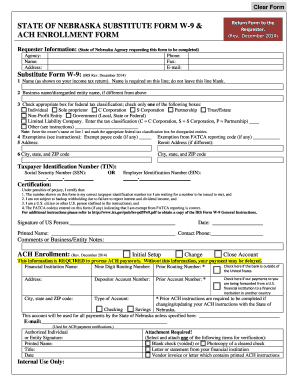
Get Ne Substitute W-9 & Ach Enrollment 2014
How it works
-

Open form follow the instructions
-

Easily sign the form with your finger
-

Send filled & signed form or save
How to fill out the NE Substitute W-9 & ACH Enrollment online
Completing the NE Substitute W-9 & ACH Enrollment forms online is straightforward. This guide will walk you through each section and field, ensuring that you provide all necessary information accurately and efficiently.
Follow the steps to complete the forms accurately.
- Press the ‘Get Form’ button to access the NE Substitute W-9 & ACH Enrollment forms in your browser.
- In the requester information section, input the details of the State of Nebraska agency that is requesting the form. This includes the agency name, address, phone, fax, and email.
- For the Substitute Form W-9, enter your name as it appears on your income tax return in the first field. Ensure that this line is not left blank.
- If applicable, enter your business name or disregarded entity name in the next field, if it differs from your name.
- Select the appropriate federal tax classification by checking only one box. Options include individual, sole proprietor, corporation types (C or S), partnership, trust/estate, non-profit entity, governmental entities, and limited liability company. If you choose limited liability company, specify the tax classification.
- If you have any exemptions, provide the exempt payee code and exemption from FATCA reporting code, if applicable.
- Enter your complete mailing address including city, state, and ZIP code. If you have a different remit address, include that as well.
- Provide your taxpayer identification number (TIN). You can enter either your Social Security number (SSN) or Employer Identification number (EIN) as appropriate.
- Read the certification statements carefully and ensure that you understand and agree to them. After that, sign and date the form where indicated.
- In the ACH Enrollment section, indicate if this is an initial setup, change, or account closure by checking the appropriate box.
- Fill in your financial institution's name, nine-digit routing number, and other required information to ensure prompt processing of ACH payments.
- Complete any additional necessary information, such as the type of account and email for ACH payment notifications.
- If changing ACH instructions, fill in prior account and routing numbers as required.
- Provide the signature of the authorized individual or entity, along with printed name, title, and date.
- Attach a required verification item, such as a voided check or letter from your financial institution. Follow any specific attachment instructions provided.
- Once all fields are completed accurately, save changes, and choose to download, print, or share the completed form as needed.
Begin the process and complete your NE Substitute W-9 & ACH Enrollment forms online today!
Get form
Experience a faster way to fill out and sign forms on the web. Access the most extensive library of templates available.
Related links form
In the context of FAFSA, ACH refers to the electronic transfer of funds for student loans or grants. This means students receive their financial aid through direct deposit into their bank accounts. Using NE Substitute W-9 & ACH Enrollment can help students manage this process smoothly. Proper understanding of ACH will enhance financial aid management.
Get This Form Now!
Use professional pre-built templates to fill in and sign documents online faster. Get access to thousands of forms.