Loading
Get Ne Dor 941n 2013
How it works
-

Open form follow the instructions
-

Easily sign the form with your finger
-

Send filled & signed form or save
How to fill out the NE DoR 941N online
This guide provides comprehensive instructions on how to fill out the NE DoR 941N form online. Whether you are new to the process or seeking clarification, these step-by-step instructions will help ensure that you effectively complete the form.
Follow the steps to fill out the NE DoR 941N efficiently.
- Click ‘Get Form’ button to obtain the form and open it in your preferred editor.
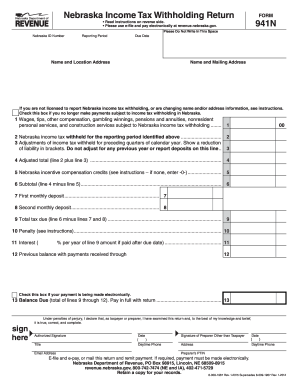
- Enter your Nebraska ID number, the reporting period, and the due date in the designated fields.
- Fill in your name and location address in the first address section, ensuring accuracy in the details provided.
- Complete your mailing address in the second address section if it differs from your location address.
- If you no longer make payments subject to withholding in Nebraska, check the appropriate box. If you are only changing payroll services, leave it unchecked.
- Proceed to line 1. Enter the total Nebraska wages, tips, other compensation, gambling winnings, pensions, annuities, nonresident personal services, and construction services subject to Nebraska withholding.
- On line 2, fill in the total amount of Nebraska income tax withheld for the reporting period.
- If applicable, document any adjustments for tax withheld from preceding quarters on line 3, ensuring to follow the guidelines provided.
- Calculate the adjusted total on line 4 by adding or subtracting the amount from line 3 to line 2.
- Complete line 5 with any applicable Nebraska incentive withholding credits, entering '0' if none apply.
- Subtract the credit amount from line 6 and indicate the subtotal on line 6.
- If required, enter your monthly deposits for lines 7 and 8. Ensure they are accurately completed.
- Calculate your total tax due by subtracting the total deposits from the adjusted total on line 9.
- If applicable, list any penalties on line 10 and the interest on line 11.
- On line 12, enter any previous balance with payments received.
- Check the box for electronic funds transfer (EFT) if your payment is being made through this method.
- Finally, calculate your balance due on line 13, ensuring all totals are correctly reflected.
- Sign the form where indicated, providing your title, date, daytime phone number, and email address.
- If applicable, have the preparer sign and provide their information.
- After reviewing the completed form for accuracy, save your changes, download a copy, print the document, or share the form as necessary.
Complete your NE DoR 941N form online today for accurate and efficient filing.
Get form
Experience a faster way to fill out and sign forms on the web. Access the most extensive library of templates available.
To find your Nebraska employer account number, check your prior tax documents or payroll records. If you can't locate it, contacting the Nebraska Department of Revenue will provide you with the information. Having this number handy is important for your business's tax compliance.
Get This Form Now!
Use professional pre-built templates to fill in and sign documents online faster. Get access to thousands of forms.