Get Ca Ftb 3557 Bc 2009
How it works
-

Open form follow the instructions
-

Easily sign the form with your finger
-

Send filled & signed form or save
How to fill out the CA FTB 3557 BC online
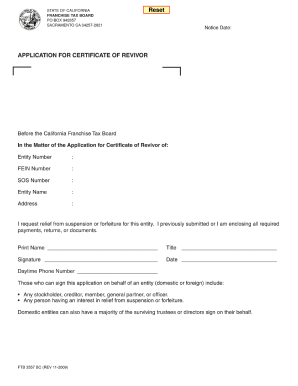
Filling out the CA FTB 3557 BC form is a crucial step for entities seeking relief from suspension or forfeiture with the California Franchise Tax Board. This guide provides a clear, step-by-step approach to completing the form online, ensuring that you provide all necessary information accurately.
Follow the steps to complete the CA FTB 3557 BC form online.
- Press the ‘Get Form’ button to access the CA FTB 3557 BC form and open it within your online editor.
- Fill in the 'Notice Date' field with the date you are submitting the application. Ensure the date is accurate and formatted correctly.
- Enter the 'Entity Number' associated with your corporation. This number is unique to your entity and can typically be found in prior correspondence from the California Franchise Tax Board.
- Input the 'FEIN' (Federal Employer Identification Number). This number is essential for tax identification purposes.
- Provide the 'SOS Number' (Secretary of State Number) for your entity, if applicable, as it also helps uniquely identify your business.
- In the 'Entity Name' section, clearly write the legal name of the entity applying for relief from suspension or forfeiture.
- Fill out the 'Address' field with the complete address of the entity, including street address, city, state, and ZIP code.
- In the statement requesting relief, confirm that you have submitted or are enclosing all required payments, returns, or documents necessary for the application.
- Print your name in the designated field. Ensure that this matches the name of the person who is authorized to sign on behalf of the entity.
- Indicate your title in the provided space, reflecting your role within the entity.
- Sign the application in the signature field. This signature must be from someone authorized to represent the entity.
- Fill in the date of signing beside the signature. This helps establish the submission timeline.
- Enter a daytime phone number where you can be reached. This information may be needed for any follow-up communication.
- After completing all fields, review the form for accuracy. Once verified, you can choose to save your changes, download the completed form, print a copy, or share it as needed.
Complete the CA FTB 3557 BC form online today to ensure your entity remains compliant and in good standing.
Get form
Related links form
To file a California corporate disclosure statement online, visit the California Secretary of State's website and locate the corporate forms section. Create an account if necessary, and fill out the required information in the online form. After submitting, you will receive a confirmation. For further clarity on filing, refer to the guidance provided by the CA FTB 3557 BC.