Eived from your original return will be sent to you separately from any additional refund you claim on Form D-400X-WS. If your original return was changed or audited by the Department of Revenue and as a result there was a change in the overpayment of tax, include the corrected overpayment on line 12. Do not include any interest you received on any refund. Line 15 Instructions - If you owe additional tax, interest is due on that amount from the due date of the original return to the date of paym.

How it works
  • Open form

    Open form follow the instructions

  • Easily sign form

    Easily sign the form with your finger

  • Share form

    Send filled & signed form or save

How to fill out the NC DoR D-400X-WS online

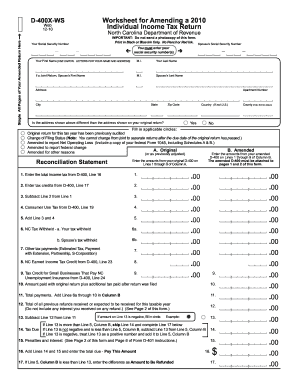
The NC DoR D-400X-WS is an essential form for individuals looking to amend their 2010 individual income tax return in North Carolina. This guide provides clear, step-by-step instructions on how to complete the form online, ensuring you can efficiently manage your tax documentation.

Follow the steps to successfully complete your NC DoR D-400X-WS form.

  1. Press the ‘Get Form’ button to access the form and open it in your preferred editing tool.
  2. Enter your social security number and your spouse’s social security number if applicable. Ensure that you include all required details in their respective fields.
  3. Complete your name, including first, middle initial, and last name, using capital letters as instructed. If filing jointly, include your spouse's name as well.
  4. Fill in your current address, including apartment number if applicable, city, state, and zip code. Indicate if this address differs from the original return.
  5. Select any applicable options regarding previous audits, changes in filing status, and the reasons for amending your return by filling in the appropriate circles.
  6. Complete the reconciliation statement by entering the required amounts from your original D-400 return in their designated lines, starting from total income tax to tax credits.
  7. Ensure all amounts entered are calculated accurately, particularly for lines involving additional payments or credits. Verify your totals for correctness.
  8. If applicable, provide explanations for all changes made and attach necessary supporting documents, including copies of federal forms if required.
  9. Sign and date the form where indicated. If applicable, ensure that both partners sign if filing jointly.
  10. Save your completed form, and choose to either download, print, or share it as needed for your filing purposes. Make sure to attach any other required forms.

Complete your NC DoR D-400X-WS form online today for an efficient amendment process.

Get form

Experience a faster way to fill out and sign forms on the web. Access the most extensive library of templates available.

Related content

Individual Income Tax Forms & Instructions

D-400 without TC, 2011, Individual Income Tax Return (no tax credits). D-401, 2011, North...

Learn more
A New Technique for Probing Quadrupolar Nuclei in...

by A Medek · 1999 · Cited by 56 — The two-pulse sequence from Fig. 9A was employed for...

Learn more
Tumble Dryers

d. The lint screen is designed to completely cover the entire opening in the lint screen...

Learn more
Questions & Answers

Get answers to your most pressing questions about US Legal Forms API.

Contact support

Can NC state taxes be filed electronically?

Yes, you can file your NC state taxes electronically. The NC DoR offers e-filing options that streamline the process, making it faster and more efficient. Utilize the NC DoR D-400 and NC DoR D-400X-WS forms through approved e-filing software or services to ensure accuracy and compliance with state regulations.

Filling out the NC D-400 form requires attention to detail. Start by entering your personal information and income sources. Then, carefully add your deductions and any credits you may qualify for, ensuring that you have the correct figures before submitting the form. If modifications are necessary, use the NC DoR D-400X-WS for accurate adjustments.

When you are ready to file your state taxes in North Carolina, the primary form to use is the NC DoR D-400. This form allows you to report your income and deductions. If you made corrections or need to amend a previously filed return, the NC DoR D-400X-WS is crucial for that process.

To file your state taxes in North Carolina, you generally need to complete the NC DoR D-400 form. This form covers income tax for residents and non-residents. If you have specific circumstances that require adjustments, you will also need the NC DoR D-400X-WS to accurately reflect your tax situation.

If you are seeking a state refund in North Carolina, you will typically need to utilize the NC DoR D-400 form. However, if you have already filed and are amending your return, you would then use the NC DoR D-400X-WS for that process. It is important to follow the instructions carefully to ensure that your refund is processed promptly.

To mail your NC D-400V, please send it to the North Carolina Department of Revenue at the designated address listed on the form. Be sure to check for the most current mailing address; it can vary depending on whether you are sending a payment or a claim. Always use certified mail to ensure your documents arrive safely.

When filing your taxes in North Carolina, you will typically need the NC DoR D-400 and the NC DoR D-400X-WS forms. The D-400 is the general income tax return, while the D-400X-WS is used for specific adjustments or corrections. Ensure you gather all necessary documentation to complete these forms accurately, as they form the basis of your state tax filing.

To determine where to send IRS forms, refer to the specific form's instructions. Each form comes with its designated mailing address based on your location and the nature of the form. Ensure you review the latest guidelines on the IRS website to verify the correct address. If you are working with the NC DoR D-400X-WS, make note of any special mailing instructions provided.

In North Carolina, homeowners associations (HOAs) typically file their income using Form D-400. The D-400 allows for the reporting of income generated from the association's activities. Be aware that while filing, it is crucial to consider any specific state regulations that apply to HOAs. Referencing the NC DoR D-400X-WS can guide you through any unique requirements related to HOA tax filing.

When addressing an envelope to the IRS, write 'Internal Revenue Service' followed by the appropriate address specified in the filing instructions. Include your complete return address in the top left corner for postal purposes. Make sure to affix the proper amount of postage to avoid delays. Utilizing the correct envelope addressing will help ensure your forms, including the NC DoR D-400X-WS, reach their destination without issue.

Get This Form Now!

Use professional pre-built templates to fill in and sign documents online faster. Get access to thousands of forms.

If you believe that this page should be taken down, please follow our DMCA take down process here.

NC DoR D-400X-WS Form

This form is available in several versions. Select the version you need from the drop-down list below.

Get NC DoR D-400X-WS