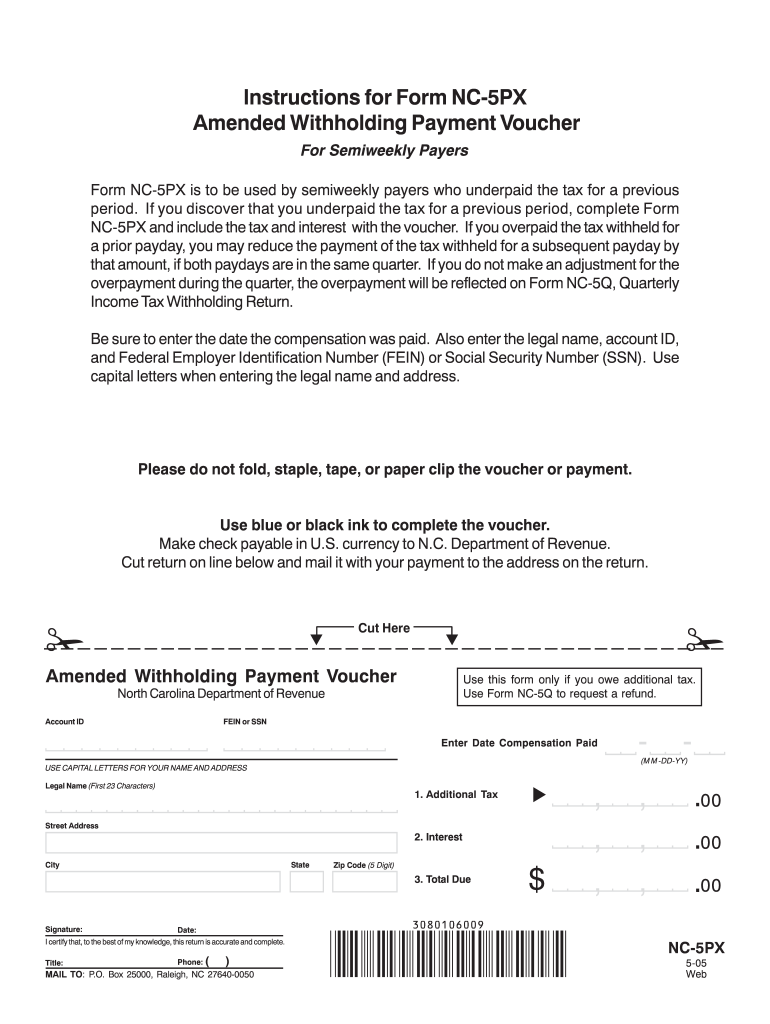
Instructions for Form NC-5PX Amended Withholding Payment Voucher For Semiweekly Payers Form NC-5PX is to be used by semiweekly payers who underpaid the tax for a previous period. If you discover that you underpaid the tax for a previous period complete Form NC-5PX and include the tax and interest with the voucher. If you overpaid the tax withheld for a prior payday you may reduce the payment of the tax withheld for a subsequent payday by that amount if both paydays are in the same quarter. If yo.
Loading

Open form follow the instructions

Easily sign the form with your finger

Send filled & signed form or save
How to fill out the NC DoR 5PX online
Form NC DoR 5PX is designed for users who need to correct underpayments of tax as semiweekly payers. This guide provides clear and supportive instructions for completing this form online, ensuring your submissions are accurate and efficient.
Follow the steps to fill out the NC DoR 5PX online.
- Press the ‘Get Form’ button to access the form and open it in the editor.
- Enter the date when compensation was paid in the format M M - D D - Y Y.
- Provide your legal name in capital letters (up to 23 characters) in the specified field.
- Input your account ID under the designated section.
- Enter your Federal Employer Identification Number (FEIN) or Social Security Number (SSN) carefully.
- Complete the 'Additional Tax' field as necessary.
- If applicable, enter the 'Interest' amount in the designated section.
- Calculate and enter the 'Total Due' amount, ensuring accuracy.
- Sign and date the form to certify its accuracy.
- Provide your title and phone number in the appropriate fields.
- Choose to save changes, download the form, print it, or share it as needed.
Complete your NC DoR 5PX online today for a seamless submission experience.
Experience a faster way to fill out and sign forms on the web. Access the most extensive library of templates available.
Related content
NC-5P, Withholding Payment Voucher, eFile and Pay Online ; NC-5PX, Amended Withholding...
To make the admission process as simple as possible, we've got step-by-step guides for...
Get answers to your most pressing questions about US Legal Forms API.
What is form NC 5 withholding return?
Form NC-5 is used as the withholding return for employers in North Carolina, detailing the total amount of state taxes withheld from employee wages. Completing this form accurately is vital for compliance with state tax regulations. For assistance, many find that resources like the NC DoR 5PX can provide clarity on the filing process. Employers should file this form quarterly with the NC Department of Revenue.
Do both parties have to be present to get a title notarized in NC?
In North Carolina, both parties do not need to be present for a title to be notarized. You can have the document notarized if one party is present along with proper identification. However, to avoid complications, both parties are encouraged to attend, especially if using the NC DoR 5PX for guidance on best practices. This ensures all signatures are verified and the transaction is secure.
How to fill out a certificate of title NC?
Filling out a certificate of title in North Carolina involves providing accurate details about the vehicle, including the Vehicle Identification Number (VIN), make, model, and the buyer's details. Ensure both parties sign the title in the designated areas, and fill out the odometer statement if required. The NC DoR 5PX serves as a helpful tool in ensuring you meet all state requirements. Submit it to the DMV for processing once completed.
How to fill out a withholding allowance form?
To complete a withholding allowance form in North Carolina, you should start with Form NC-4. This form allows you to declare your personal allowances, which will determine how much tax is withheld from your paycheck. Knowing how to accurately fill this out can be made easier through guides on NC DoR 5PX, which provide essential insights. After filling it, submit the form to your employer.
How to file an amended sales tax return in NC?
To file an amended sales tax return in North Carolina, you need to complete Form E-500, designated for this purpose. Ensure you indicate the reason for the amendment and report the corrected figures. Using the NC DoR 5PX can streamline this process, ensuring compliance with state regulations. After filling, submit the form to the NC Department of Revenue with any due payment.
How do I get NC tags?
To get North Carolina tags for your vehicle, you need to go through the DMV. First, you will need to provide the necessary documentation, including proof of ownership and insurance. By using the resources available on the NC DoR 5PX platform, you can streamline the process and ensure that you have everything you need to avoid delays.
What is a NC plea?
A NC plea typically refers to the formal statement made by a defendant in a North Carolina court regarding their guilt or innocence. Different types of pleas, such as guilty or no contest, can significantly impact the outcome of a case. It's vital to seek legal advice to understand how a NC plea might affect your situation.
What is the NC 5P?
The NC 5P, similar to the NC 5 form, serves as a specific reporting tool that enables employers to disclose additional withholding details. It is essential for employers to understand when to use this form to ensure compliance with North Carolina tax laws. Proper use of the NC DoR 5PX platform can help clarify your obligations.
What is a NC 5P?
The NC 5P form is used to report and remit the amounts withheld from employee wages in specific situations, such as for certain types of non-resident income. This form allows employers to detail the withholding for employees who may not usually be subject to North Carolina withholding. Using the NC DoR 5PX platform can facilitate this reporting process.
How do I get a NC withholding number?
To obtain a North Carolina withholding number, you can register your business online through the NC DoR 5PX website. This registration process typically requires basic information about your business, such as your business name and type. Once registered, you will receive your withholding number, which you will use for tax purposes.
Use professional pre-built templates to fill in and sign documents online faster. Get access to thousands of forms.
If you believe that this page should be taken down, please follow our DMCA take down process here.