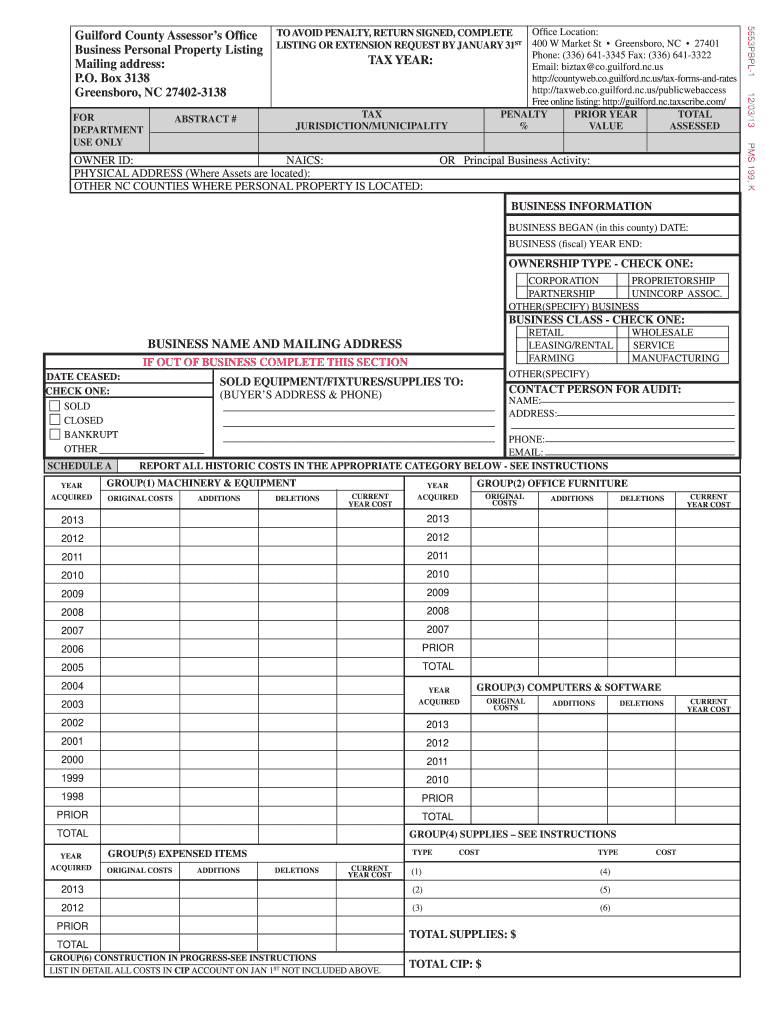
G/RENTAL FARMING BUSINESS NAME AND MAILING ADDRESS IF OUT OF BUSINESS COMPLETE THIS SECTION DATE CEASED: CHECK ONE: SOLD CLOSED BANKRUPT OTHER SCHEDULE A YEAR ACQUIRED CONTACT PERSON FOR AUDIT: NAME: ADDRESS: PHONE: EMAIL: REPORT ALL HISTORIC COSTS IN THE APPROPRIATE CATEGORY BELOW - SEE INSTRUCTIONS GROUP(1) MACHINERY & EQUIPMENT ORIGINAL COSTS ADDITIONS DELETIONS CURRENT YEAR COST 2013 2012 2012 2011 2011 2010 2010 2009 2009 2008 2008 2007 2007 2006 PRIOR 2005 TOTAL 20.
Loading

Open form follow the instructions

Easily sign the form with your finger

Send filled & signed form or save
How to fill out the NC 5653PBPL online
The NC 5653PBPL form is essential for reporting business personal property in Guilford County. This guide provides a clear step-by-step process to assist users in completing the form accurately and efficiently online.
Follow the steps to successfully complete the NC 5653PBPL form online.
- Press the ‘Get Form’ button to access the document and open it in your editor.
- Begin by completing the information section at the top of the form. Include details such as the tax year, tax jurisdiction, owner ID, NAICS code, and physical address where the business assets are located.
- Identify any other North Carolina counties where your personal property is located and provide this information in the designated field.
- Under 'Principal Business Activity', describe the nature of your business. If applicable, list the appropriate NAICS code or state 'unknown' if you do not have this information.
- Fill out the 'Business Information' section, including the date your business began operations in this county and the end date of your fiscal year.
- Indicate the ownership type by checking the appropriate box that fits your business entity (corporation, proprietorship, partnership, unincorporated association, or other).
- Select the business class that best describes your operations (retail, leasing/rental, or farming).
- Provide your business name and mailing address in the designated fields. If the business is out of operation, complete the section regarding the date ceased and indicate whether it was sold, closed, bankrupt, or other.
- Move on to Schedule A to report all historic costs of the business assets, including machinery, office furniture, and supplies. Fill in the original costs, contextually applicable additions, and deletions for each asset group.
- For vehicle equipment, complete Schedule B with details of any unregistered motor vehicles, boats, or aircraft owned and used in the business as of January 1.
- If applicable, list property in your possession but owned by others in Schedule C, with a complete description including the owner's information.
- Finally, complete the affirmation section by having it signed by an authorized person. Ensure all fields are filled accurately to avoid delays or penalties and submit your listing by January 31.
Complete your NC 5653PBPL form online today to ensure timely submission and avoid penalties.
Experience a faster way to fill out and sign forms on the web. Access the most extensive library of templates available.
Get answers to your most pressing questions about US Legal Forms API.
What is health assessment form?
The health assessment form is a document used to review an individual's health status through various questions and evaluations. It plays a crucial role in determining health needs and guiding medical decisions. For ease of use, you can find templates and related services through US Legal Forms, which can assist you under the context of NC 5653PBPL.
Where can I get a NC health assessment form?
The NC health assessment form is available on the North Carolina Department of Health and Human Services website. You can easily download it from their resources section. If you need additional help, consider using US Legal Forms, which can simplify the process while addressing the NC 5653PBPL.
How to get a Sales tax exemption certificate in North Carolina?
To obtain a Sales tax exemption certificate in North Carolina, you must apply through the North Carolina Department of Revenue. They have specific criteria and forms needed to process your request. Platforms like US Legal Forms can offer templates and guidance to ensure you navigate the NC 5653PBPL requirements smoothly.
Who performs a health assessment?
Typically, a health assessment is conducted by licensed health professionals such as doctors, nurses, or trained healthcare providers. They evaluate various health indicators to provide informed recommendations. If you’re looking for a reliable way to document these assessments, check out US Legal Forms, especially if you're focusing on specifics like NC 5653PBPL.
Where to get NC Health Assessment form?
You can find the NC Health Assessment form online through the North Carolina Department of Health and Human Services website. They provide easy access to this important document. For assistance, you may also utilize services like US Legal Forms, which can direct you to the right resources while keeping the NC 5653PBPL in mind.
How do I get a NC Sales tax ID?
To obtain a NC Sales tax ID, you should visit the North Carolina Department of Revenue’s website. There, you can apply for your Sales tax ID online or provide the necessary information via mail. Consider using US Legal Forms for guidance in completing the application correctly, especially if you're referencing NC 5653PBPL.
Why would the NC Department of Revenue call me?
A call from the NC Department of Revenue could indicate they require additional information about your taxes or may be addressing unpaid tax issues. They might contact you to clarify details concerning your tax filings. If you are concerned about a call related to NC 5653PBPL, it is crucial to address their inquiries promptly.
What is nc3 North Carolina?
Nc3 North Carolina is part of an initiative aimed at fostering collaboration among state agencies, businesses, and educational institutions to improve economic development. This initiative helps bridge gaps in workforce skills and drives economic growth. For anyone interested in programs related to NC 5653PBPL, nc3 can offer valuable insights.
What does NC Department of Revenue do?
The NC Department of Revenue is responsible for administering state tax laws and collecting tax revenue. They provide resources for taxpayers and handle various forms of taxation, ensuring compliance and clarity. If you have questions related to NC 5653PBPL, they can assist you in understanding your responsibilities.
What does the Department of Revenue Services do?
The Department of Revenue Services in North Carolina manages the assessment and collection of taxes. They ensure compliance with tax laws and offer assistance to taxpayers in understanding their obligations. For matters related to NC 5653PBPL, their resources can guide you in navigating tax regulations smoothly.
Use professional pre-built templates to fill in and sign documents online faster. Get access to thousands of forms.
If you believe that this page should be taken down, please follow our DMCA take down process here.
This form is available in several versions. Select the version you need from the drop-down list below.