LGHQFH $GGUHVV 1XPEHU DQG 6WUHHW 6WDWH &LW RU 7RZQ LS &RGH &/$,0.
Open form follow the instructions
Easily sign the form with your finger
Send filled & signed form or save
How to fill out the MS DoR 89-350 online
Filling out the MS DoR 89-350 online can simplify your tax processes and ensure compliance with state requirements. This guide will walk you through each section of the form, providing clear instructions to help you complete it successfully.
Follow the steps to complete the MS DoR 89-350 online.
- Click ‘Get Form’ button to obtain the form and open it in the editor.
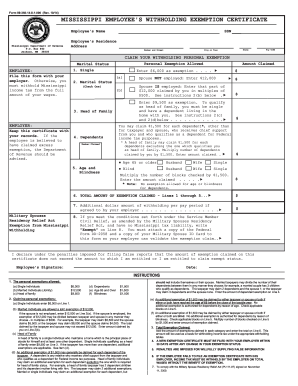
- In Section 1, enter your name as the employee. Ensure that the spelling matches your identification documents.
- For your residence, input your address, including the street number, city or town, and ZIP code. This information is essential for identification and processing.
- Next, determine your employment status by selecting whether you are single, married, or the head of a family. Fill in the corresponding exemption amounts based on your status, as detailed in the instructions.
- Next, you will claim exemptions for any dependents. If you have qualifying dependents, enter the number of dependents you are claiming and the total amount on the specified line.
- If applicable, indicate whether you or your spouse qualify for additional exemptions based on age or blindness. Check the appropriate boxes and calculate the total exemption amount.
- Finally, review all sections for accuracy. Once you confirm that all information is correct, save your changes. You can choose to download, print, or share the completed form with your employer or relevant department.
Complete your MS DoR 89-350 form online today to ensure efficient handling of your tax obligations.
Experience a faster way to fill out and sign forms on the web. Access the most extensive library of templates available.
Related content
Form 89-350-20-8-1-000 (Rev. 08/20). MISSISSIPPI EMPLOYEE'S WITHHOLDING EXEMPTION...
Get answers to your most pressing questions about US Legal Forms API.
Where can I get Mississippi tax forms?
You can find Mississippi tax forms on the official website of the Mississippi Department of Revenue. Additionally, the MS DoR 89-350 includes links to various forms needed for tax filing. For a more convenient experience, USLegalForms provides a comprehensive collection of these forms, making it easy for you to access what you need.
Do I need to file a Mississippi tax return?
Whether you need to file a Mississippi tax return depends on your income and residency status. If you meet the criteria outlined in the MS DoR 89-350, you are required to file. If you have questions, USLegalForms offers resources to help you determine your filing obligations.
How to get a MS state tax ID number?
You can obtain a Mississippi state tax ID number by applying through the Mississippi Department of Revenue. This application process is typically straightforward, and the MS DoR 89-350 provides essential details on how to proceed. Using USLegalForms can simplify this process and provide you with necessary forms.
Who is tax exempt in Mississippi?
Certain organizations, such as non-profits and specific government entities, may qualify for tax exemption in Mississippi. The MS DoR 89-350 specifies the criteria for tax-exempt status based on industry and activities. For detailed guidance, consider reviewing resources on USLegalForms to ensure you understand if your organization qualifies.
How do I get a Mississippi withholding account number?
To obtain a Mississippi withholding account number, you must register your business with the Mississippi Department of Revenue. This process often requires completing a form that can be found in the MS DoR 89-350 guidelines. By using USLegalForms, you can find the necessary forms and instructions for a smooth registration.
Do I have to file a Mississippi tax return?
Yes, if you earned income in Mississippi or are a resident of the state, you need to file a Mississippi tax return. The MS DoR 89-350 outlines specific filing requirements based on your income level. If unsure, consulting our resources at USLegalForms can clarify your responsibilities.
Is it mandatory to file a tax return?
Filing a tax return is generally mandatory for individuals and businesses that meet certain income thresholds. If your income exceeds the minimum requirement set by the state, you must file a return. Understanding your obligations under MS DoR 89-350 can help you stay compliant and avoid penalties.
Can you file Mississippi state taxes online?
Yes, you can file your Mississippi state taxes online. Using the MS DoR 89-350 form makes filing straightforward when you opt for e-filing. Online platforms, including uslegalforms, streamline the filing process, ensuring accuracy while saving you time. With their support, you can confidently complete your tax obligations without hassle.
What income is not taxable in Mississippi?
In Mississippi, several sources of income are not taxable. Examples include certain social security benefits, retirement benefits from qualified plans, and some interest income. Understanding these exemptions can help you make informed decisions about your taxes. For a comprehensive overview, refer to the MS DoR 89-350 and uslegalforms can provide additional clarification on these tax exemptions.
How do I fill out an employee withholding exemption?
To fill out an employee withholding exemption using the MS DoR 89-350 form, start by entering your name and social security number at the top. Next, indicate your filing status by checking the appropriate box. Finally, provide the number of exemptions you wish to claim. If you need further assistance, consider using uslegalforms, which guides you through the process effortlessly.
Use professional pre-built templates to fill in and sign documents online faster. Get access to thousands of forms.
If you believe that this page should be taken down, please follow our DMCA take down process here.
This form is available in several versions. Select the version you need from the drop-down list below.