Tion in Excess of Cost Basis , , . 00 c. Interest on Obligations of Other States/Political Subdivisions , , . 00 d. Expenses Directly Applicable to Earning Interest on U.S. Government Obligations claimed on Federal Form 1041 , , . 00 e. Itemized Deductions claimed on Form 1041 (Add back only if Standard Deduction is claimed below.) , , . 00 f. MS Source QSST Income , , . 00 g. Other Additions (Ite.
Loading

Open form follow the instructions

Easily sign the form with your finger

Send filled & signed form or save
How to fill out the MS DoR 81-110 online
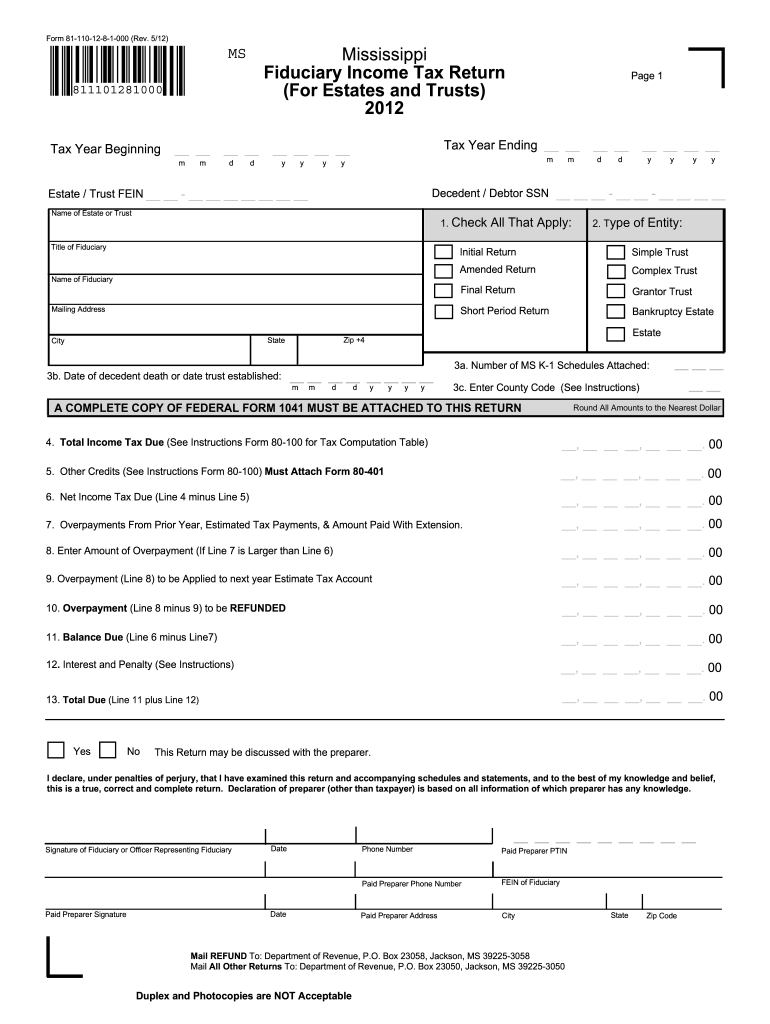
Filling out the MS DoR 81-110 form online is essential for managing fiduciary income tax returns for estates and trusts in Mississippi. This guide will provide clear steps to help you successfully complete this form.
Follow the steps to fill out the MS DoR 81-110 online.
- Click the ‘Get Form’ button to obtain the MS DoR 81-110 form and open it in your online document editor.
- Enter the tax year beginning and ending dates in the specified fields, using the appropriate format.
- Fill in the decedent or debtor's social security number and the estate or trust’s federal employer identification number in the corresponding sections.
- Provide the name of the estate or trust and check the applicable boxes for the title of fiduciary, indicating the type of entity (initial, final, amended, etc.).
- Fill in the date of the decedent's death or the date the trust was established, along with the county code as provided in the instructions.
- Complete the income tax calculations, starting with total income tax due, other credits, and net income tax due, rounding all amounts to the nearest dollar.
- Add information for overpayments, including previous year overpayments and estimated tax payments.
- Indicate whether the return may be discussed with the preparer and declare your verification of the return under penalties of perjury.
- Complete the section for the paid preparer's contact information if applicable, including their signature and PTIN.
- Finalize the process by deciding on the mailing instructions for refunds and other returns, and make sure to save changes, download, or print the completed document.
Start completing your MS DoR 81-110 form online today.
Experience a faster way to fill out and sign forms on the web. Access the most extensive library of templates available.
Related content
Form 81-110 is a Fiduciary Income Tax Return for Estates and Trusts in Mississippi for the...
A ciência do desenvolvimento, foco principal deste livro, refere-se ao conjunto de...
Power Tower Pro. This machine has everything that you could possibly want in a high-end...
Get answers to your most pressing questions about US Legal Forms API.
How to fill out a tax amendment form?
To fill out a tax amendment form, start by gathering your original tax return and identifying the changes needed. When making adjustments, refer to the MS DoR 81-110 so that you follow the correct procedures. Complete the form, ensuring you provide accurate information, and submit it to the relevant tax authority.
What does 3 allowances mean?
Claiming 3 allowances means you are reporting that you have certain deductions, such as dependents, that decrease the amount of tax withheld from your paycheck. Each allowance you claim reduces your taxable income, which can lead to a more substantial paycheck. Consult the MS DoR 81-110 for more information about how allowances work in your tax situation.
What should I put for withholding allowance?
For calculating your withholding allowances, consider your dependents, marital status, and other financial obligations. The MS DoR 81-110 provides guidance on how to determine the right number of allowances for your circumstances. Use this guidance to make informed decisions that help manage your tax withholdings effectively.
How to fill out a withholding allowance form?
Filling out a withholding allowance form involves stating your personal information and indicating the number of allowances you wish to claim. Review the MS DoR 81-110 materials to understand the criteria for allowances based on your unique situation. Finally, ensure all information is accurate before submitting the form to your employer.
Where to put 0 or 1 on W4?
On the W4 form, you will find a section specifically designed for allowances. In the allowances section, simply indicate '0' if you are claiming no allowances, or '1' if you are claiming one allowance. Following the instructions in the MS DoR 81-110 can help ensure that you complete the W4 correctly.
Is it better to claim 1 or 0 allowances?
Claiming 1 allowance typically results in a larger paycheck as less tax is withheld, while claiming 0 may lead to a larger tax refund when you file your return. Your choice should align with your financial goals, whether you prefer to receive more income upfront or receive a refund later. Consult the MS DoR 81-110 guidelines to assess which option supports your tax strategy more effectively.
How to fill out a withholding exemption form?
To fill out a withholding exemption form, begin by gathering your personal information, including your name, address, and Social Security number. Next, refer to the guidelines associated with the MS DoR 81-110 to determine your eligibility for withholding exemptions. Ensure you accurately report your allowances based on your financial situation and dependents, then submit the completed form to your employer for processing.
Who must file a Montana income tax return?
You must file a Montana income tax return if your gross income exceeds established limits or if you receive income from specific sources such as self-employment. Certain conditions may also apply to dependents and retirees. Referencing MS DoR 81-110 can help clarify your responsibilities. Our platform simplifies the filing process and ensures you comply with applicable regulations.
Who are not required to file income tax returns?
Individuals who earn below a specific amount, Social Security recipients, and certain retirees may not need to file tax returns in Montana. However, there are exceptions based on additional income sources or tax credits. Familiarizing yourself with MS DoR 81-110 is essential to understand your filing obligations. Our platform can assist you in determining whether you qualify for this exemption.
Who needs to file a Montana tax return?
In Montana, you must file a tax return if you have a certain amount of gross income or are self-employed, among other criteria. This applies regardless of residency status. Understanding the details in relation to MS DoR 81-110 can help clarify your filing requirements. Our platform offers resources to ensure you meet your tax obligations effortlessly.
Use professional pre-built templates to fill in and sign documents online faster. Get access to thousands of forms.
If you believe that this page should be taken down, please follow our DMCA take down process here.
This form is available in several versions. Select the version you need from the drop-down list below.