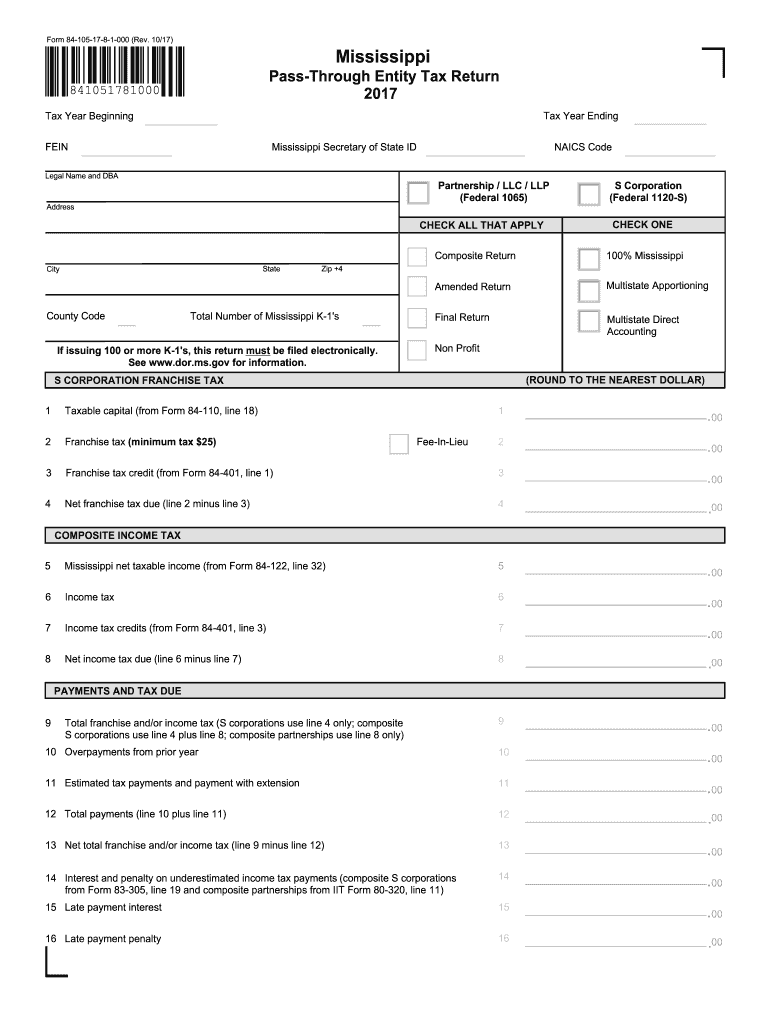
Form 84-105-17-8-1-000 (Rev. 10/17). 841051781000. Mississippi. Pass- Through Entity Tax Return. 2017. 11 Estimated tax payments and payment with extension. 12 Total payments (line 10 plus line 11).
Loading

Open form follow the instructions

Easily sign the form with your finger

Send filled & signed form or save
How to fill out the MS 84-105 online
The MS 84-105 is a crucial tax form for pass-through entities in Mississippi. This guide provides clear, step-by-step instructions to assist users in completing the form accurately and efficiently in an online format.
Follow the steps to successfully complete the MS 84-105 form online.
- Click ‘Get Form’ button to obtain the form and open it in the online editor.
- Enter the tax year beginning and ending dates in the appropriate fields at the top of the form. Make sure to include the Federal Employer Identification Number (FEIN) and the Mississippi Secretary of State ID.
- Provide the legal name and any 'Doing Business As' (DBA) names in the designated fields along with the NAICS code that corresponds to your principal business activity.
- Indicate the type of entity by checking the appropriate box for Partnership, LLC, LLP, or S Corporation and specify if you are filing a composite return, amended return, or final return.
- Fill in your main business address, ensuring accuracy with state, city, and county code along with the zip +4 code.
- Complete the sections regarding the total number of Mississippi K-1's issued. Remember, if you are issuing 100 or more K-1's, this return must be filed electronically.
- Proceed to the tax calculation sections. Enter the franchise tax amounts as outlined, including any credits or deductions. Follow the guided structure for calculating net franchise tax due.
- Complete any sections relevant to composite income tax, including Mississippi net taxable income and any associated credits or payments.
- In the entity information section, provide reasons and details for any final returns or amendments, including contact information for responsible parties.
- List any pass-through entities and disregarded entities affiliated with your company in the specified sections. Be prepared to attach additional pages if necessary.
- Sign and date the form to certify that all information is true and complete. Ensure all necessary signatures from preparers are also included.
- Once all fields are completed, proceed to save changes, download, print, or share the completed form as needed.
Begin filling out the MS 84-105 online today to ensure a smooth and compliant tax filing process.
Experience a faster way to fill out and sign forms on the web. Access the most extensive library of templates available.
Related content
84-105 | Pass Through Entity Tax Return. 84-110 | S-Corporation Franchise Tax Schedule...
ClassyFire is a freely accessible computational tool that uses the ChemOnt taxonomy to...
This manual explains correct handling, taking test shots, using the shutter button, and...
Get answers to your most pressing questions about US Legal Forms API.
What are the rules for filing W-2?
The rules for filing a W-2 include timely submission and ensuring that all employee data is accurate. Employers must provide W-2 forms by January 31st for the previous tax year to comply with MS 84-105. Following these guidelines reduces the risk of errors and potential penalties from the IRS.
How do I fill out a W-2 for an employer?
To fill out a W-2 for your employer, start by entering your business details at the top of the form. Then, accurately report your employee's earnings, taxes withheld, and other required information in the correct boxes. For assistance, turn to uslegalforms, which provides templates and guidance tailored to MS 84-105 regulations.
How to read a W-2 for dummies?
Reading a W-2 can initially seem challenging, but it's straightforward once you understand the sections. The form includes key information such as your total earnings, withheld taxes, and any benefits. By breaking down each box, you can easily determine your tax obligations while ensuring adherence to MS 84-105 standards.
How to fill out a W-2 form for an employer?
Filling out a W-2 form for your employer requires you to input accurate employee information, including Social Security numbers and wages. You also need to report withheld taxes and any other necessary deductions. Utilizing uslegalforms simplifies this process, ensuring correct completion and compliance with the MS 84-105 requirements.
Does the name on my W-2 need to match my Social Security card?
Yes, the name on your W-2 must match the name on your Social Security card. This consistency is crucial to avoid issues during tax filing, especially under the MS 84-105 regulations. Any discrepancies can lead to delays or complications with your tax return.
What is the standard deduction for Mississippi income tax?
The standard deduction for Mississippi income tax under the MS 84-105 is adjusted annually. As of the latest updates, individuals can expect to claim a standard deduction that simplifies tax filing. Ensure you check the current figures and how they apply to your specific situation.
How do you calculate the current tax expense?
To calculate your current tax expense under the MS 84-105 guidelines, first determine your taxable income by subtracting all deductions from your total income. Then, apply the relevant tax rate to this taxable income. After figuring out your tax liability, subtract any tax credits you qualify for to arrive at your current tax expense.
What is the retirement income exemption in Mississippi?
Mississippi allows a retirement income exemption, which applies to various retirement benefits. For example, individuals aged 59 and older can exclude up to $6,000 of retirement income, while taxpayers aged 65 and above can exclude up to $12,000. This exemption is valuable for planning under MS 84-105 and can significantly reduce your tax burden.
What is the income tax exemption in Mississippi?
Mississippi offers various income tax exemptions, allowing residents to reduce their taxable income. Taxpayers can benefit from exemptions on things like Social Security income, retirement benefits, and certain types of interest income. To stay compliant with MS 84-105, it's crucial to know which exemptions apply to your situation.
What is the minimum income to file taxes in Mississippi?
In Mississippi, the minimum income threshold to file taxes varies depending on your filing status and age. For example, single filers under 65 must file if their income exceeds $8,300, while married couples filing jointly must file if their combined income exceeds $16,650. Understanding these thresholds can help you navigate MS 84-105 regulations effectively.
Use professional pre-built templates to fill in and sign documents online faster. Get access to thousands of forms.
If you believe that this page should be taken down, please follow our DMCA take down process here.
This form is available in several versions. Select the version you need from the drop-down list below.