Loading
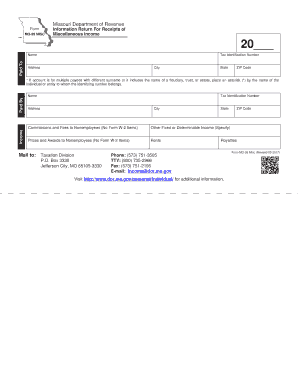
Get Mo Mo-99 Misc 2017-2026
How it works
-

Open form follow the instructions
-

Easily sign the form with your finger
-

Send filled & signed form or save
How to fill out the MO MO-99 MISC online
Filling out the MO MO-99 MISC form is essential for reporting miscellaneous income received by individuals or entities. This guide provides clear, step-by-step instructions to help users complete the form online with ease and confidence.
Follow the steps to complete the MO MO-99 MISC form.
- Click the ‘Get Form’ button to obtain the form, allowing you to access it in the editor and begin filling it out.
- In the 'Paid To' section, fill in the name, tax identification number, address, state, city, and ZIP code of the individual or entity receiving the income.
- Next, provide the income details under the 'Income' section. Specify commissions and fees to nonemployees, other fixed or determinable income, or prizes and awards, ensuring to include any necessary explanations.
- If payments were made by multiple payees with different surnames or to a fiduciary, trust, or estate, mark an asterisk (*) next to the respective name to indicate whose tax identification number is being used.
- In the 'Paid By' section, repeat the same procedure as in step 2 for the individual or entity that issued the payments.
- Once all sections have been completed accurately, review the form for any errors or missing information before finalizing.
- You can then save your changes, download a copy of the completed form, print it for your records, or share it as needed.
Start filling out your MO MO-99 MISC form online today to ensure accurate reporting of miscellaneous income!
Related links form
You cannot fill out a 1099-MISC for your own income. This form is intended for reporting payments received as a contractor or to other entities. If you need assistance or templates, the USLegalForms platform offers resources that can guide you through the MO MO-99 MISC process more effectively.