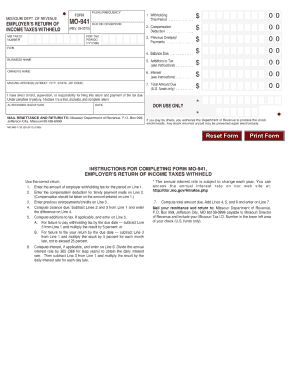
MISSOURI DEPT. OF REVENUE FORM FILING FREQUENCY EMPLOYER'S RETURN OF INCOME TAXES WITHHELD MO TAX ID NUMBER FEIN MO-941 (REV. 09-2010) 1. Withholding This Period . . . . . . . . . . . . . . 2. Compensation.
Open form follow the instructions
Easily sign the form with your finger
Send filled & signed form or save
How to fill out the MO MO-941 online
Filing the MO MO-941 form online can streamline your tax reporting process. This guide provides clear instructions on how to effectively complete the form, ensuring that you provide all necessary information correctly.
Follow the steps to successfully fill out the MO MO-941.
- Click 'Get Form' button to access the MO MO-941 form and open it for editing.
- Begin by entering your personal information in the designated fields, including your name, address, and Social Security number. Ensure all information is accurate to avoid processing delays.
- In the income section, report all sources of Missouri income. Make sure to include any relevant adjustments or deductions that may apply to your situation.
- Fill in the tax credits you are claiming. Refer to the instructions provided with the form to determine which credits you are eligible for and ensure the amounts are correctly calculated.
- Review any additional fields that may require completion, such as those related to penalties or specific provisions applicable to your tax situation.
- Once all sections are filled out, double-check all entries for accuracy and completeness. Make any necessary corrections.
- Finally, save your changes, and download or print the completed form for your records. You can also share it with a tax professional if needed.
Start filing your documents online today to simplify your tax process.
Experience a faster way to fill out and sign forms on the web. Access the most extensive library of templates available.
Related content
E-filing also eliminates the need to physically mail your return and payment. See page 2...
Employers may file and pay Employer's Return of Income Taxes Withheld (Form MO-941)...
Versão ADVANCED permite a expansão através de mó- dulos de entrada e saída...
Get answers to your most pressing questions about US Legal Forms API.
Can you make Missouri estimated tax payments online?
Yes, you can make Missouri estimated tax payments online through the Missouri Department of Revenue's website. This convenient option allows you to manage your payments securely and efficiently, helping you stay current on your tax obligations. Using this online platform can complement your MO MO-941 filing and streamline your overall tax experience.
What is tax form 941 used for?
Tax form 941 is a federal form used by employers to report payroll taxes, including income tax withheld and Social Security and Medicare taxes. While it focuses on federal obligations, the information you provide parallels your state requirements. Completing both forms accurately, including the MO MO-941, is crucial for staying compliant with tax laws.
Who must file a MO tax return?
Generally, anyone with a taxable income in Missouri must file a state tax return. This includes individual residents, non-residents who earn income in Missouri, and businesses operating within the state. If you are unsure whether you need to file, reviewing the requirements can help you comply with the necessary regulations, including the MO MO-941.
How often do I have to file MO-941?
The MO-941 form needs to be filed quarterly, which means you will submit it four times a year. The due dates align with the federal filing schedule, making it easier to manage both federal and state requirements. Timely filing is essential to avoid penalties, so keep track of each quarter's deadline while preparing your MO MO-941.
What is MO state tax?
MO state tax refers to the income tax levied by the State of Missouri on individuals and businesses. The tax rate may vary based on your income level, and it typically includes various deductions and credits available for taxpayers. Understanding MO state tax is crucial for ensuring compliance when you file your MO MO-941 form.
How to get Missouri employer account number?
To obtain your Missouri employer account number, you need to register with the Missouri Department of Revenue. You can complete this process online through the department’s website or by mail. Once you submit the necessary forms, you will receive your employer account number, which is essential for filing the MO MO-941.
How do I make a payment to 941?
To make a payment to MO MO-941, you have several options, including online, by mail, or via bank transfer. Online payments are preferred for their speed and convenience, and you can easily navigate this on the IRS website or our user-friendly platform. Be sure to have your Employer Identification Number (EIN) ready when making the payment. Our tools offer step-by-step assistance to ensure your payment process goes smoothly.
How often do I have to file MO 941?
You must file the MO MO-941 quarterly if your business has employees. Generally, this means you'll file it four times a year, specifically in April, July, October, and January. Each filing period requires accurate reporting of wages and taxes, so staying organized is essential. Engaging with uslegalforms can help you set reminders, ensuring you never miss a filing deadline.
Can I make a 941 payment online?
Yes, you can make a MO MO-941 payment online easily through the IRS website or using our platform. Online payments allow for quick transactions, eliminating the need to send paper checks. By choosing online payment, you ensure faster processing and immediate confirmation of your payment. With uslegalforms, you have a streamlined process that guides you through this step effortlessly.
What is MO sit tax?
MO sit tax, or Missouri State Income Tax, is the tax imposed on individual incomes earned in the state. It varies based on income levels and is essential for residents and non-residents with taxable income in Missouri. Understanding how it integrates with your MO-941 filing is vital for accurate tax reporting and compliance.
Use professional pre-built templates to fill in and sign documents online faster. Get access to thousands of forms.
If you believe that this page should be taken down, please follow our DMCA take down process here.
This form is available in several versions. Select the version you need from the drop-down list below.