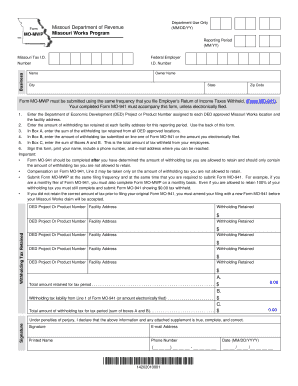
I Tax I.D. Name Owner Name City State Zip Code Form MO-MWP must be submitted using the same frequency that you file Employer s Return of Income Taxes Withheld, (Form MO-941). Your completed Form MO-941 must accompany this form, unless electronically filed. 1. Enter the Department of Economic Development (DED) Project or Product Number assigned to each DED approved Missouri Works location and the facility address. 2. Enter the amount of withholding tax retained at each facility add.
Open form follow the instructions
Easily sign the form with your finger
Send filled & signed form or save
How to fill out the MO DoR MO-MWP online
The MO DoR MO-MWP form is essential for businesses participating in the Missouri Works Program to report the withholding tax retained. This guide provides clear, step-by-step instructions on completing the form online, ensuring accuracy and compliance.
Follow the steps to fill out the MO DoR MO-MWP form correctly.
- Click the ‘Get Form’ button to obtain the form and open it in your preferred editor.
- In the first section, enter the reporting period in the MM/YY format and provide your federal employer identification number and Missouri tax ID number.
- Fill in the name of your business, owner's name, city, state, and zip code. Make sure all details are accurate.
- List each DED project or product number, along with their corresponding facility addresses. It is crucial to provide complete and accurate details on each relevant location.
- Enter the amount of withholding tax retained at each facility for the reported period. Use the space provided on the back of the form for additional entries if necessary.
- In Box A, calculate and input the total sum of the withholding tax retained from all DED-approved locations.
- In Box B, enter the amount of withholding tax that was submitted on line one of Form MO-941 or the amount you filed electronically.
- Calculate the total for Box C by summing up Boxes A and B. This number represents the total amount of withholding tax for the period.
- Finally, complete the form by signing, printing your name, and providing a reachable phone number and email address.
- Once all sections are filled out accurately, save any changes, and download or print the completed form for your records.
Complete and submit your MO DoR MO-MWP form online today to ensure compliance and maintain your Missouri Works benefits.
Experience a faster way to fill out and sign forms on the web. Access the most extensive library of templates available.
Related content
Your completed Form MO-941 must accompany this form, unless electronically filed. Name...
UCM is consistently ranked as a top university by US News & World Report and The Princeton...
by GM Zaucha · Cited by 4 — In conducting the research described in this report, the...
Get answers to your most pressing questions about US Legal Forms API.
Where do I file my MO 1040?
You can file your MO 1040 form online or by mail, depending on your preference. Ensure you follow the filing guidelines provided by the Missouri Department of Revenue. The MO DoR MO-MWP website offers updated instructions for filing your tax return accurately.
What is the MO compensation deduction?
The MO compensation deduction specifically refers to the deductions available under Missouri tax law for employee compensation. This deduction can provide tax relief by allowing businesses to lower their taxable income. For more information, check the MO DoR MO-MWP resources.
What is a compensation deduction?
A compensation deduction is a tax benefit that allows employers to deduct certain employee-related expenses from their taxable income. This deduction can help reduce overall tax liability. For specific details regarding qualification, consult the MO DoR MO-MWP.
How do I get a Missouri employer account number?
To obtain a Missouri employer account number, you need to register with the Missouri Department of Revenue. You can do this online or via mail by submitting the necessary forms. The MO DoR MO-MWP can assist you in navigating this process effectively.
What is the Missouri income deduction?
The Missouri income deduction reduces the amount of income subject to tax, which ultimately helps lower your tax liability. Various factors determine eligibility for this deduction. For detailed guidance, explore the resources available in the MO DoR MO-MWP.
How do I set up a Missouri Department of Revenue account?
Setting up an account with the Missouri Department of Revenue is a straightforward process. You can do this online by visiting the MO DoR MO-MWP website and providing necessary information such as your tax ID. This account will allow you to manage your state tax obligations efficiently.
What is the new standard deduction for seniors over 65?
For seniors over 65, the Missouri tax code provides an increased standard deduction. This deduction is intended to lighten the tax burden on older residents. Refer to the latest updates from the MO DoR MO-MWP to ensure you benefit from this deduction in your tax filings.
How do I speak to someone at the Missouri Department of Revenue?
To speak with someone at the Missouri Department of Revenue, you can call their customer service line or visit their official website for contact information. Having questions prepared can help streamline your call. The MO DoR MO-MWP provides further resources to assist with your inquiries.
What is the Missouri compensation deduction?
The Missouri compensation deduction allows employers to deduct qualified employee compensation from their taxable income. This deduction can significantly lower overall tax liability. Make sure to refer to the MO DoR MO-MWP for specific guidelines on what qualifies for the deduction.
How do I set up payroll in Missouri?
Setting up payroll in Missouri involves several key steps. First, you must register with the Missouri Department of Revenue to obtain your employer identification number. Additionally, ensure compliance with state tax laws by using the MO DoR MO-MWP guidelines, which provide comprehensive information on payroll tax rates and filing requirements.
Use professional pre-built templates to fill in and sign documents online faster. Get access to thousands of forms.
If you believe that this page should be taken down, please follow our DMCA take down process here.