Loading
Form preview
  • US Legal Forms
  • Other Templates
  • Tax Forms
  • Missouri Tax Forms
  • Mo Dor 5060 2014

Get Mo Dor 5060 2014

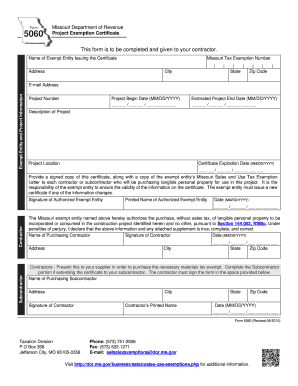
R. Name of Exempt Entity Issuing the Certificate Missouri Tax Exemption Number Address City State Zip Code Exempt Entity and Project Information E-mail Address Project Number Project Begin Date (MM/DD/YYYY) Estimated Project End Date (MM/DD/YYYY) / / / / Description of Project Project Location Certificate Expiration Date (MM/DD/YYYY) / / Provide a si.

How it works

  1. Open form

    Open form follow the instructions

  2. Easily sign form

    Easily sign the form with your finger

  3. Share form

    Send filled & signed form or save

How to fill out the MO DoR 5060 online

Completing the MO DoR 5060, also known as the project exemption certificate, is essential for exempt entities looking to purchase tangible personal property tax-free for specific construction projects. This guide provides a clear, step-by-step approach for filling out the form online.

Follow the steps to complete the MO DoR 5060 online.

  1. Click ‘Get Form’ button to obtain the form and open it in the editor.
  2. Enter the name of the exempt entity issuing the certificate in the designated field.
  3. Provide the Missouri tax exemption number associated with the exempt entity.
  4. Fill in the address, including city, state, and zip code, where the exempt entity is located.
  5. In the exempt entity and project information section, enter the email address for communication.
  6. Input the project number for your specific project.
  7. Specify the project begin date in the format MM/DD/YYYY.
  8. Indicate the estimated project end date, also in the MM/DD/YYYY format.
  9. Describe the project briefly in the designated field.
  10. Enter the project location, ensuring all relevant details are accurate.
  11. Fill in the certificate expiration date in the format MM/DD/YYYY.
  12. Ensure a signed copy of this certificate, along with a copy of the exempt entity’s Missouri Sales and Use Tax Exemption Letter, is prepared for each contractor or subcontractor involved with the project.
  13. Have an authorized person from the exempt entity sign and print their name in the designated areas.
  14. Complete the date field under the signature of the authorized exempt entity with MM/DD/YYYY.
  15. For contractors, include the name of the purchasing contractor, their signature, and the date of signature.
  16. Complete the address fields for the contractor, including city, state, and zip code.
  17. If applicable, complete the subcontractor section by entering the name, address, and signature.
  18. Finalize the documentation by saving your changes, downloading, printing, or sharing the form as needed.

Complete your MO DoR 5060 form online today to ensure efficient processing.

Get form

Experience a faster way to fill out and sign forms on the web. Access the most extensive library of templates available.

Related content

Form 5060 Project Exemption Certificate
This form is to be completed and given to your contractor. The Missouri exempt entity...
Learn more
Clinic Manual - Ketchum.edu
Jul 24, 2025 — Marshall Bidwell Ketchum was born in Canada in 1856 and became a...
Learn more
Serie Blue Star 145DX, 185DX
Miller Electric fabrica una línea completa de máquinas para soldadura y equipos...
Learn more

Related links form

AL INV 26-15 2019 MI D941/501 2015 AL ADV-40 2019 AL A-1 2019

Questions & Answers

Get answers to your most pressing questions about US Legal Forms API.

Contact support

Filling out a W-4 for tax exemption starts by indicating your eligibility for claiming exemption on line 7. You need to state that you had no tax liability last year and expect none this year. Ensure all personal information is accurate, as this form is essential for your employer to withhold the appropriate amount for taxes. Keeping in mind the MO DoR 5060 can help clarify your overall tax responsibilities.

Setting up a Missouri Department of Revenue account requires visiting their official website. You will need to provide relevant personal and business information during the registration process. After completing the necessary steps, be sure to save your account details for future reference, which will be essential for managing your taxes, including any tax exemption through the MO DoR 5060.

When filling out a W-9 for a tax-exempt organization, ensure you indicate your tax status appropriately. For line 3, check the box for 'Other,' and clearly state your tax-exempt status. Make sure to include the organization's name and address, along with any relevant identification numbers. This ensures that entities requesting your W-9 accurately reflect your tax-exempt nature.

An example of a tax exemption includes the agricultural exemptions offered to farmers in Missouri. These exemptions may relieve you from state sales tax on certain farm purchases, provided you fill out the appropriate MO DoR 5060 paperwork. Understanding your specific situation can help you take advantage of these financial benefits.

To fill out a federal tax exemption, start by completing IRS Form 1023, which is typically used for charitable organizations. You'll need to provide information about your organization, including its mission and activities. Ensure you reference specific tax laws that apply to tax-exempt entities, and remember to keep the MO DoR 5060 in mind for state-specific exemptions.

Filling out a tax exemption certificate requires you to complete all required fields accurately. You'll need to provide your name, address, and the reason for exemption. Make sure to specify the type of exemption you are claiming, and check that you have the correct MO DoR 5060 form if applicable. After completing the form, you should submit it to the seller or service provider.

To apply for a farm tax-exempt number in Missouri, you will need to complete the MO DoR 5060 form. Gather necessary documentation, such as proof of agricultural production and your business information. Then, submit the completed form to the Missouri Department of Revenue. Once approved, you will receive your tax-exempt number.

Entering sales tax information on your tax return requires you to accurately report all taxable sales and the sales tax collected. Ensure you follow the guidelines provided in the MO DoR 5060 to include this information correctly. Keeping thorough records throughout the year will make this process easier. Proper entry helps avoid potential fines.

When filling out a Missouri sales tax form, start by entering your business's identification information and the reporting period. Carefully input your total sales and any tax collected before calculating the amount due. You can find helpful instructions on the MO DoR 5060 that simplify the reporting process. Accurate completion will help you stay compliant with state regulations.

Filling out a withholding exemption form involves stating your personal details and determining if you qualify for the exemption. You’ll need to review your previous year's tax obligations, which will guide your decisions. The MO DoR 5060 offers clarity on who can claim exemptions and how to complete the form correctly. This ensures you do not have excess tax withheld from your earnings.

Get This Form Now!

Use professional pre-built templates to fill in and sign documents online faster. Get access to thousands of forms.
If you believe that this page should be taken down, please follow our DMCA take down processhere.
Get MO DoR 5060
  • Adoption
  • Bankruptcy
  • Contractors
  • Divorce
  • Home Sales
  • Employment
  • Identity Theft
  • Incorporation
  • Landlord Tenant
  • Living Trust
  • Name Change
  • Personal Planning
  • Small Business
  • Wills & Estates
  • Packages A-Z
  • Affidavits
  • Bankruptcy
  • Bill of Sale
  • Corporate - LLC
  • Divorce
  • Employment
  • Identity Theft
  • Internet Technology
  • Landlord Tenant
  • Living Wills
  • Name Change
  • Power of Attorney
  • Real Estate
  • Small Estates
  • Wills
  • All Forms
  • Forms A-Z
  • Other Templates
  • Legal Hub
  • About Us
  • Help Portal
  • Legal Resources
  • Blog
  • Affiliates
  • Contact Us
  • Delete My Account
  • Site Map
  • Industries
  • Forms in Spanish
  • Localized Forms
  • State-specific Forms
  • Forms Kit
  • Real Estate Handbook
  • All Guides
  • Notarize
  • Incorporation services
  • For Consumers
  • For Small Business
  • For Attorneys
  • USLegal
  • FormsPass
  • pdfFiller
  • signNow
  • altaFlow
  • DocHub
  • Instapage
Form Packages
  • Adoption
  • Bankruptcy
  • Contractors
  • Divorce
  • Home Sales
  • Employment
  • Identity Theft
  • Incorporation
  • Landlord Tenant
  • Living Trust
  • Name Change
  • Personal Planning
  • Small Business
  • Wills & Estates
  • Packages A-Z
Form Categories
  • Affidavits
  • Bankruptcy
  • Bill of Sale
  • Corporate - LLC
  • Divorce
  • Employment
  • Identity Theft
  • Internet Technology
  • Landlord Tenant
  • Living Wills
  • Name Change
  • Power of Attorney
  • Real Estate
  • Small Estates
  • Wills
  • All Forms
  • Forms A-Z
  • Other Templates
Customer Service
  • Legal Hub
  • About Us
  • Help Portal
  • Legal Resources
  • Blog
  • Affiliates
  • Contact Us
  • Delete My Account
  • Site Map
  • Industries
  • Forms in Spanish
  • Localized Forms
  • State-specific Forms
  • Forms Kit
Legal Guides
  • Real Estate Handbook
  • All Guides
Prepared for you
  • Notarize
  • Incorporation services
Our Customers
  • For Consumers
  • For Small Business
  • For Attorneys
Our Sites
  • USLegal
  • FormsPass
  • pdfFiller
  • signNow
  • altaFlow
  • DocHub
  • Instapage
Social Media
Call us now toll free:
+1 833 426 79 33
As seen in:
© Copyright 1999-2026 airSlate Legal Forms, Inc. 17 Station Street, Suite 303, Brookline, MA 02445
  • Your Privacy Choices
  • Terms of Service
  • Privacy Notice
  • Content Takedown Policy
  • Bug Bounty Program
MO DoR 5060
This form is available in several versions.
Select the version you need from the drop-down list below.
2019 MO DoR 5060
Select form
  • 2019 MO DoR 5060
  • 2015 MO DoR 5060
  • 2014 MO DoR 5060
Select form