Loading
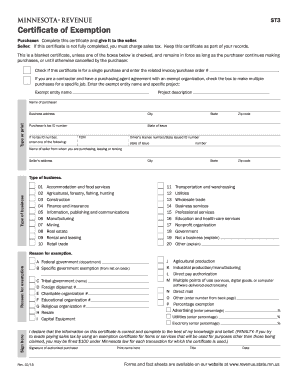
Get Mn Dor St3 2015
How it works
-

Open form follow the instructions
-

Easily sign the form with your finger
-

Send filled & signed form or save
How to fill out the MN DoR ST3 online
This guide provides clear instructions for completing the MN DoR ST3, Certificate of Exemption, online. Whether you are a purchaser or seller, understanding how to accurately fill out this form is essential to ensure compliance with Minnesota sales tax laws.
Follow the steps to complete the MN DoR ST3 online accurately.
- Press the ‘Get Form’ button to obtain the MN DoR ST3 form and open it in your chosen online editor.
- In the 'Purchaser' section, enter your name, business name, and complete the business address along with your purchaser’s tax ID number, or provide an alternative identification if you do not have a tax ID.
- Indicate if the certificate is for a single purchase by checking the appropriate box and providing the related invoice or purchase order number.
- If applicable, check the box indicating you are a contractor with a purchasing agent agreement, and fill out the exempt entity name and project description.
- In the 'Seller' section, provide the seller’s details including name, address, and type of business.
- Circle the number that describes your business type from the provided list, such as accommodation and food services or wholesale trade.
- State the reason for exemption by selecting the corresponding letter that identifies your reason from the options provided.
- In the 'Sign here' section, provide your signature, printed name, title, and the date. Ensure that all provided information is accurate and complete.
- After completing the form, save your changes, download, print, or share the completed ST3 form as needed.
Complete your documents online to streamline your filing process.
Get form
Experience a faster way to fill out and sign forms on the web. Access the most extensive library of templates available.
Filling out the ST3 form requires you to provide accurate information about your organization and the exemption claimed. Follow the instructions carefully, and ensure you have all necessary documentation ready to support your claims. If you're uncertain, using resources from US Legal Forms can simplify this process and enhance your confidence in submitting the MN DoR ST3 correctly.
Get This Form Now!
Use professional pre-built templates to fill in and sign documents online faster. Get access to thousands of forms.