Loading
Form preview
  • US Legal Forms
  • Other Templates
  • Tax Forms
  • Minnesota Tax Forms
  • Mn Dor Schedule M1nr 2014

Get Mn Dor Schedule M1nr 2014

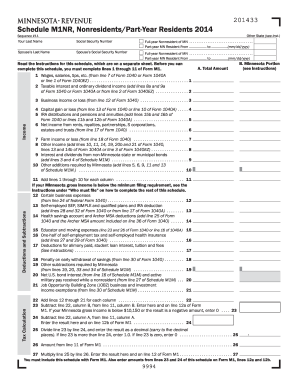
Oyed health insurance (add lines 27 and 29 of Form 1040) . . . . . . . . . . . . . . . . . . . . . . . . . . . . . . . . . . 16 17 Deductions for alimony paid, student loan interest, tuition and fees (See instructions) . . . . . . . . . . . . . . . . . . . . . . . . . . . . . . . . . . . . . . . . . . . . . . . . . . 17 18 Penalty on early withdrawal of savings (from line 30 of Form 1040) . . . . . . . . . 19 Other subtractions required by Minnesota (from lines 19, 20, 33 and 34 of Schedule M1M).

How it works

  1. Open form

    Open form follow the instructions

  2. Easily sign form

    Easily sign the form with your finger

  3. Share form

    Send filled & signed form or save

How to fill out the MN DoR Schedule M1NR online

Filling out the MN DoR Schedule M1NR can be a straightforward process if you follow the right steps. This guide provides clear instructions to help you fill out the form efficiently, ensuring you capture all necessary information accurately.

Follow the steps to complete your Schedule M1NR with confidence.

  1. Click ‘Get Form’ button to obtain the form and open it in the editor.
  2. Start by filling in your last name and Social Security number at the top of the form. Then indicate whether you are a full-year nonresident or part-year resident by checking the appropriate box and providing the residency dates if applicable.
  3. Proceed to part A where you will report your total income. Begin with line 1 to input your wages, salaries, or tips as reported on your federal income tax return.
  4. Continue with line 2 and enter taxable interest and ordinary dividend income. Make sure to sum these figures accurately as they contribute to your total income.
  5. Move to lines 3 through 10 to report other types of income, including business income, capital gains, and statutory inclusions. Carefully follow any specific instructions regarding what amounts to include or exclude.
  6. For lines 12 through 22, input deductions related to expenses and contributions, as prescribed. Include relevant expenses you incurred while residing in Minnesota, ensuring to adhere to the guidelines provided in the instructions.
  7. Next, subtract your total deductions from your total income as indicated in line 23, and continue to line 24 for the corresponding calculations.
  8. Finally, review all entries for accuracy. Save changes, download the completed form, and ensure to print it or share it as needed. Don't forget to include this schedule when submitting your Form M1.

Complete your Minnesota DoR Schedule M1NR online today to ensure timely and accurate filing.

Get form

Experience a faster way to fill out and sign forms on the web. Access the most extensive library of templates available.

Related content

Your search - Search Page / mn.gov // Minnesota's...
Minnesota Taxable Income | Minnesota Department of Revenue year resident All of your...
Learn more
Individual and Business Income Tax
It provides for the allocation of federal income and deductions, and Minnesota additions...
Learn more

Related links form

WV SCA-CG 915C 2010 WV SCA-FC-101 2014 WV SCA-FC-106 2014 WV SCA-M207 1994

Questions & Answers

Get answers to your most pressing questions about US Legal Forms API.

Contact support

The formula for gross income is simple: add up all sources of income, such as wages, rental income, and interest, minus any allowable deductions. This total provides you with your gross income, an important figure for tax filing. A clear understanding of this formula will help you when navigating forms like the MN DoR Schedule M1NR, ensuring you report your finances accurately.

To fill out Schedule 1 Line 1, start by determining your total wages or salaries. If you're filing the MN DoR Schedule M1NR, ensure you only include the income earned within Minnesota. Carefully follow the instructions for accuracy, as this line is crucial for calculating your gross income.

To file a non-resident tax return, gather all necessary documents, including income statements and any relevant tax forms. Use the required forms, like the MN DoR Schedule M1NR, to report your Minnesota income. Completing the return correctly ensures you fulfill your tax obligations while possibly reducing your tax liability.

The Schedule M1NR is a form specifically designed for non-residents filing their Minnesota tax returns. This schedule allows non-residents to report their income earned within the state and calculate their tax liability. It's crucial for accurately submitting your taxes to ensure you comply with the state's regulations when using the MN DoR Schedule M1NR.

To calculate your gross income in Minnesota, add all the income you earned over the year, including wages, tips, and other earnings. Remember to exclude any tax-deferred income, like certain retirement contributions. After you total these figures, you'll have the gross income needed for completing your MN DoR Schedule M1NR diligently.

Minnesota gross income includes all income derived from various sources while you were a resident or non-resident. It encompasses wages, salaries, rental income, interest, dividends, and even certain retirement distributions. It's essential to be thorough to ensure everything is reported accurately on your tax forms, especially if you’re filing the MN DoR Schedule M1NR.

To calculate your gross income, start by compiling all your income sources. This includes your salary, wages, bonuses, and any side income. Don’t forget to include dividends, rental income, and any other earnings. By summing these amounts, you can arrive at your total gross income, which you will need for filing the MN DoR Schedule M1NR.

Social Security benefits may still be taxable regardless of age, depending on your total income. It's important to review your entire financial picture to know if your benefits will be taxed. Use the MN DoR Schedule M1NR to help you determine your eligibility and ensure accurate tax reporting in Minnesota.

Yes, Minnesota offers various tax breaks for seniors, including the elimination of taxes on Social Security benefits. These breaks aim to ease financial pressures on retirees, enabling them to retain more of their income. To understand how these advantages affect your tax situation, check the MN DoR Schedule M1NR.

If you earn income from Minnesota while living outside the state, you may need to file a Minnesota nonresident tax return. This includes income from work or investments within Minnesota. To assist in this process, using the MN DoR Schedule M1NR will provide clarity on your requirements.

Get This Form Now!

Use professional pre-built templates to fill in and sign documents online faster. Get access to thousands of forms.
If you believe that this page should be taken down, please follow our DMCA take down processhere.
Get MN DoR Schedule M1NR
  • Adoption
  • Bankruptcy
  • Contractors
  • Divorce
  • Home Sales
  • Employment
  • Identity Theft
  • Incorporation
  • Landlord Tenant
  • Living Trust
  • Name Change
  • Personal Planning
  • Small Business
  • Wills & Estates
  • Packages A-Z
  • Affidavits
  • Bankruptcy
  • Bill of Sale
  • Corporate - LLC
  • Divorce
  • Employment
  • Identity Theft
  • Internet Technology
  • Landlord Tenant
  • Living Wills
  • Name Change
  • Power of Attorney
  • Real Estate
  • Small Estates
  • Wills
  • All Forms
  • Forms A-Z
  • Other Templates
  • Legal Hub
  • About Us
  • Help Portal
  • Legal Resources
  • Blog
  • Affiliates
  • Contact Us
  • Delete My Account
  • Site Map
  • Industries
  • Forms in Spanish
  • Localized Forms
  • State-specific Forms
  • Forms Kit
  • Real Estate Handbook
  • All Guides
  • Notarize
  • Incorporation services
  • For Consumers
  • For Small Business
  • For Attorneys
  • USLegal
  • FormsPass
  • pdfFiller
  • signNow
  • altaFlow
  • DocHub
  • Instapage
Form Packages
  • Adoption
  • Bankruptcy
  • Contractors
  • Divorce
  • Home Sales
  • Employment
  • Identity Theft
  • Incorporation
  • Landlord Tenant
  • Living Trust
  • Name Change
  • Personal Planning
  • Small Business
  • Wills & Estates
  • Packages A-Z
Form Categories
  • Affidavits
  • Bankruptcy
  • Bill of Sale
  • Corporate - LLC
  • Divorce
  • Employment
  • Identity Theft
  • Internet Technology
  • Landlord Tenant
  • Living Wills
  • Name Change
  • Power of Attorney
  • Real Estate
  • Small Estates
  • Wills
  • All Forms
  • Forms A-Z
  • Other Templates
Customer Service
  • Legal Hub
  • About Us
  • Help Portal
  • Legal Resources
  • Blog
  • Affiliates
  • Contact Us
  • Delete My Account
  • Site Map
  • Industries
  • Forms in Spanish
  • Localized Forms
  • State-specific Forms
  • Forms Kit
Legal Guides
  • Real Estate Handbook
  • All Guides
Prepared for you
  • Notarize
  • Incorporation services
Our Customers
  • For Consumers
  • For Small Business
  • For Attorneys
Our Sites
  • USLegal
  • FormsPass
  • pdfFiller
  • signNow
  • altaFlow
  • DocHub
  • Instapage
Social Media
Call us now toll free:
+1 833 426 79 33
As seen in:
© Copyright 1999-2026 airSlate Legal Forms, Inc. 17 Station Street, Ste. 203, Brookline, MA 02445
  • Your Privacy Choices
  • Terms of Service
  • Privacy Notice
  • Content Takedown Policy
  • Bug Bounty Program
MN DoR Schedule M1NR
This form is available in several versions.
Select the version you need from the drop-down list below.
2022 MN DoR Schedule M1NR
Select form
  • 2022 MN DoR Schedule M1NR
  • 2020 MN DoR Schedule M1NR
  • 2019 MN DoR Schedule M1NR
  • 2018 MN DoR Schedule M1NR
  • 2017 MN DoR Schedule M1NR
  • 2016 MN DoR Schedule M1NR
  • 2015 MN DoR Schedule M1NR
  • 2014 MN DoR Schedule M1NR
  • 2013 MN DoR Schedule M1NR
  • 2012 MN DoR Schedule M1NR
  • 2011 MN DoR Schedule M1NR
  • Www.revenue.state.mn.us2020-06m1nr192019 M1NR, Nonresidents/Part-Year Residents
Select form