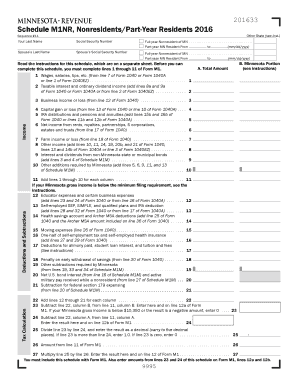
. . . . . . . . . . . . . . . . . . Part-year MN Resident From to (mm/dd/yyyy) Spouse s Last Name Spouse s Social Security Number Full-year Nonresident of MN . . . . . . . . . . . . . . . . . . . . . . . . . . . . . . . . . . . Part-year MN Resident From to (mm/dd/yyyy) instructions for this schedule, which are on a separate sheet. Before you can Read the this schedule, you must complete lines 1 through 11 of Form M1. complete Tax Calculation Deductions and Subtractions Inco.
Open form follow the instructions
Easily sign the form with your finger
Send filled & signed form or save
How to fill out the MN DoR Schedule M1NR online
Completing the MN DoR Schedule M1NR is essential for individuals who are full-year nonresidents or part-year residents of Minnesota. This guide provides step-by-step instructions to help you accurately fill out the form online, ensuring that you meet all necessary requirements.
Follow the steps to complete the MN DoR Schedule M1NR online.
- Press the ‘Get Form’ button to access the Schedule M1NR form. Open it in your preferred online editor.
- Begin filling out your last name and Social Security number at the top of the form. If you are a part-year resident, indicate the period of residency.
- Enter the last name and Social Security number of your spouse, if applicable, in the designated fields. Repeat the residency information if they also meet the criteria to file.
- Proceed to the income section and report your total amounts from your federal tax return in the appropriate fields for wages, interest, dividends, and other income types.
- For each relevant income source, complete the Minnesota portion, following instructions for business income, capital gains, and other specific categories.
- Continue to the deductions and subtractions section, carefully entering amounts related to educator expenses, savings account contributions, and any other relevant deductions.
- Add the amounts from the income section to get a total. Ensure you follow any special instructions provided for calculating additional amounts.
- Once all required fields are completed, review the form for accuracy. Make any necessary corrections.
- Finalize by saving your changes. You have the option to download, print, or share the completed form as needed.
Get started on completing your MN DoR Schedule M1NR online today!
Experience a faster way to fill out and sign forms on the web. Access the most extensive library of templates available.
Related content
Minnesota Taxable Income | Minnesota Department of Revenue year resident All of your...
It provides for the allocation of federal income and deductions, and Minnesota additions...
Get answers to your most pressing questions about US Legal Forms API.
Who must file a Minnesota nonresident tax return?
Anyone who earns income from Minnesota sources while living outside the state must file a Minnesota nonresident tax return. This includes wages, rental income, and any business earnings tied to Minnesota activities. It's essential to comply with this requirement to avoid additional penalties or interest. If you're uncertain about the details, uslegalforms can assist you in understanding your filing responsibilities.
How to file a non-resident tax return?
Filing a non-resident tax return involves completing the MN DoR Schedule M1NR to report any income earned from Minnesota sources. You will need to gather necessary documentation, such as W-2s or 1099s, showing your income details. Completing the return accurately ensures you fulfill your tax obligations while potentially claiming due deductions. For a smooth filing experience, explore the tools available at uslegalforms.
Who is exempt from filing Schedule L and M?
Exemptions from filing Schedule L and M typically apply to individuals with no Minnesota-source income and certain low-income earners. If you do not have taxable income from Minnesota, you likely do not need to file the MN DoR Schedule M. However, always verify your individual situation with the Minnesota Department of Revenue to avoid potential issues. Consulting with uslegalforms can clarify any uncertainties.
Do I have to fill out Schedule M-2 on 1120s?
Yes, if you are filing an 1120S form for an S corporation that operates in Minnesota, you will need to fill out Schedule M-2. The MN DoR Schedule M-2 helps report the adjustments to shareholders' equity resulting from items that affect Minnesota income. It is important to ensure this information is accurate, as it unfolds the financial health of your business. For assistance, uslegalforms can provide valuable support.
Do I need to file Schedule M?
Whether you need to file the MN DoR Schedule M depends on your income sources within Minnesota. If you earn income from Minnesota activities, such as work or business, you typically must file this schedule. Even if you are a non-resident, it is crucial to report any Minnesota-sourced income accurately. For a straightforward process, reaching out to uslegalforms might be beneficial.
What is schedule M1NR?
Schedule M1NR is a specific form designed for individuals to report Minnesota income as a non-resident. By using the MN DoR Schedule M1NR, you can detail the income earned in Minnesota while residing elsewhere. This form is essential for correctly calculating your tax obligations and ensuring you remain compliant with Minnesota tax laws. Resources like uslegalforms offer support if you need help navigating this form.
What is Schedule M used for?
The MN DoR Schedule M is primarily used to report income that is taxable in Minnesota for non-residents. This form helps delineate what portion of your income is subject to Minnesota tax. Understanding this helps you accurately compute your tax liability while ensuring you take advantage of any applicable deductions. For more guidance, consider options provided by uslegalforms.
Who must file Schedule M?
Individuals who have income from Minnesota sources, including non-residents, must file the MN DoR Schedule M. If you have Minnesota-sourced income but do not live in the state, your filing obligation remains. To ensure compliance, check the specific requirements outlined by the Minnesota Department of Revenue. Utilizing resources like uslegalforms can simplify this process.
How do I file taxes for a state I don't live in?
You can file taxes for a state where you do not reside by completing the appropriate state forms, such as Minnesota's MN DoR Schedule M1NR if you have income sourced from the state. Gather all necessary documentation and ensure accurate reporting of your earnings. It's advisable to use tax preparation software or consult with tax professionals to navigate this process effectively.
How to fill out Schedule 1 Line 1?
To fill out Schedule 1 Line 1, start by reporting your total income from all sources. This figure should include your wages, self-employment income, and other earnings before any deductions. Make sure to cross-reference with the MN DoR Schedule M1NR to ensure clarity and accuracy while filing your taxes.
Use professional pre-built templates to fill in and sign documents online faster. Get access to thousands of forms.
If you believe that this page should be taken down, please follow our DMCA take down process here.
This form is available in several versions. Select the version you need from the drop-down list below.