Account Balance shown on this report. Interest accrues at the rate of 1% per month (computed on a daily basis) on all taxes or reimbursements remaining unpaid after the due date as provided by Section 15(a) of the MES Act. For Contributing Employers: A penalty of 10% of the tax due for the quarter, minimum charge of $5 and a maximum charge of $25, is assessed for each quarter that the information in Section 3 is received by UIA after the due date. Employer Type: Indicate if you are a Contributi.
Loading

Open form follow the instructions

Easily sign the form with your finger

Send filled & signed form or save
How to fill out the MI UIA 1028 online
The MI UIA 1028 form is crucial for reporting employer wages and taxes in Michigan. This guide will help you navigate the online process for completing this important document, ensuring compliance and accuracy in your reporting.
Follow the steps to complete the MI UIA 1028 online effectively.
- Press the ‘Get Form’ button to access the MI UIA 1028 form and open it for editing.
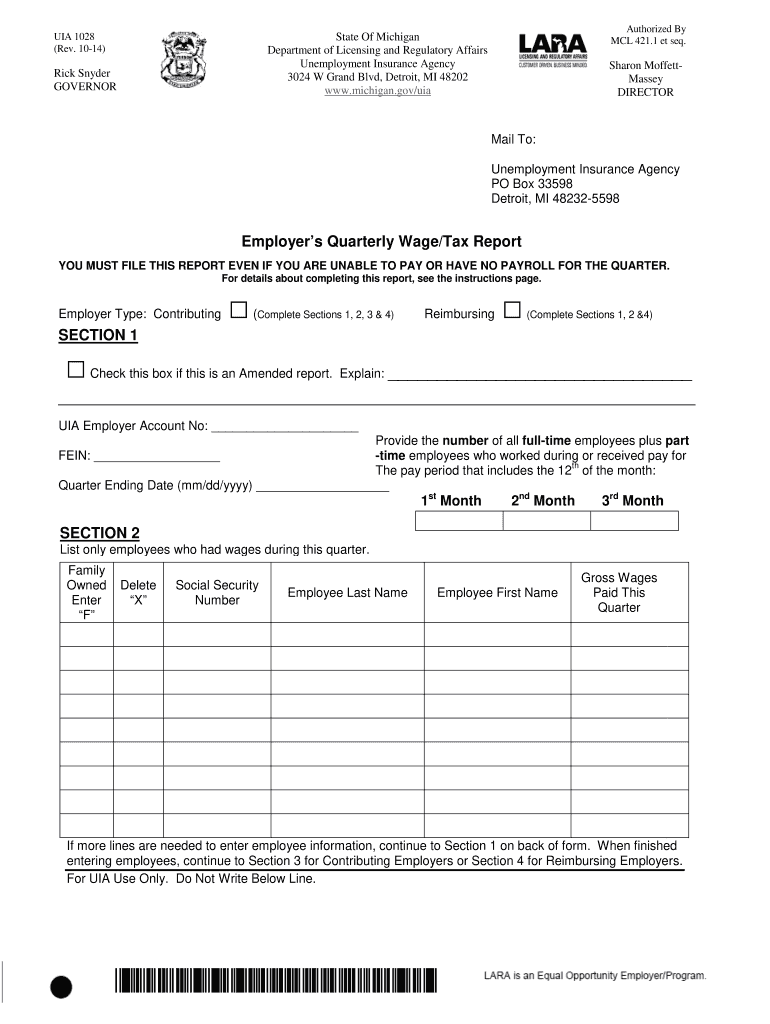
- Indicate the type of employer you are by selecting either ‘Contributing’ or ‘Reimbursing’ in Section 1.
- If filing an amended report, check the appropriate box, and provide an explanation for the amendment.
- Enter your UIA Employer Account Number and Federal Employer Identification Number (FEIN) in the specified fields.
- For the quarter ending date, input the correct date in mm/dd/yyyy format.
- Provide the total number of full-time and part-time employees for each month of the quarter.
- In Section 2, list employees who received wages during the quarter. Include their Social Security number, last name, first name, and gross wages paid.
- Continue adding employee information as necessary, ensuring complete and accurate data is provided.
- In Section 3, calculate total gross wages, excess wages, taxable wages, and corresponding tax amounts.
- Finally, in Section 4, certify the report by providing your signature, title, and contact phone number.
- Once all sections are completed, save any changes, and choose to download, print, or share the form.
Complete your MI UIA 1028 form online now to ensure timely and accurate reporting.
Experience a faster way to fill out and sign forms on the web. Access the most extensive library of templates available.
Related content
Here is what the electronic version of the Employer's Quarterly Wage/Tax Report. (UIA form...
Webmiwam is the uia's system for managing your own unemployment insurance account online...
Feb 5, 2020 — ... Michigan Unemployment Insurance Agency (“UIA”)); c. Record and...
Get answers to your most pressing questions about US Legal Forms API.
How much unemployment will I get if I make $1000 a week in Michigan?
If you earn $1,000 a week in Michigan, your unemployment benefit will depend on your previous earnings and the state's benefit calculations. Typically, the maximum weekly benefit is a percentage of your prior wages. By using the MI UIA 1028 form, you can gather the needed information to estimate your potential benefits more accurately.
What is form mi uia 1028?
Form MI UIA 1028 is a document issued by the Michigan Unemployment Insurance Agency. This form is used for various purposes, including reporting unemployment claims or issues with benefits. Completing the MI UIA 1028 accurately helps facilitate the processing of your claims. Ensure you follow the instructions provided on the form for the best results.
How do I report unemployment in Michigan?
You report unemployment in Michigan through the Michigan Unemployment Insurance Agency (UIA) portal. It's essential to report weekly to update your status and continue receiving benefits. You can also report issues with your claim or request assistance if needed. For guidance, consider using the UIA 1028 form, which can help clarify your reporting process.
How do I file a UIA claim in Michigan?
To file a UIA claim in Michigan, visit the Michigan Unemployment Insurance Agency (UIA) website. You can complete the claim online for convenience. Make sure you have all required documents handy, such as your Social Security number and employment history. After submitting your claim, you will receive instructions on next steps.
How much is UIA in Michigan?
The amount of Unemployment Insurance Assistance (UIA) in Michigan generally depends on a claimant’s past earnings and the state’s established benefit rates. The average UIA benefits can change, so it’s wise to keep track of annual adjustments. If you are unsure how to apply or need assistance, consider using platforms like US Legal Forms, which can guide you through necessary forms and processes linked with MI UIA 1028.
What does reimbursing employer mean?
A reimbursing employer refers to an organization that compensates the state for unemployment benefits it disburses to eligible claimants. This system allows certain types of employers, such as non-profits, to avoid the conventional unemployment insurance tax. Instead of tax payments, they respond to claims by repaying the benefits as they arise. Understanding this terminology is essential for any employer navigating the unemployment system in Michigan.
What is the maximum UIA in Michigan?
The maximum UIA benefit amount in Michigan can vary based on the individual’s previous earnings and the state’s regulations. For most claimants, this amount is determined annually, with changes reflecting the state’s economic conditions. Staying informed about the maximum UIA helps applicants maximize their potential benefits. You can find this information through the MI UIA 1028 updates or the state’s unemployment agency.
What is MI UIA 1028?
MI UIA 1028 is a specific form used in Michigan for reporting unemployment insurance claim data. This form plays a crucial role for employers in maintaining compliance with state unemployment insurance laws. Understanding MI UIA 1028 is essential for employers to ensure accurate reporting and benefit management. Additionally, using the correct form helps streamline the claims process.
How to get Michigan unemployment 1099?
To obtain your Michigan unemployment 1099 form, you can access it through your MiWAM account on the Michigan Unemployment Insurance Agency’s website. Alternatively, if you prefer traditional mail, you can request to have it sent directly to your address. Make sure to retrieve this document for accurate tax filing, as it details the unemployment benefits you received.
How do I find my Michigan employer account number?
Finding your Michigan employer account number is straightforward. You can locate it on your previously filed unemployment tax documents or reports. If you cannot find these documents, you may contact the Michigan Unemployment Insurance Agency directly for assistance in retrieving your account number.
Use professional pre-built templates to fill in and sign documents online faster. Get access to thousands of forms.
If you believe that this page should be taken down, please follow our DMCA take down process here.