Loading
Form preview
  • US Legal Forms
  • Other Templates
  • Tax Forms
  • Michigan Tax Forms
  • Mi Rd-108t 2018

Get Mi Rd-108t 2018-2026

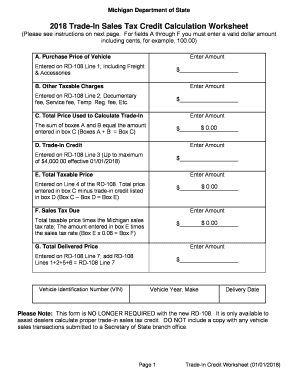
Cluding cents, for example, 100.00) Enter Amount A. Purchase Price of Vehicle Entered on RD-108 Line 1; Including Freight & Accessories $ Enter Amount B. Other Taxable Charges Entered on RD-108 Line 2; Documentary fee, Service fee, Temp. Reg. fee, Etc. $ C. Total Price Used to Calculate Trade-In Enter Amount The sum of boxes A and B equal the amount entered in box C (Boxes A + B Box C) $ 0.00 $ Enter Amount D. Trade-In Credit Enter.

How it works

  1. Open form

    Open form follow the instructions

  2. Easily sign form

    Easily sign the form with your finger

  3. Share form

    Send filled & signed form or save

How to fill out the MI RD-108T online

Filling out the MI RD-108T form can help ensure an accurate calculation of your trade-in sales tax credit. This guide provides step-by-step instructions to assist you in completing the form online with confidence.

Follow the steps to accurately complete your MI RD-108T form.

  1. Click the ‘Get Form’ button to access the MI RD-108T and open it in your preferred online document editor.
  2. Begin with field A, where you need to enter the purchase price of the vehicle. This amount should include factory-installed accessories, freight destination charges, and any dealer-installed accessories.
  3. In field B, enter other taxable charges which may include fees such as documentary fees, service fees, or temporary registration fees. Ensure these amounts are entered correctly.
  4. For field C, calculate the total price used to determine the trade-in sales tax credit. This requires adding the amounts entered in fields A and B together. Ensure the sum is accurate.
  5. In field D, input your trade-in credit amount, which can be a maximum of $4,000.00. This credit represents the value agreed upon for the trade-in vehicle.
  6. Field E requires you to calculate the total taxable price. Subtract the trade-in credit entered in field D from the total price calculated in field C.
  7. For field F, calculate the sales tax due by multiplying the total taxable price from field E by the Michigan sales tax rate of 0.06.
  8. Lastly, in field G, determine the total delivered price, which is obtained by adding the relevant lines as indicated. This will finalize the calculation for the transaction.
  9. Once all fields are filled out correctly, you can save your changes, download, print, or share the completed MI RD-108T form as needed.

Start completing your MI RD-108T form online today for an efficient and accurate process.

Get form

Experience a faster way to fill out and sign forms on the web. Access the most extensive library of templates available.
Get form

Related content

RD-108 Application for Michigan Title &...
Note to purchasers: If you do not receive your vehicle title within 45 days, contact the...
Learn more
Vehicle Procurement and Purchase Guidelines
Purchase Order · RD-108 Application for title · Invoice · Contact person information ·...
Learn more
radio. receiving set ·an/urr-22
Radio Receiver R-302/URR-22,. Functional Block Diagram ........................ 2-2. R.F...
Learn more

Related links form

UT Temporary Protective Order 2015 UT Temporary Protective Order 2014 UT Termination of Parental Rights Act UT Voluntary Relinquishment of Parental Rights 2015

Questions & Answers

Get answers to your most pressing questions about US Legal Forms API.

Contact support

Yes, as a business operating in Michigan, you must file a business tax return. Depending on your business structure, you may need to submit various forms, including the MI RD-108T for sales tax. This process ensures you meet your tax obligations and can prevent future legal issues. For guidance, check out US Legal Forms to make your filing process simpler.

Filing a Michigan sales tax return involves completing the MI RD-108T form, which is designed for this purpose. First, calculate your total sales and tax collected for the reporting period. Next, fill out the necessary details on the form and submit it as directed by the Michigan Department of Treasury. Utilizing tools like US Legal Forms can simplify this task with step-by-step instructions.

To file a sales tax return in Michigan, you need to fill out the MI RD-108T form accurately. Gather your sales data for the reporting period, and ensure all information is correct. You can then file the form electronically or via mail to the Michigan Department of Treasury. For additional assistance, platforms like US Legal Forms offer resources to streamline this process.

The RD-108 form in Michigan is a crucial document used for reporting sales tax. Specifically, the MI RD-108T version assists businesses in addressing their sales tax liabilities effectively. This form provides a detailed overview of taxable sales, allowing for accurate calculation of owed taxes. Using this form correctly can help avoid issues with regulatory compliance.

To file sales tax on your taxes in Michigan, you'll need to complete the MI RD-108T form. This form allows you to report sales tax collected over a specific period. After completing the form, you must submit it to the Michigan Department of Treasury. Consider using platforms like US Legal Forms for a straightforward process and guidance.

The RD 108 form in Michigan, commonly referred to as the MI RD-108T, is an essential document for property transactions. It provides vital information about property transfers which assists in accurate tax assessments. Completing this form is necessary for new property owners to ensure compliance with the state's regulations and helps streamline the transfer process.

Yes, you can register a car with a rebuilt title in Michigan, but certain conditions must be met. First, you need to provide documentation confirming that the vehicle has been repaired and inspected. The MI RD-108T may be required in this process to show ownership transfer, making it crucial to follow all guidelines for smooth registration.

A property transfer affidavit in Michigan, often associated with the MI RD-108T, is a document that certifies the details of a property transfer. It includes information about the buyer, seller, and property specifics. Having this affidavit filed is essential as it facilitates the proper assessment of property taxes based on the new ownership.

The MI RD-108T is a form used in Michigan for reporting property transfers. It helps track changes in property ownership and ensures accurate property tax assessments. By completing this form, you provide the state with necessary data on real estate transactions, which is crucial in maintaining state records and supporting local government operations.

The new tax credit for Michigan aims to incentivize investments in various sectors, including technology and clean energy. This initiative fosters business growth and attracts new investments. By utilizing the MI RD-108T, taxpayers can ensure they capture all applicable credits. US Legal Forms is an excellent resource to help navigate the application process for this credit.

Get This Form Now!

Use professional pre-built templates to fill in and sign documents online faster. Get access to thousands of forms.
Get form
If you believe that this page should be taken down, please follow our DMCA take down processhere.
Get MI RD-108T
Get form
  • Adoption
  • Bankruptcy
  • Contractors
  • Divorce
  • Home Sales
  • Employment
  • Identity Theft
  • Incorporation
  • Landlord Tenant
  • Living Trust
  • Name Change
  • Personal Planning
  • Small Business
  • Wills & Estates
  • Packages A-Z
  • Affidavits
  • Bankruptcy
  • Bill of Sale
  • Corporate - LLC
  • Divorce
  • Employment
  • Identity Theft
  • Internet Technology
  • Landlord Tenant
  • Living Wills
  • Name Change
  • Power of Attorney
  • Real Estate
  • Small Estates
  • Wills
  • All Forms
  • Forms A-Z
  • Other Templates
  • Legal Hub
  • About Us
  • Help Portal
  • Legal Resources
  • Blog
  • Affiliates
  • Contact Us
  • Delete My Account
  • Site Map
  • Industries
  • Forms in Spanish
  • Localized Forms
  • State-specific Forms
  • Forms Kit
  • Real Estate Handbook
  • All Guides
  • Notarize
  • Incorporation services
  • For Consumers
  • For Small Business
  • For Attorneys
  • USLegal
  • FormsPass
  • pdfFiller
  • signNow
  • altaFlow
  • DocHub
  • Instapage
Form Packages
  • Adoption
  • Bankruptcy
  • Contractors
  • Divorce
  • Home Sales
  • Employment
  • Identity Theft
  • Incorporation
  • Landlord Tenant
  • Living Trust
  • Name Change
  • Personal Planning
  • Small Business
  • Wills & Estates
  • Packages A-Z
Form Categories
  • Affidavits
  • Bankruptcy
  • Bill of Sale
  • Corporate - LLC
  • Divorce
  • Employment
  • Identity Theft
  • Internet Technology
  • Landlord Tenant
  • Living Wills
  • Name Change
  • Power of Attorney
  • Real Estate
  • Small Estates
  • Wills
  • All Forms
  • Forms A-Z
  • Other Templates
Customer Service
  • Legal Hub
  • About Us
  • Help Portal
  • Legal Resources
  • Blog
  • Affiliates
  • Contact Us
  • Delete My Account
  • Site Map
  • Industries
  • Forms in Spanish
  • Localized Forms
  • State-specific Forms
  • Forms Kit
Legal Guides
  • Real Estate Handbook
  • All Guides
Prepared for you
  • Notarize
  • Incorporation services
Our Customers
  • For Consumers
  • For Small Business
  • For Attorneys
Our Sites
  • USLegal
  • FormsPass
  • pdfFiller
  • signNow
  • altaFlow
  • DocHub
  • Instapage
Social Media
Call us now toll free:
+1 833 426 79 33
As seen in:
© Copyright 1999-2026 airSlate Legal Forms, Inc. 17 Station Street, Suite 303, Brookline, MA 02445
  • Your Privacy Choices
  • Terms of Service
  • Privacy Notice
  • Content Takedown Policy
  • Bug Bounty Program