Loading
Get Mi Dot 5089 (formerly 2271) 2017
How it works
-

Open form follow the instructions
-

Easily sign the form with your finger
-

Send filled & signed form or save
How to fill out the MI DoT 5089 (Formerly 2271) online
Filling out the MI DoT 5089, also known as the Concessionaire’s Sales Tax Return, can seem daunting. This guide provides a step-by-step approach to complete the form online, ensuring that you meet all necessary requirements accurately and efficiently.
Follow the steps to complete the MI DoT 5089 online.
- Click the ‘Get Form’ button to obtain the form and open it in the editor.
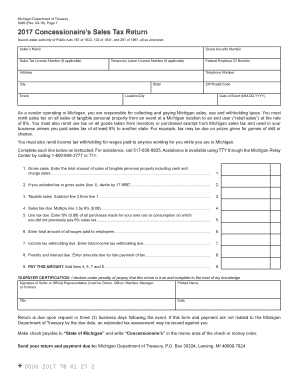
- Enter the seller’s name in the designated field. This should be the legal name of the business or the individual completing the form.
- Input your Social Security Number. If you are a business entity, use your Federal Employer ID Number instead.
- If applicable, provide your Sales Tax License Number and Temporary Liquor License Number.
- Fill in the address information, including city, state, and ZIP/postal code.
- Specify the date of the event in the format MM-DD-YYYY, which relates to the taxable sales.
- Line 1 requests the total amount of gross sales of tangible personal property, including cash and charge sales. Provide this amount accurately.
- If tax is included in gross sales (line 1), divide that amount by 17.6667 for line 2.
- For line 3, subtract the amount in line 2 from line 1 to get your taxable sales.
- Line 4 requires you to calculate the sales tax due by multiplying line 3 by 6% (0.06).
- Line 5 is for use tax due; enter 6% (0.06) of all purchases made for your own use where you didn’t pay 6% sales tax.
- Enter the total amount of all wages paid to employees on line 6.
- Provide the total income tax withholding due on line 7.
- For line 8, enter any penalty and interest amounts due for late payments.
- On line 9, aggregate the amounts from lines 4, 5, 7, and 8 to determine the total amount due.
- Complete the taxpayer certification section by signing and dating the form. Ensure the printed name and title are also filled out.
- After reviewing your information for accuracy, save changes, download, or print the form for submission.
Complete your MI DoT 5089 online today to ensure compliance and timely submission.
Get form
Experience a faster way to fill out and sign forms on the web. Access the most extensive library of templates available.
When sending your state taxes in Michigan, the address depends on the type of return you are filing. Generally, most tax returns can be sent to the Michigan Department of Treasury, P.O. Box 30199, Lansing, MI 48909. Ensure you check specific guidelines and forms like the MI DoT 5089 (Formerly 2271) for any updates regarding tax submission addresses.
Get This Form Now!
Use professional pre-built templates to fill in and sign documents online faster. Get access to thousands of forms.