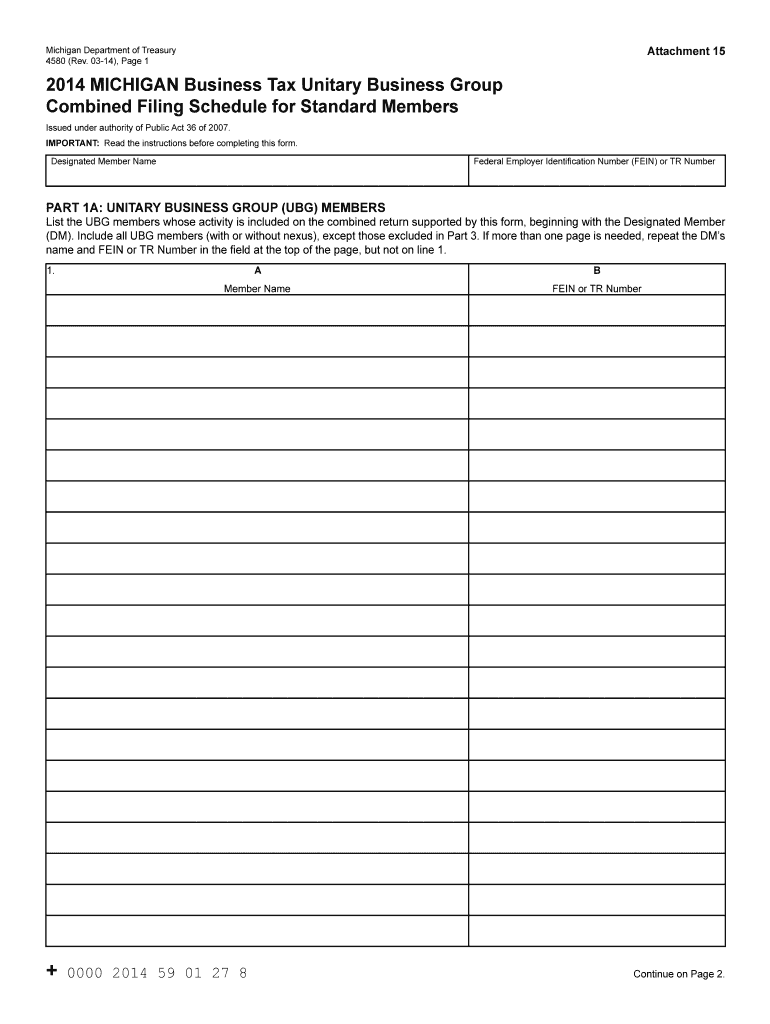
Ic Act 36 of 2007. IMPORTANT: Read the instructions before completing this form. Designated Member Name Federal Employer Identification Number (FEIN) or TR Number Part 1A: Unitary Business Group (UBG) Members List the UBG members whose activity is included on the combined return supported by this form, beginning with the Designated Member (DM). Include all UBG members (with or without nexus), except those excluded in Part 3. If more than one page is needed, repeat the DM s name and FEIN.
Loading

Open form follow the instructions

Easily sign the form with your finger

Send filled & signed form or save
How to fill out the MI DoT 4580 online
The Michigan Department of Treasury Form 4580 is essential for reporting combined filing schedules for unitary business groups. This guide provides clear, step-by-step instructions to help users navigate each section of the form efficiently, ensuring accurate completion.
Follow the steps to fill out the MI DoT 4580 form online.
- Click ‘Get Form’ button to obtain the form and open it in the editor.
- Begin with Part 1A, listing all unitary business group (UBG) members supported by this form, starting with the designated member. Enter their names and corresponding Federal Employer Identification Numbers (FEINs) or TR numbers.
- Proceed to Part 1B to identify each member. Complete this section separately for each UBG member, entering their names, FEINs or TR numbers, organization types, addresses, and other details as required.
- In Part 2A, provide comprehensive data for each member's business activities. Enter whole dollar amounts only for sales, receipts, and relevant deductions.
- For Part 2B, summarize the collected data from Part 2A. Ensure to eliminate intercompany transactions where appropriate and report the modified gross receipts.
- In Part 3, list any affiliates excluded from the combined return, providing their names and reasons for exclusion based on predefined codes.
- Complete Part 4 if there are any persons included in the prior return but excluded in the current one, noting the reasons for their exclusion.
- Review the completed form for accuracy, ensuring all necessary sections are filled, and then save changes, download the form, or prepare to print it.
Complete your documents online today for quick and efficient submission.
Experience a faster way to fill out and sign forms on the web. Access the most extensive library of templates available.
Related content
If you're unsure the status of your Michigan IFTA account or just have questions relating...
The Manufacturing Engineering Technology curriculum offers preparation for entry positions...
During and after operation, motors and gearmotors have live and moving parts and their...
Get answers to your most pressing questions about US Legal Forms API.
How to get a MI DOT number?
Getting a MI DOT number involves registering your motor carrier business with the relevant state authorities and the Federal Motor Carrier Safety Administration. You'll need to submit specific documentation about your operations, which helps track compliance and safety standards. This number is crucial for those operating under MI DoT 4580 guidelines.
How do I get a DOT number in Michigan?
To obtain a DOT number in Michigan, you must apply through the Federal Motor Carrier Safety Administration. The process involves completing an application that provides details about your business and the type of transportation you will engage in. After approval, you will receive your DOT number, which is essential for compliance with MI DoT 4580 regulations.
Can I look up a DOT number?
Yes, you can easily look up a DOT number using the Federal Motor Carrier Safety Administration's online database. This tool allows you to search for various details associated with that number, including the registered company's safety record and compliance information. Keeping track of these details can help ensure adherence to MI DoT 4580 standards.
How to get certified to do DOT physicals?
To get certified to perform DOT physicals, you need to become a certified medical examiner through the National Registry. This involves completing training on the Federal Motor Carrier Safety Administration regulations and passing an examination. Once certified, you can conduct DOT physicals for individuals who require a MI DoT 4580 compliance check.
What form do I use to file a state of Michigan tax extension?
To file a state tax extension in Michigan, you should use Form 4. This form allows you to request additional time to file your tax return. For personalized guidance throughout the process, refer to the information provided in the MI DoT 4580, which outlines the steps clearly.
Who must file MI Form 4567?
MI Form 4567 must be filed by all businesses that collect sales and use tax in Michigan. This includes retailers, wholesalers, and service providers that meet the sales threshold. Ensure you check the details outlined in the MI DoT 4580 to confirm your filing requirements.
How to file Michigan Form 5081?
To file Michigan Form 5081, begin by downloading the form from the state's official website. Fill in the required information regarding your sales tax and income details. Once completed, submit it electronically or by mail. Utilizing the MI DoT 4580 can streamline this process by providing clear instructions.
How often do I need to file sales tax in Michigan?
The frequency of filing sales tax in Michigan depends on your business's tax liability. Most businesses file monthly, while others may file quarterly or annually. Consult the MI DoT 4580 for specific filing timelines that align with your business operations.
What makes you exempt from Michigan withholding?
You are exempt from Michigan withholding if you meet specific criteria, such as having no tax liability the previous year or expecting to owe no tax for the current year. Additionally, certain types of income may also qualify for exemption. Make sure to reference the MI DoT 4580 guidelines to understand your eligibility thoroughly.
How do I file sales tax online in Michigan?
To file sales tax online in Michigan, you can use the Michigan Department of Treasury's e-File system. Simply register for an account, input your business information, and follow the prompts to file your sales tax return. If you need assistance, consider utilizing the MI DoT 4580 form, which helps in the accurate filing process.
Use professional pre-built templates to fill in and sign documents online faster. Get access to thousands of forms.
If you believe that this page should be taken down, please follow our DMCA take down process here.
This form is available in several versions. Select the version you need from the drop-down list below.