. . . . . . . . . . . 5. 6. Business income or (loss). . . . . . . . . . . . . . . . . . . . . . . . 6. 7. Capital gain or (loss). . . . . . . . . . . . . . . . . . . . . . . . . . . 7. 8. Other gains or (losses) (from federal Form 4797). . . . . . . 8. 9. Taxable amount of pensions, IRA distributions, and annuities. . . . . . . . . . . . . . . . . . . . . . . . . . . . . . . . . . . . 9. 10. Rents, royalties, partnerships, estates, trusts, etc. (Circle appropriate item.). . . . . . .
Loading

Open form follow the instructions

Easily sign the form with your finger

Send filled & signed form or save
How to fill out the MD Comptroller 515 online
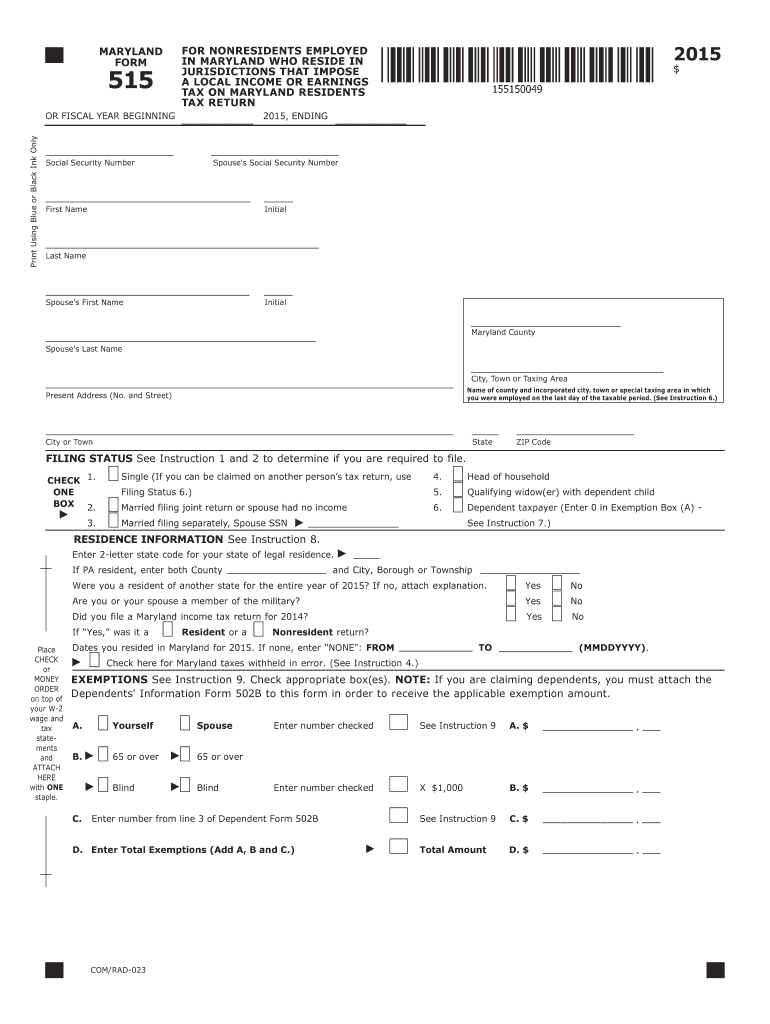
This guide provides a clear and supportive walkthrough of how to accurately fill out the MD Comptroller 515 form online. Follow these steps to ensure your tax return is complete and submitted correctly.
Follow the steps to successfully complete the MD Comptroller 515 form.
- Click ‘Get Form’ button to obtain the MD Comptroller 515 form and open it in the editor.
- Fill in your personal information, including your Social Security Number, first name, last name, and address. Ensure accuracy to avoid potential delays or issues.
- Select your filing status by checking the appropriate box. Refer to the instructions to determine which status applies to you.
- Provide your residence information including the state code and details about your residence for the entire tax year.
- Complete the exemptions section by checking the boxes that apply to you and entering the appropriate numbers. Remember to include dependents if applicable.
- Report your income by entering figures for wages, taxable interest, dividends, and other sources of income as required.
- Fill in any adjustments to income if applicable. This may include various deductions or adjustments based on your situation.
- Complete the deductions section by selecting either the standard deduction or itemized deductions and entering the appropriate amounts.
- Calculate your Maryland taxable net income, subtract any allowable exemptions and deductions from your total income.
- Figure your taxes using the tax computation methods outlined. Make sure to follow the provided tax rate schedules based on your taxable income.
- Review your form for any errors or omissions before submitting. Ensure all required attachments, like W-2 forms, are included.
- After completing the form, you can save your changes, download, or print the form for your records, and share it as needed.
Complete your MD Comptroller 515 form online to ensure a smooth tax filing experience.
Experience a faster way to fill out and sign forms on the web. Access the most extensive library of templates available.
Related content
To collect unpaid taxes, the Comptroller is authorized to seize the salary, wages, or...
May 18, 2015 — The Due Process Clause allows a State to tax “all the income of its...
Developed by the. ALCTS/CCS-PCC Task Force on. Library of Congress Classification...
Get answers to your most pressing questions about US Legal Forms API.
Where can I pick up tax forms?
Tax forms, including the MD Form 515, are available for pickup at local government offices and public libraries. If convenience is key, consider checking the MD Comptroller's website, where you can also download these forms. This simplifies the process and ensures you always have access to what you need.
Where do I pick up my Maryland tax forms?
You can pick up your Maryland tax forms at several locations, including the Comptroller's local offices and some public libraries. Additionally, you can download and print forms directly from the MD Comptroller's website. This allows you to have the necessary paperwork ready for your tax filing.
What is a MD Form 515?
MD Form 515 is a specific tax form used for reporting certain tax information to the Comptroller of Maryland. This form guides you through the process of fulfilling your tax obligations accurately. To access this form, visit the MD Comptroller’s website or use platforms like uslegalforms for user-friendly solutions.
Where can I get MD tax forms?
You can easily find MD tax forms online through the MD Comptroller's official website. They offer a comprehensive list of all the required forms, including the MD Form 515, for downloading or printing. If you prefer a physical copy, you may visit designated government offices that provide these forms.
Where can I get physical copies of tax forms?
To obtain physical copies of tax forms, including the MD Form 515, you should visit the Comptroller of Maryland's offices or request them via their official website. Additionally, some libraries and government offices may also provide copies, helping you access the forms you need easily.
Does the post office have state tax forms?
Generally, the post office does not stock Maryland state tax forms like the MD Form 515. Instead, you can access these forms online through the MD Comptroller's website or by visiting local government offices. This will ensure you get the correct and most up-to-date versions of necessary forms.
How do I get my notice number for Maryland taxes?
You can find your notice number for Maryland taxes by checking the correspondence you received from the MD Comptroller. If you cannot locate it, consider contacting their office directly for assistance. Additionally, you may check your Maryland tax account online if you have registered for online services.
How do I get an appointment with the Comptroller of Maryland?
To schedule an appointment with the Comptroller of Maryland, you can visit the official MD Comptroller website. There, you will find information about available services and how to book your appointment online. It's essential to prepare any necessary documents beforehand to ensure a smooth visit.
How to fill out an Employee Withholding Exemption Certificate?
To fill out an Employee Withholding Exemption Certificate, first provide your personal information such as name and social security number. Then, indicate your exemptions ensuring you meet the criteria established by the MD Comptroller 515. Double-check the form for accuracy before submitting it to avoid future issues with your withholding.
Where to put 0 or 1 on W4?
On the W4 form, you will specify your allowances in the appropriate section typically labeled as 'Allowances'. If you choose to claim 0 allowances, you write '0' in the space provided; if you are claiming 1 allowance, write '1'. This information influences how much federal income tax is withheld from your paycheck.
Use professional pre-built templates to fill in and sign documents online faster. Get access to thousands of forms.
If you believe that this page should be taken down, please follow our DMCA take down process here.
This form is available in several versions. Select the version you need from the drop-down list below.