Loading
Get Ca Ftb 3843 2023-2026
How it works
-

Open form follow the instructions
-

Easily sign the form with your finger
-

Send filled & signed form or save
How to fill out the CA FTB 3843 online
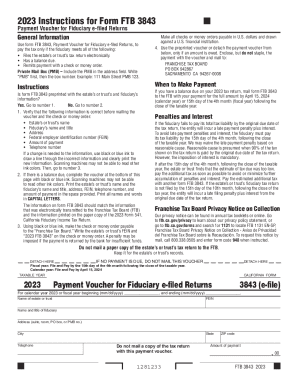
Filling out the CA FTB 3843 form is essential for fiduciaries to ensure timely tax payments for electronically filed estate or trust returns. This guide provides clear instructions to help users complete the form accurately and efficiently.
Follow the steps to successfully complete the CA FTB 3843 online.
- Click the ‘Get Form’ button to obtain the form and open it in the editor.
- Verify the preprinted information on the form, including the estate's or trust's name, fiduciary’s name and title, address, federal employer identification number (FEIN), amount of payment, and telephone number. If any information is incorrect, use black or blue ink to draw a line through the incorrect entry and clearly print the new information.
- If the form does not contain preprinted information and there is a balance due, complete the voucher fields at the bottom of the form. Use black or blue ink to print the necessary details in capital letters, including the estate’s or trust’s name, fiduciary’s name and title, address, FEIN, telephone number, and amount of payment.
- Make the check or money order payable to 'Franchise Tax Board.' Use black or blue ink to write the estate's or trust's FEIN and '2023 FTB 3843' on the check or money order to avoid penalties for insufficient funds.
- After completing the form and preparing the payment, mail the CA FTB 3843 to the Franchise Tax Board at the provided address, ensuring it is dispatched by the due date to avoid late penalties.
- Save your changes and download or print a copy of the completed form for your records. Ensure to keep the tax return documentation for the estate or trust on file.
Complete your CA FTB 3843 online to ensure timely tax payments.