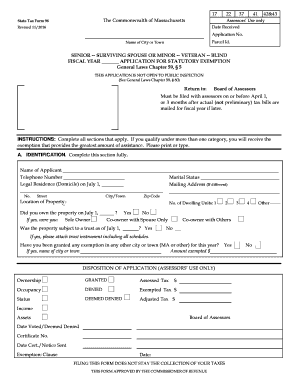
ING SPOUSE OR MINOR -- VETERAN -- BLIND FISCAL YEAR APPLICATION FOR STATUTORY EXEMPTION General Laws Chapter 59, 5 THIS APPLICATION IS NOT OPEN TO PUBLIC INSPECTION (See General Laws Chapter 59, 60) Return to: Board of Assessors Must be filed with assessors on or before April 1, or 3 months after actual (not preliminary) tax bills are mailed for fiscal year if later. INSTRUCTIONS: Complete all sections that apply. If you qualify under more than one category, you will receive the exempt.
Open form follow the instructions
Easily sign the form with your finger
Send filled & signed form or save
How to fill out the MA State Tax Form 96 online
Filling out the Massachusetts State Tax Form 96 is an essential step for qualifying for various property tax exemptions. This guide provides a clear, step-by-step approach to completing this form online, ensuring users have the necessary information to proceed with their application.
Follow the steps to successfully complete the MA State Tax Form 96.
- Click 'Get Form' button to obtain the form and open it in the editor.
- Begin by filling out Section A, Identification. Enter the name of the applicant, telephone number, and legal residence as of July 1. Be sure to provide your marital status and mailing address if it differs from your residence.
- In Section A, indicate the location of the property and whether you owned it on July 1. Specify your ownership type: Sole Owner, Co-owner with Spouse Only, or Co-owner with Others. Attach the trust instrument if applicable.
- Proceed to Section B, Exemption Status. Check the appropriate box that describes your status (e.g., Blind Person, Veteran, Surviving Spouse). Complete any related questions that follow your selected status.
- Move on to Section C if you are applying as a senior. Provide gross receipts from all sources in the preceding calendar year, including retirement benefits and other income. Be ready to supply documentation if requested.
- Continue to Section D, where you need to list the value of all property owned as of July 1. This should include real estate, personal estate, bank accounts, and any vehicles.
- Finally, complete Section E by signing the application. Ensure that if an agent signed on your behalf, a copy of the written authorization is attached.
- After filling out the form, review all entries. Save your changes, download a copy for your records, and print or share the form as necessary.
Complete your MA State Tax Form 96 online today and secure your tax exemptions.
Experience a faster way to fill out and sign forms on the web. Access the most extensive library of templates available.
Related content
Form 96-1 is for seniors 70+ (or 65+ by local option) to apply for personal property tax...
State Tax Form 96-5. The Commonwealth of Massachusetts. Assessors' Use only. Revised...
Provide America's taxpayers top quality service by helping them understand and meet their...
Get answers to your most pressing questions about US Legal Forms API.
Who qualifies for property tax exemption in Massachusetts?
In Massachusetts, various groups qualify for property tax exemption, including seniors, individuals with disabilities, and veterans. To qualify, applicants generally need to meet specific income and residency requirements set by local municipalities. The process may involve submitting forms like the MA State Tax Form 96 to ensure eligibility. For precise guidance on navigating these exemptions, consider seeking help from knowledgeable platforms like uslegalforms.
What is the Massachusetts state tax form 96 1?
The Massachusetts State Tax Form 96-1 is a specific document used for tax purposes within the state. This form aids in reporting personal exemptions and helps taxpayers calculate their potential tax obligations. If you need further details or help with the filing process, platforms like uslegalforms provide valuable resources, including the MA State Tax Form 96 and its components.
At what age do seniors stop paying property taxes in Massachusetts?
In Massachusetts, seniors do not automatically stop paying property taxes at a certain age. However, various programs offer property tax exemptions or deferrals for qualified seniors, typically starting at age 65. To determine eligibility, seniors should review the specific guidelines provided by the local assessor's office or utilize resources like the MA State Tax Form 96 for further assistance.
Where to get MA state tax forms?
You can obtain MA state tax forms from several sources to meet your tax filing needs. The Massachusetts Department of Revenue's official website provides downloadable versions of all necessary forms, including the MA State Tax Form 96. Additionally, local public libraries and post offices often carry printed forms. For a more streamlined experience, platforms like uslegalforms can assist you in finding accurate forms.
How many exemptions should I claim in Massachusetts?
Claiming the right number of exemptions in Massachusetts is crucial for managing your state tax obligations. You should consider your personal situation, including your income level and family size. It's important to note that excessive exemptions can lead to owing taxes at the end of the year. For tailored advice, consider using resources like the MA State Tax Form 96.
How do I get my property tax statement in Massachusetts?
To obtain your property tax statement in Massachusetts, you can visit your local assessor's office or their website. Most places allow you to view or print your statement online. If you prefer a more streamlined approach, consider utilizing USLegalForms to help you navigate any challenges in accessing your property tax information effortlessly.
Where do I find my property tax statement?
Your property tax statement can typically be found through your local city or town's assessor's office website. Many municipalities now offer online access to property tax records, including statements. If you need further assistance, consider using USLegalForms, which can guide you on obtaining the necessary information promptly.
Can I file MA state taxes online?
Yes, you can file MA state taxes online, including submitting your MA State Tax Form 96 for property tax abatements. The Massachusetts Department of Revenue offers an online platform for tax filings, making it convenient to manage your taxes. Using reputable online services like US Legal Forms can further enhance your experience, providing you with the necessary forms and guidance for smooth filings.
How to file an abatement for property tax?
Filing for an abatement of property tax requires completing the MA State Tax Form 96. You'll need to gather relevant documentation, such as proof of ownership and any evidence supporting your claim, then submit everything to your local board of assessors. Be mindful of deadlines to ensure your application is processed. For an easier experience, many find it helpful to use resources like US Legal Forms.
What is an abatement application?
An abatement application is a request for a reduction in property tax assessments, allowing taxpayers to seek relief when they believe their property has been overvalued. In Massachusetts, this involves filing the MA State Tax Form 96. Submitting this form provides local authorities with the necessary information to assess your claim accurately. If you're uncertain about preparing an abatement application, US Legal Forms can provide guidance and templates.
Use professional pre-built templates to fill in and sign documents online faster. Get access to thousands of forms.
If you believe that this page should be taken down, please follow our DMCA take down process here.
This form is available in several versions. Select the version you need from the drop-down list below.