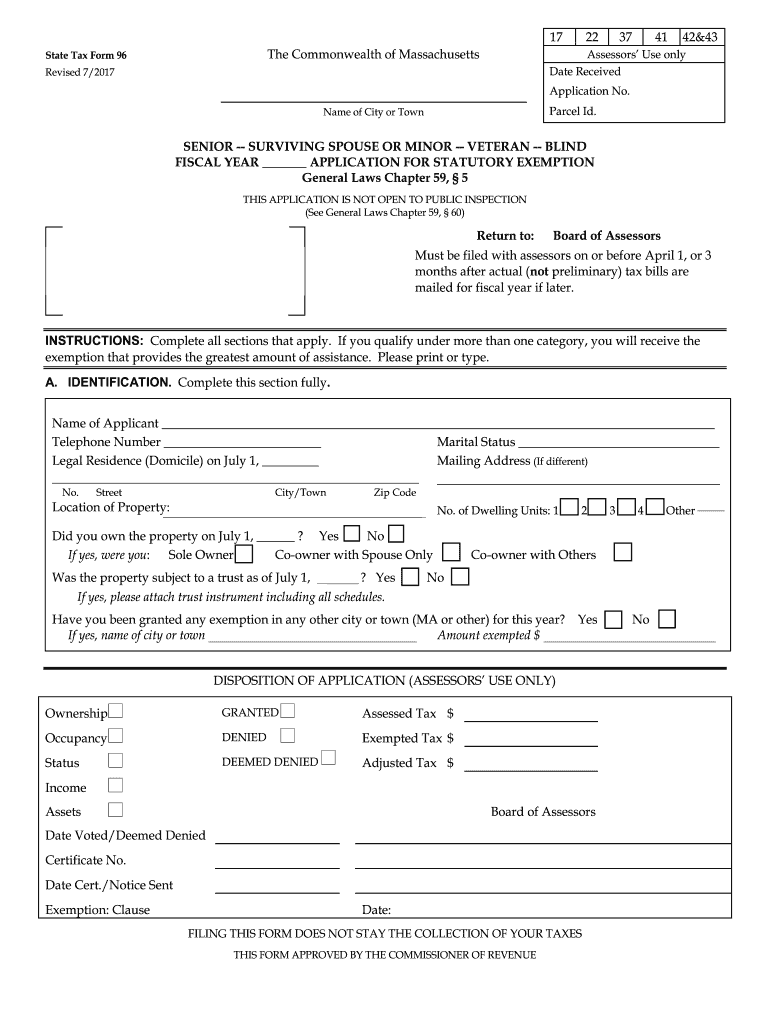
Ame of City or Town SENIOR -- SURVIVING SPOUSE OR MINOR -- VETERAN -- BLIND FISCAL YEAR APPLICATION FOR STATUTORY EXEMPTION General Laws Chapter 59, 5 THIS APPLICATION IS NOT OPEN TO PUBLIC INSPECTION (See General Laws Chapter 59, 60) Return to: Board of Assessors Must be filed with assessors on or before April 1, or 3 months after actual (not preliminary) tax bills are mailed for fiscal year if later. INSTRUCTIONS: Complete all sections that apply. If you qualify under more t.
Loading

Open form follow the instructions

Easily sign the form with your finger

Send filled & signed form or save
How to fill out the MA State Tax Form 96 online
Filling out the MA State Tax Form 96 online can simplify the process of applying for statutory tax exemptions. This guide provides step-by-step instructions to help you navigate through each section of the form effectively.
Follow the steps to complete the application easily.
- Click ‘Get Form’ button to obtain the form and open it in the editor.
- Begin filling out Section A: Identification. Complete all required fields, including your name, telephone number, marital status, legal residence on July 1, and mailing address if it differs from your residence. Specify the location of the property and indicate whether you owned the property as of July 1.
- Next, identify your exemption status by checking the applicable boxes in Section B, which includes options for being blind, a veteran, a surviving spouse, or a senior citizen. Provide additional details as prompted in this section.
- If applying as a senior, complete Section C: Gross receipts from all sources in the preceding calendar year. Include financial details such as retirement benefits, wages, and any other income sources.
- Proceed to Section D to document the value of all property you owned on July 1. This includes real estate, personal estate, bank accounts, stocks, bonds, motor vehicles, and other non-exempt properties.
- Finally, sign in Section E to complete the application, certifying that all information provided is true and accurate. If someone else prepared the application for you, ensure they attach a copy of the written authorization to sign on your behalf.
- After completing the form, you may save your changes, download a copy for your records, print the application, or share it as needed.
Complete your MA State Tax Form 96 online today!
Experience a faster way to fill out and sign forms on the web. Access the most extensive library of templates available.
Related content
Form 96-1 is for seniors 70+ (or 65+ by local option) to apply for personal property tax...
State Tax Form 96-5. The Commonwealth of Massachusetts. Assessors' Use only. Revised...
Provide America's taxpayers top quality service by helping them understand and meet their...
Get answers to your most pressing questions about US Legal Forms API.
At what age do seniors stop paying property taxes in Massachusetts?
In Massachusetts, there is no specific age at which seniors stop paying property taxes entirely. However, seniors over 65 may qualify for various exemptions that lower their tax burden. It is valuable to explore available relief programs and apply for those you qualify for. For comprehensive information about these benefits, uslegalforms can be a great resource.
What is the Massachusetts state tax form 96 1?
The Massachusetts state tax form 96 1 is a document used by taxpayers to apply for a property tax exemption. This form requires detailed personal information and specifics about the property in question. Complete the form accurately to ensure the review process goes smoothly. You can find detailed instructions on completing form 96 1 on uslegalforms.
Who qualifies for property tax exemption in Massachusetts?
In Massachusetts, individuals who qualify for property tax exemption include seniors, veterans, and certain disabled individuals. Property owners must meet specific criteria and income limits to be eligible. If you believe you may qualify, you should investigate the application process and gather necessary documentation. Uslegalforms provides useful information to help you determine your eligibility.
How many exemptions should I claim in Massachusetts?
The number of exemptions you should claim in Massachusetts depends on your personal situation and financial responsibilities. Typically, residents can claim one personal exemption and additional exemptions based on dependents. It is essential to assess your financial needs each tax year. For specific advice, consider consulting with a tax professional or use reliable resources like uslegalforms.
Who is exempt from paying property taxes in Massachusetts?
Certain groups may qualify for exemptions from property taxes in Massachusetts. These typically include seniors, veterans, and individuals with disabilities who meet specific criteria. The exemptions vary based on local laws and regulations, so it’s crucial to check with local authorities. For more details, you may want to start with the MA State Tax Form 96 for guidance.
Where to get MA State tax forms?
You can obtain MA State tax forms, including the crucial MA State Tax Form 96, from various sources. The Massachusetts Department of Revenue website offers downloadable forms online. Additionally, local libraries, post offices, and tax preparation offices often provide printed versions. Utilizing these resources can streamline the filing process for your taxes.
Do senior citizens get a property tax break in Massachusetts?
Yes, senior citizens in Massachusetts can qualify for property tax breaks under certain conditions. Typically, they must meet age, income, and residency requirements. These benefits can significantly ease the financial burden of property ownership. If you are seeking to apply, reviewing the MA State Tax Form 96 can guide you through the process.
At what point do seniors stop paying taxes?
Seniors do not automatically stop paying taxes based on age alone. While some may see reduced tax liability due to exemptions or deductions, others might still owe taxes depending on their income. It's essential to assess your specific financial situation and tax obligations annually. Additionally, consider reviewing the guidelines for MA State Tax Form 96 for potential benefits.
How do I get my property tax statement in Massachusetts?
To obtain your property tax statement in Massachusetts, you can contact your local tax assessor's office directly. Many municipalities provide online access to property tax statements, making retrieval convenient. Additionally, you may receive your tax statement through the mail annually. It's important to keep track of these documents to stay informed about your property tax obligations.
What is the Massachusetts state tax form 96?
The MA State Tax Form 96 is a crucial document used by residents to report specific tax-related information to the state of Massachusetts. This form helps in determining eligibility for certain tax benefits and credits. By accurately filling out Form 96, taxpayers ensure compliance with state tax regulations and avoid any penalties. It's important to understand its requirements to fully benefit from the available tax opportunities.
Use professional pre-built templates to fill in and sign documents online faster. Get access to thousands of forms.
If you believe that this page should be taken down, please follow our DMCA take down process here.