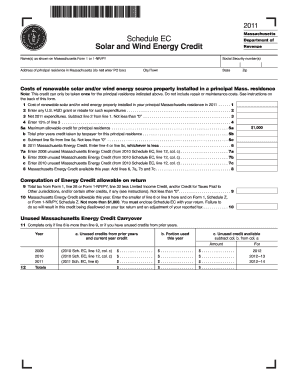
Clude repair or maintenance costs. See instructions on the back of this form. 91 Cost of renewable solar and/or wind energy property installed in your principal Massachusetts residence in 2011 . . . . . . 1 92 Enter any U.S. HUD grant or rebate for such expenditures . . . . . . . . . . . . . . . . . . . . . . . . . . . . . . . . . . . . . . . . . . . . . . . . . . 2 93 Net 2011 expenditures. Subtract line 2 from line 1. Not less than 0 . . . . . . . . . . . . . . . . . . . . . . . . . . .
Open form follow the instructions
Easily sign the form with your finger
Send filled & signed form or save
How to fill out the MA Schedule EC online
The MA Schedule EC is a valuable tax form for homeowners who have invested in renewable energy sources such as solar and wind energy systems. This guide provides a step-by-step approach to filling out the MA Schedule EC online, ensuring that users can easily navigate the process and claim their eligible credits.
Follow the steps to complete your MA Schedule EC online.
- Press the ‘Get Form’ button to access the form and open it in your chosen editor.
- Enter your name(s) as shown on Massachusetts Form 1 or 1-NR/PY. Make sure to input the correct spelling to ensure accuracy in processing your tax form.
- Provide your Social Security number(s) in the designated field. It is crucial to enter this information accurately to avoid any delays.
- Fill in the address of your principal residence in Massachusetts. Do not use a PO box; provide the actual street address.
- List the costs of renewable solar and/or wind energy property that you installed in your principal Massachusetts residence during the year. Remember to exclude any repair or maintenance costs.
- Enter any U.S. HUD grant or rebate you received for such expenditures. This value will help you calculate your net expenditures.
- Calculate your net 2011 expenditures by subtracting the grant or rebate amount from your total costs of renewable energy property.
- Enter 15% of the net expenditures. This figure helps determine your potential energy credit.
- Identify the maximum allowable credit of $1,000 for your principal residence. Note that you can only claim this credit once for the specified residence.
- Declare any prior year credits taken for this residence. This will affect your current year's allowable credit.
- Subtract the total prior credits from the maximum allowable credit to find out how much you can claim for this tax year.
- Follow the calculations provided to determine your 2011 Massachusetts energy credit. Enter the lesser amount between the calculated figure and the maximum credit allowed.
- If you have unused Massachusetts energy credits from previous years, list them in the provided fields for carryover.
- Make sure to review your entries for accuracy and completeness before proceeding.
- Finally, save your changes, and download, print, or share the completed form as necessary.
Start completing your MA Schedule EC online today to take advantage of your renewable energy credits.
Experience a faster way to fill out and sign forms on the web. Access the most extensive library of templates available.
Related content
In calculating the available credit amount, the taxpayer must subtract from the $1,000...
The EC Schedule is divided into: X-schedule days (first half of week: Mondays, Tuesdays...
manual contains important operating instructions for the MA-500TR CLASS B AIS TRANSPONDER...
Get answers to your most pressing questions about US Legal Forms API.
What is the purpose of the Schedule E?
The purpose of Schedule E is to provide a comprehensive format for reporting particular types of income, including rental and royalty income. This form helps taxpayers calculate their total taxable income from these sources. Utilizing the MA Schedule EC can enhance your understanding of potential deductions and credits available related to your reported income.
Is Schedule E the same as 1099?
No, Schedule E and Form 1099 serve different purposes. Schedule E is used for reporting supplemental income, while Form 1099 is primarily for reporting income received from various sources, especially contract work and freelance services. When filing your taxes, knowing how both forms relate to the MA Schedule EC can help you organize your information accurately.
What is Massachusetts Schedule E?
Massachusetts Schedule E is a tax form used to report income or loss from supplemental sources like rental properties. This form helps taxpayers accurately report their earnings and deductions related to these types of income. If you are filing your taxes in Massachusetts, understanding how to effectively use Schedule E with the MA Schedule EC will ensure accurate reporting.
Who is subject to MA excise tax?
The Massachusetts excise tax applies primarily to businesses and individuals who engage in certain activities, such as owning and operating vehicles and making sales of tangible goods. If you conduct business in Massachusetts, it’s essential to understand if your activities trigger this tax. Using the MA Schedule EC can help you navigate the intricacies of compliance.
Is Schedule E considered business income?
Schedule E is primarily used for reporting supplemental income, such as rental properties and royalties. However, if you have a rental property, the income reported on Schedule E may be classified as business income depending on the circumstances. Understanding how the MA Schedule EC applies to your income can help clarify your tax obligations.
What is the Massachusetts energy efficient tax credit?
The Massachusetts energy efficient tax credit is a financial incentive designed to encourage residents and businesses to adopt energy-saving measures. It allows taxpayers to claim a credit for the installation of energy-efficient equipment and improvements. By utilizing the MA Schedule EC, you can maximize your savings and contribute to a greener environment.
How do I redeem my solar tax credit?
To redeem your solar tax credit, include the relevant forms with your tax return at the end of the year. Be sure to fill out IRS Form 5695 accurately, detailing your solar expenditures. Ensuring you follow guidelines outlined in the MA Schedule EC will aid in smooth processing. If in doubt, a tax preparer can provide the necessary assistance to ensure you redeem your credit effectively.
Why am I not getting my full solar tax credit?
If you are not receiving your full solar tax credit, several factors could be at play, such as incomplete paperwork or eligibility issues. You may not have claimed all the relevant expenses associated with the system. Review the documentation, as well as the criteria set forth in the MA Schedule EC, to identify any missing components. Consulting with a tax professional can also clarify any misunderstandings.
How to claim Massachusetts solar tax credit?
Claiming the Massachusetts solar tax credit involves completing the appropriate state tax forms and providing receipts for your solar installation. It's crucial to ensure all information is accurate to maximize your savings. Using the MA Schedule EC can simplify this process and help you understand state-specific incentives. Consider reaching out to tax experts for additional support.
How much is an SREC worth in MA?
In Massachusetts, the value of a Solar Renewable Energy Certificate (SREC) varies based on market factors. Typically, SRECs can be worth a few hundred dollars, but this value can fluctuate. Monitoring current market prices through resources or platforms can help you understand the potential earnings available to you. Utilizing the MA Schedule EC can further maximize your benefits.
Use professional pre-built templates to fill in and sign documents online faster. Get access to thousands of forms.
If you believe that this page should be taken down, please follow our DMCA take down process here.
This form is available in several versions. Select the version you need from the drop-down list below.