Ion that support your proposal. Attach additional sheets and documents if helpful. Additional options 1. Expedited settlement Check if you would like this office to consider reviewing your settlement proposal on an expedited basis. The following criteria must be met to be considered for settlement on an expedited basis: You have submitted a complete explanation of the facts and issues in dispute. You have submitted a settlement proposal. You have provided all documentation necess.
Loading

Open form follow the instructions

Easily sign the form with your finger

Send filled & signed form or save
How to fill out the MA DR-1 online
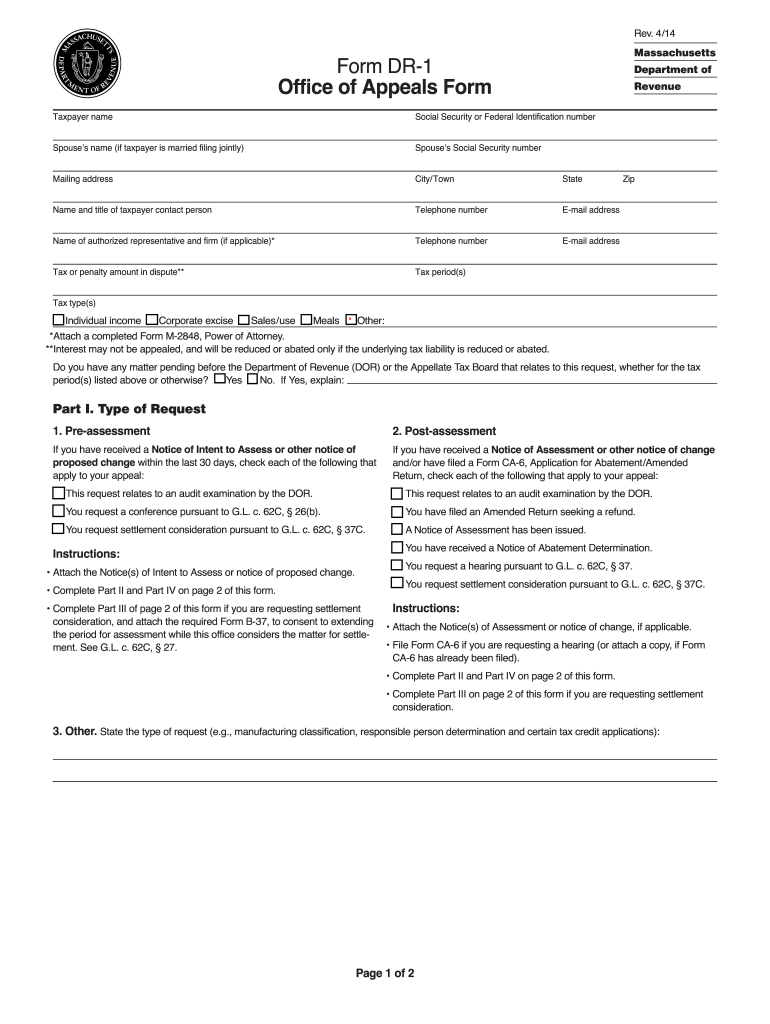
The MA DR-1 form, also known as the Office of Appeals Form, is an important document for taxpayers in Massachusetts seeking to dispute a tax or penalty. This guide provides step-by-step instructions to help you complete the form effectively and accurately.
Follow the steps to complete the MA DR-1 form online
- Click the ‘Get Form’ button to access the MA DR-1 form and open it in your editor. This allows you to begin entering necessary information.
- Enter your full name as the taxpayer, along with your Social Security or Federal Identification number. If you are married and filing jointly, include your spouse’s name and Social Security number. Additionally, fill in your mailing address, city/town, state, and zip code.
- Provide the name and title of the contact person, along with their telephone number and e-mail address. If you have an authorized representative or firm, include their name, telephone number, and e-mail address as well.
- Indicate the tax or penalty amount you are disputing and specify the tax period(s) and tax type(s) involved, such as individual income, corporate excise, or sales/use.
- Answer whether there are any pending matters related to this request before the Department of Revenue (DOR) or the Appellate Tax Board. If 'Yes', provide a brief explanation.
- Select the type of request you are making in Part I, indicating whether it is pre-assessment, post-assessment, or other. Follow the specific instructions related to your selection.
- In Part II, clearly state the facts and legal issues in your dispute. Explain why you believe the tax amount is excessive or incorrect, and attach any relevant support or documentation.
- In Part III, make your settlement request by detailing your proposal for resolving the matter. Include all pertinent arguments and documentation, attaching additional sheets as needed.
- Complete Part IV by signing the form, ensuring that your signature, printed name, title or relationship to the taxpayer, and the spouse's signature (if married filing jointly) are included. Enter the date.
- Finally, review the completed form for accuracy. You can then save your changes, download the file, print it, or share the form as necessary.
Complete your MA DR-1 form online today for a streamlined filing process.
Experience a faster way to fill out and sign forms on the web. Access the most extensive library of templates available.
Related content
Pre-assessment. If you have received a Notice of Intent to Assess or other notice of...
by DR Lorimer · 2007 · Cited by 2071 — We analyzed archival survey data and found a...
May 1, 2013 — Na integração é utilizado os padrões SOAP (Simple Object Access...
Get answers to your most pressing questions about US Legal Forms API.
How do I file an appeal with Massachusetts tax Connect?
To file an appeal with Massachusetts Tax Connect, begin by logging into your account on the Tax Connect portal. You will find the necessary forms and instructions to submit your appeal electronically. Make sure to provide all required documentation to support your case. If you need assistance, US Legal Forms offers resources that guide you through the appeal process smoothly.
Where to send Massachusetts estimated tax payments?
You should send your Massachusetts estimated tax payments to the address listed on the payment voucher. If you are using a check, be sure to include your identification number on the payment to ensure proper processing. You can also opt for electronic payments through the Massachusetts Department of Revenue’s website for a faster alternative. Consider using US Legal Forms for forms and instructions to simplify your payment process.
Where do I file my MA Form 1?
To file your MA Form 1, you need to submit it to the Massachusetts Department of Revenue. You can do this either electronically through the e-filing option on their website or by mail at the appropriate address specified in the form instructions. If you file electronically, you may receive faster processing times. For convenience, consider using the US Legal Forms platform, which offers easy navigation for filing Massachusetts forms.
Can I track my Massachusetts tax refund?
Absolutely, you can track your Massachusetts tax refund through the online portal set up by the Massachusetts Department of Revenue. By entering your details, you can see real-time updates regarding your refund status. If you filed using the MA DR-1 form, having your information at hand will make this process straightforward. Utilizing online resources will keep you informed and reduce any uncertainty.
What is 7% tax in Massachusetts?
The 7% tax in Massachusetts typically refers to the sales tax applied to most goods and services sold within the state. This tax is necessary for funding state and local services. When filing taxes with the MA DR-1 form, it's important to account for this sales tax where applicable. For tax-related questions, uslegalforms provides resources that clarify how Massachusetts taxes apply to your situation.
Can I track my refund online?
Yes, you can track your Massachusetts tax refund online through the Massachusetts Department of Revenue’s website. This online service allows you to enter necessary personal details for a quick update on your refund status. Making use of the MA DR-1 form while filing can contribute to a smooth tracking experience. Having your information checked and ready can enhance the ease of this process.
Who must file MA form 1?
Individuals who are residents of Massachusetts and have earned income must file MA form 1. This form applies to those whose income exceeds the state's filing thresholds. If you meet the criteria and used the MA DR-1 form, make sure your financial details are correctly reported. For personalized assistance, uslegalforms can help guide you through the filing process.
How do I track my Massachusetts state tax refund?
To track your Massachusetts state tax refund, visit the Massachusetts Department of Revenue's online portal. You can enter your personal details, including your social security number and refund amount, for quick access. If your return was submitted via the MA DR-1, ensure you have the relevant information ready. Using an organized method for tracking your refund can save you time and worry.
How long does it take to get a Massachusetts tax refund?
Typically, it takes about 4 to 6 weeks to receive your Massachusetts tax refund if you filed electronically, and 6 to 8 weeks for paper returns. Processing times may vary based on various factors, including how you filed and the time of year. If you used the MA DR-1 form for your submission, ensure all information is accurate to avoid delays. Staying updated through the Massachusetts Department of Revenue's website can provide you insights into the status.
How do I track my refund status?
You can track your refund status through the Massachusetts Department of Revenue’s website. They provide an online tool where you can input your personal information to check the status of your refund. If you filed using the MA DR-1, you would need your social security number and the refund amount. Keeping your information handy can help streamline the process.
Use professional pre-built templates to fill in and sign documents online faster. Get access to thousands of forms.
If you believe that this page should be taken down, please follow our DMCA take down process here.
This form is available in several versions. Select the version you need from the drop-down list below.