. . . . . . . . 8 Alimony and/or child support received . . . . . . . . . . . . . . . . . . . . . . . . . . . . . . . . . . . . . . . . . . . . . . . . . . . . . . . . . . . . . . . . . . . 9 Unemployment payments . . . . . . . . . . . . . . . . . . . . . . . . . . . . . . . . . . . . . . . . . . . . . . . . . . . . . . . . . . . . . . . . . . . . . . . . . . . . 10 Other income. List sources below, including contributions to expenses by other household members . . . . . . . . . . . . . . . .
Open form follow the instructions
Easily sign the form with your finger
Send filled & signed form or save
How to fill out the MA DoR M-433I online
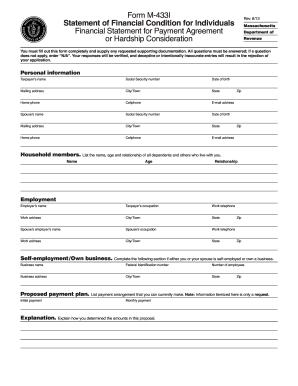
The MA DoR M-433I is a vital form for individuals seeking payment agreements or hardship consideration from the Massachusetts Department of Revenue. Accurately completing this financial statement is essential for presenting your financial condition clearly.
Follow the steps to fill out the MA DoR M-433I online successfully.
- Press the ‘Get Form’ button to obtain the form and open it for editing.
- Begin by entering your personal information in the designated fields, including taxpayer’s name, Social Security number, date of birth, and contact details. Make sure all questions are answered thoroughly, using 'N/A' for non-applicable entries.
- Provide details about additional household members by listing their names, ages, and relationships to you.
- Fill in the employment section, detailing both your and your spouse’s employment information. This includes employer's name, occupation, and contact information.
- If self-employed or owning a business, complete the corresponding section with the business name, federal identification number, number of employees, and business address.
- Outline your proposed payment plan, detailing your initial payment and how you arrived at the proposed monthly payment. Include any relevant explanations regarding your financial situation.
- Enter your monthly income details in Schedule 1. List all income sources and itemize them as requested, ensuring all figures are accurate and verifiable.
- Complete Schedule 2 for monthly expenses, detailing all expenditures such as groceries, housing, utilities, and any other financial obligations.
- If applicable, provide schedules for motor vehicles, real estate, credit cards, and other loans or debts. This includes relevant details about assets and liabilities.
- Before submission, review all the entered information for accuracy. You can save changes, download, print, or share the completed form as necessary.
Take the next step in your financial journey by filing the MA DoR M-433I online today!
Experience a faster way to fill out and sign forms on the web. Access the most extensive library of templates available.
Related content
You can manage your Payment Agreement online through MassTaxConnect at...
Manual de Direito do Trabalho - Vicente Paulo e Marcelo Alexandrino.
Get answers to your most pressing questions about US Legal Forms API.
How many times can you do a tax payment plan?
You can apply for a tax payment plan multiple times in Massachusetts, depending on your financial circumstances and tax obligations. Each application is considered based on specific criteria and your tax history. Using the MA DoR M-433I form can help you present your financial situation more clearly during the application process.
Where can I get MA tax forms?
You can obtain Massachusetts tax forms on the official Massachusetts Department of Revenue website. The site offers a range of forms, including the MA DoR M-433I that might be specific to your needs. This form can guide you in managing your tax matters efficiently.
What does dor mean in payment terms?
In payment terms, 'DoR' refers to the Department of Revenue, which oversees tax collection and management in Massachusetts. Understanding the functions of the DoR is essential for meeting your tax obligations effectively. For more guidance, the MA DoR M-433I form can be helpful in navigating your tax responsibilities.
How to avoid Massachusetts underpayment penalty?
To avoid an underpayment penalty in Massachusetts, ensure that your withholding and estimated payments equal at least 90% of your current year’s tax or 100% of the previous year’s tax. If you follow these guidelines, you can protect yourself from penalties. Utilizing the MA DoR M-433I may help clarify your payment responsibilities.
Does Massachusetts grant an automatic extension?
Massachusetts does not grant automatic extensions for income tax filings; however, you can file for an extension before the original deadline. To ensure you can manage your tax obligations effectively, consider utilizing the MA DoR M-433I form. This form may provide insights into your situation and help with planning.
How do I request a payment plan on Mass tax Connect?
To request a payment plan on Mass Tax Connect, you need to log in to your account or create one if you do not have it yet. After logging in, navigate to the 'Payment Plans' section and follow the prompts to apply for a plan. Keep in mind that the MA DoR M-433I form may be relevant to your situation, as it helps outline your financial capacity.
What to include with a Massachusetts tax return?
When filing your Massachusetts tax return, you should include a completed Form 1 or Form 1-NR/PY, along with any required schedules. It is also essential to attach any supporting documents such as W-2s, 1099s, or additional forms documenting deductions or credits. Be thorough to avoid delays in processing your return. If you're unsure what to include, the US Legal Forms platform can assist you in organizing your documents.
How do I set up a payment plan for mass taxes?
To set up a payment plan for your Massachusetts taxes, you can visit the MA DoR website where you’ll find the necessary forms. Typically, you need to fill out Form M-433I, which outlines your tax situation and proposed payment plan. After completing the form, submit it along with your financial information to the Massachusetts Department of Revenue. They will review your application and let you know if your plan is approved.
Where do I send my tax return in Massachusetts?
The location where you send your tax return in Massachusetts depends on whether you are filing your return electronically or by mail. For mailed returns, you must send your completed forms to the address specified on the instruction sheet of the form you are filing. Electronic filers can benefit from the online system provided by the MA DoR M-433I, which offers instant submission and confirmation of receipt.
How do I file an appeal with Massachusetts tax Connect?
To file an appeal with Massachusetts tax Connect, you first need to log into your account or create one if you haven’t already. You will find the option to submit an appeal under the relevant section for disputes. Make sure to include all necessary information and documentation to support your appeal, referencing the MA DoR M-433I to ensure your submission aligns with state guidelines.
Use professional pre-built templates to fill in and sign documents online faster. Get access to thousands of forms.
If you believe that this page should be taken down, please follow our DMCA take down process here.