Loading
Form preview
  • US Legal Forms
  • Other Templates
  • Tax Forms
  • Massachusetts Tax Forms
  • Ma Dor Ifta-1 2013

Get Ma Dor Ifta-1 2013

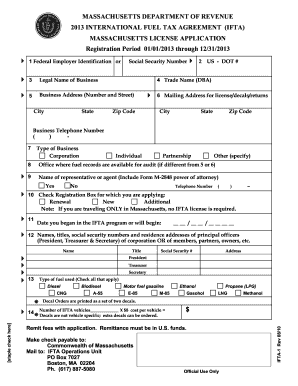
On or Social Security Number 3 Legal Name of Business 5 Business Address (Number and Street) City State 2 US - DOT # 4 Trade Name (DBA) Zip Code 6 Mailing Address for license/decals/returns City State Zip Code Business Telephone Number ( ) 7 8 9 Type of Business Corporation Individual Partnership Other (specify) Office where fuel records are available for audit (if different from 5 or 6) Name of representative or agent (Include Form M-2848 power of attorney) Yes.

How it works

  1. Open form

    Open form follow the instructions

  2. Easily sign form

    Easily sign the form with your finger

  3. Share form

    Send filled & signed form or save

How to fill out the MA DoR IFTA-1 online

Filling out the MA DoR IFTA-1 form is essential for those operating qualified motor vehicles across multiple jurisdictions under the International Fuel Tax Agreement. This guide provides a clear, step-by-step approach to ensure a smooth online application process.

Follow the steps to effectively complete your MA DoR IFTA-1 form online.

  1. Click ‘Get Form’ button to obtain the MA DoR IFTA-1 form and access it in the online editor.
  2. Input your Federal Employer Identification Number or Social Security Number in Line 1.
  3. Provide the legal name of your business in Line 3, ensuring it matches the documentation under which the business operates.
  4. If applicable, include your trade name (Doing Business As) in Line 4.
  5. Complete Line 5 with your business address, including the number and street, city, state, and zip code.
  6. In Line 6, enter the mailing address where you prefer to receive your license, decals, and returns if it differs from your business address.
  7. Select the type of business you operate in Line 7, categorizing it as a corporation, individual, partnership, or other.
  8. Mention the location where your fuel records will be audited in Line 8, if it differs from the addresses provided earlier.
  9. Indicate whether you're granting Power of Attorney to an agent in Line 9, completing the name and address if you are.
  10. Select the appropriate registration box in Line 10 corresponding to whether you are applying for renewal, a new license, or additional decals.
  11. Enter the date you began or will begin your association with the IFTA program in Line 11.
  12. Provide the names, titles, social security numbers, and residence addresses of the principal officers or partners in Line 12.
  13. In Line 13, check all types of fuel that your vehicles utilize.
  14. State the number of IFTA vehicles for which you are applying and calculate the fee in Line 14, submitting the total amount with your application.
  15. In Line 15, indicate any jurisdictions you travel to by placing an 'X' in the corresponding boxes.
  16. Check YES or NO for bulk fuel storage maintenance in Line 16, providing the jurisdiction if you do.
  17. List the IFTA jurisdictions where you are currently or have been registered in Line 17.
  18. Indicate if your IFTA license has ever been revoked in Line 18.
  19. If applicable, list any jurisdictions where your license is currently revoked in Line 19.
  20. Print, sign, and date the application, ensuring that it's completed by the authorized individual listed in Line 12 or Line 9.
  21. Once all fields are filled correctly, save your changes, download, print, or share the completed form.

Complete your MA DoR IFTA-1 form online today for a streamlined application process.

Get form

Experience a faster way to fill out and sign forms on the web. Access the most extensive library of templates available.

Related content

Form IFTA-1 International Fuel Tax Agreement ...
Jan 1, 2023 — The applicant agrees to comply with reporting, payment, record-keeping...
Learn more
State International Fuel Tax Agreement (IFTA) Data...
by RL Schmoyer · 2003 — Accounting for International Fuel Tax Agreement Procedures...
Learn more

Related links form

KY AOC-495 2016 KY AOC-495 2015 KY AOC-495.10 2015 KY AOC-495.12 2015

Questions & Answers

Get answers to your most pressing questions about US Legal Forms API.

Contact support

To file an IFTA report, you will need details such as your total miles driven in each participating state, the amount of fuel purchased, and information about your vehicle. The MA DoR IFTA-1 provides a tailored form that requests this data. Having accurate records on hand simplifies the process and ensures you meet all filing requirements.

The easiest way to track IFTA is to use a dedicated software or app that automatically records your miles and fuel purchases. These tools can simplify the process and help you maintain accurate records, making filing easier. Alternatively, you can keep a detailed logbook to track your data manually, ensuring you have everything ready when you file using the MA DoR IFTA-1.

To manually calculate IFTA, first gather your total miles and fuel purchases for each state. Then, use the total gallons of fuel purchased and the total miles driven to find your fuel efficiency. Lastly, fill out the IFTA report, which you can obtain through the MA DoR IFTA-1, to determine if you owe taxes or are eligible for a refund based on your calculations.

To calculate IFTA miles, you need to track the number of miles driven in each state during the reporting period. You can find this information on your vehicle's odometer and ensure you record it accurately. This total is necessary for the report you submit with the MA DoR IFTA-1, as it helps determine your fuel tax responsibility.

Yes, box trucks are generally required to have IFTA if they operate in multiple jurisdictions and have a gross vehicle weight over 26,000 pounds. If you own a box truck that meets these criteria, it's essential to register for an IFTA account and submit fuel tax reports using the MA DoR IFTA-1 form to ensure compliance.

You can obtain your IFTA report by accessing your account on the MA Department of Revenue's website. Your report outlines fuel usage and miles driven for the reporting period. If you need assistance, the uslegalforms platform provides resources to help guide you through the process.

To get your IFTA sticker in Massachusetts, start by applying for an IFTA account through the MA DoR IFTA-1 form. After your account is created, you will receive stickers for your vehicles. It is important to display these stickers on your vehicles prominently to comply with state regulations.

Setting up an IFTA account is straightforward. You will need to complete the MA DoR IFTA-1 application form, providing necessary details about your business and vehicles. Once your application is submitted, your account will be set up, allowing you to manage your fuel tax reporting with ease.

Filing your IFTA in Massachusetts involves calculating the fuel used and miles traveled across different jurisdictions. You will complete the required sections on the MA DoR IFTA-1 report, ensuring that all data is accurate. After reviewing, submit your report either online or via mail to keep your account in good standing.

To receive your IFTA sticker, you must first apply and establish your IFTA account. Once your application is processed, you will receive the MA DoR IFTA-1 sticker for each qualified vehicle in your fleet. Keep in mind that you will need to renew your stickers annually to remain compliant.

Get This Form Now!

Use professional pre-built templates to fill in and sign documents online faster. Get access to thousands of forms.
If you believe that this page should be taken down, please follow our DMCA take down processhere.
Get MA DoR IFTA-1
  • Adoption
  • Bankruptcy
  • Contractors
  • Divorce
  • Home Sales
  • Employment
  • Identity Theft
  • Incorporation
  • Landlord Tenant
  • Living Trust
  • Name Change
  • Personal Planning
  • Small Business
  • Wills & Estates
  • Packages A-Z
  • Affidavits
  • Bankruptcy
  • Bill of Sale
  • Corporate - LLC
  • Divorce
  • Employment
  • Identity Theft
  • Internet Technology
  • Landlord Tenant
  • Living Wills
  • Name Change
  • Power of Attorney
  • Real Estate
  • Small Estates
  • Wills
  • All Forms
  • Forms A-Z
  • Other Templates
  • Legal Hub
  • About Us
  • Help Portal
  • Legal Resources
  • Blog
  • Affiliates
  • Contact Us
  • Delete My Account
  • Site Map
  • Industries
  • Forms in Spanish
  • Localized Forms
  • State-specific Forms
  • Forms Kit
  • Real Estate Handbook
  • All Guides
  • Notarize
  • Incorporation services
  • For Consumers
  • For Small Business
  • For Attorneys
  • USLegal
  • FormsPass
  • pdfFiller
  • signNow
  • altaFlow
  • DocHub
  • Instapage
Form Packages
  • Adoption
  • Bankruptcy
  • Contractors
  • Divorce
  • Home Sales
  • Employment
  • Identity Theft
  • Incorporation
  • Landlord Tenant
  • Living Trust
  • Name Change
  • Personal Planning
  • Small Business
  • Wills & Estates
  • Packages A-Z
Form Categories
  • Affidavits
  • Bankruptcy
  • Bill of Sale
  • Corporate - LLC
  • Divorce
  • Employment
  • Identity Theft
  • Internet Technology
  • Landlord Tenant
  • Living Wills
  • Name Change
  • Power of Attorney
  • Real Estate
  • Small Estates
  • Wills
  • All Forms
  • Forms A-Z
  • Other Templates
Customer Service
  • Legal Hub
  • About Us
  • Help Portal
  • Legal Resources
  • Blog
  • Affiliates
  • Contact Us
  • Delete My Account
  • Site Map
  • Industries
  • Forms in Spanish
  • Localized Forms
  • State-specific Forms
  • Forms Kit
Legal Guides
  • Real Estate Handbook
  • All Guides
Prepared for you
  • Notarize
  • Incorporation services
Our Customers
  • For Consumers
  • For Small Business
  • For Attorneys
Our Sites
  • USLegal
  • FormsPass
  • pdfFiller
  • signNow
  • altaFlow
  • DocHub
  • Instapage
Social Media
Call us now toll free:
+1 833 426 79 33
As seen in:
© Copyright 1999-2026 airSlate Legal Forms, Inc. 17 Station Street, Ste. 203, Brookline, MA 02445
  • Your Privacy Choices
  • Terms of Service
  • Privacy Notice
  • Content Takedown Policy
  • Bug Bounty Program
MA DoR IFTA-1
This form is available in several versions.
Select the version you need from the drop-down list below.
2020 MA DoR IFTA-1
Select form
  • 2020 MA DoR IFTA-1
  • 2019 MA DoR IFTA-1
  • 2018 MA DoR IFTA-1
  • 2016 MA DoR IFTA-1
  • 2015 MA DoR IFTA-1
  • 2014 MA DoR IFTA-1
  • 2013 MA DoR IFTA-1
Select form