Loading
Form preview
  • US Legal Forms
  • Other Templates
  • Tax Forms
  • Massachusetts Tax Forms
  • Ma Dor 1 2003

Get Ma Dor 1 2003

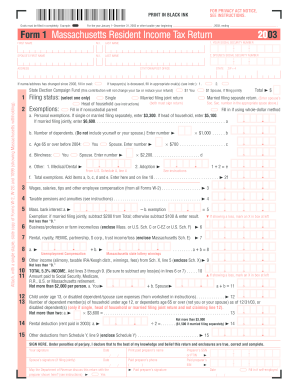
, U.S. or Massachusetts retirement. Not more than $2,000 per person. a. You + b. Spouse a + b 11 , 12 13 , , , , , Rental, royalty, REMIC, partnership, S corp., trust income/loss (enclose Massachusetts Sch. E) 7 8 , , Business/profession or farm income/loss (enclose Mass. or U.S. Sch. C or C-EZ or U.S. Sch. F) 6 , , , Child under age 13, or disabled dependent/spouse care expenses (from worksheet in instructions) . . . . . . . . . . . . . 12 Number of dependent mem.

How it works

  1. Open form

    Open form follow the instructions

  2. Easily sign form

    Easily sign the form with your finger

  3. Share form

    Send filled & signed form or save

How to fill out the MA DoR 1 online

Completing the MA DoR 1 form online can streamline your Massachusetts resident income tax return process. This guide provides clear, step-by-step instructions to help users accurately fill out the form with confidence.

Follow the steps to successfully complete the MA DoR 1 online.

  1. Press the ‘Get Form’ button to access the MA DoR 1 form and open it in your chosen editor.
  2. Enter your first name, middle initial, and last name in the designated fields. Make sure to include the correct spelling and formatting.
  3. Provide your social security number in the specified field; ensure it is correct to avoid any processing issues.
  4. If filing jointly, enter your spouse’s first name, middle initial, last name, and social security number.
  5. Complete the address section by filling in your current address, city or town, state, and zip code accurately.
  6. If any changes have occurred in your name or address since last filing, ensure to indicate this by filling in the oval provided.
  7. Select your filing status by checking the appropriate box: single, married filing jointly, married filing separately, or head of household.
  8. For exemptions, fill in the appropriate amounts based on your circumstances as directed in the instruction manual.
  9. Calculate your income sources including wages, taxable pensions, and other compensations as detailed in the form.
  10. Total your income and apply any deductions based on the guidelines provided.
  11. Review your calculations thoroughly to ensure accuracy before submission.
  12. Once all fields are filled and verified, save your changes, and choose to download, print, or share your completed form as needed.

Complete your MA DoR 1 form online today for a smoother tax filing experience.

Get form

Experience a faster way to fill out and sign forms on the web. Access the most extensive library of templates available.

Related content

Massachusetts Personal Income Tax Forms and...
Jan 15, 2024 — DOR has released its 2024 Massachusetts Personal Income tax forms. You...
Learn more
Form 1 Massachusetts Resident Income Tax Return...
1 FILING STATUS. Fill in one only. Single. Fill in if noncustodial parent. Married filing...
Learn more
PT Manual do utilizador 1 Atendimento ao Cliente e...
Este manual electrónico do utilizador destina-se a qualquer pessoa que utilize o monitor...
Learn more

Related links form

KS Notice ot Extension to File Contractor Lien 2005 KS Notice to Appear 2006 KS Notice to Judgment Debtor (earnings garnishment) 2013 KS Notice to Judgment Debtor (nonearnings garnishment) 2013

Questions & Answers

Get answers to your most pressing questions about US Legal Forms API.

Contact support

Similarly to the earlier query, a Massachusetts tax ID number is not the same as an EIN. The Massachusetts tax ID is used for state tax purposes, while the EIN identifies your business at the federal level. Being informed about these distinctions can streamline your business operations.

Schedule Line 1 typically refers to the section where you report your total income for the tax year. This line is foundational in the MA DoR 1 process, as it determines your taxable income. Correctly completing this line can impact your overall tax liability.

To calculate line 1 on your W-2, you need to refer to your total earnings. This figure includes wages, bonuses, and any other compensation before taxes and deductions. Make sure that you cross-check this with your MA DoR 1 to ensure everything aligns correctly.

No, a sales tax ID number and an Employer Identification Number (EIN) serve different purposes. The sales tax ID is used for tax collection on retail sales, while an EIN is used for business identification with the IRS. Understanding these differences can simplify your tax dealings and filings.

Line 1 of Schedule 1 requires you to report your total income from all sources. This includes wages, tips, and any additional earnings you may have received during the tax year. Accurately capturing this data is vital for correctly completing your MA DoR 1.

On Schedule A Line 1, you will need to enter your itemized deductions, such as medical expenses, property taxes, and mortgage interest. This information plays a crucial role in determining your taxable income on your MA DoR 1. Ensure that each item is well-documented to support your claims.

You should file your MA form 1 with the Massachusetts Department of Revenue. You can do this electronically or by mail, depending on your preference or requirements. It's essential to verify that your form is submitted by the tax deadline to avoid any penalties.

To fill out Schedule 1 Line 1 for your MA DoR 1, start by entering your total income. This may include wages, interest, and any other types of income you've received. Make sure to review all relevant sections of your tax documents for accuracy to avoid complications.

In jail terminology, 'DoR' often refers to Date of Release. This date indicates when an incarcerated individual is expected to be released from custody. Understanding the significance of the DoR can be critical for planning post-release arrangements, ensuring individuals return to their communities effectively.

In Massachusetts, DoR stands for the Department of Revenue, which oversees the state’s tax collection and revenue distribution. This government body provides essential resources and guidance for taxpayers to navigate their financial responsibilities effectively. Engaging with the MA DoR helps ensure compliance and aids in understanding your tax duties.

Get This Form Now!

Use professional pre-built templates to fill in and sign documents online faster. Get access to thousands of forms.
If you believe that this page should be taken down, please follow our DMCA take down processhere.
Get MA DoR 1
  • Adoption
  • Bankruptcy
  • Contractors
  • Divorce
  • Home Sales
  • Employment
  • Identity Theft
  • Incorporation
  • Landlord Tenant
  • Living Trust
  • Name Change
  • Personal Planning
  • Small Business
  • Wills & Estates
  • Packages A-Z
  • Affidavits
  • Bankruptcy
  • Bill of Sale
  • Corporate - LLC
  • Divorce
  • Employment
  • Identity Theft
  • Internet Technology
  • Landlord Tenant
  • Living Wills
  • Name Change
  • Power of Attorney
  • Real Estate
  • Small Estates
  • Wills
  • All Forms
  • Forms A-Z
  • Other Templates
  • Legal Hub
  • About Us
  • Help Portal
  • Legal Resources
  • Blog
  • Affiliates
  • Contact Us
  • Delete My Account
  • Site Map
  • Industries
  • Forms in Spanish
  • Localized Forms
  • State-specific Forms
  • Forms Kit
  • Real Estate Handbook
  • All Guides
  • Notarize
  • Incorporation services
  • For Consumers
  • For Small Business
  • For Attorneys
  • USLegal
  • FormsPass
  • pdfFiller
  • signNow
  • altaFlow
  • DocHub
  • Instapage
Form Packages
  • Adoption
  • Bankruptcy
  • Contractors
  • Divorce
  • Home Sales
  • Employment
  • Identity Theft
  • Incorporation
  • Landlord Tenant
  • Living Trust
  • Name Change
  • Personal Planning
  • Small Business
  • Wills & Estates
  • Packages A-Z
Form Categories
  • Affidavits
  • Bankruptcy
  • Bill of Sale
  • Corporate - LLC
  • Divorce
  • Employment
  • Identity Theft
  • Internet Technology
  • Landlord Tenant
  • Living Wills
  • Name Change
  • Power of Attorney
  • Real Estate
  • Small Estates
  • Wills
  • All Forms
  • Forms A-Z
  • Other Templates
Customer Service
  • Legal Hub
  • About Us
  • Help Portal
  • Legal Resources
  • Blog
  • Affiliates
  • Contact Us
  • Delete My Account
  • Site Map
  • Industries
  • Forms in Spanish
  • Localized Forms
  • State-specific Forms
  • Forms Kit
Legal Guides
  • Real Estate Handbook
  • All Guides
Prepared for you
  • Notarize
  • Incorporation services
Our Customers
  • For Consumers
  • For Small Business
  • For Attorneys
Our Sites
  • USLegal
  • FormsPass
  • pdfFiller
  • signNow
  • altaFlow
  • DocHub
  • Instapage
Social Media
Call us now toll free:
+1 833 426 79 33
As seen in:
© Copyright 1999-2026 airSlate Legal Forms, Inc. 17 Station Street, Suite 303, Brookline, MA 02445
  • Your Privacy Choices
  • Terms of Service
  • Privacy Notice
  • Content Takedown Policy
  • Bug Bounty Program
MA DoR 1
This form is available in several versions.
Select the version you need from the drop-down list below.
2019 MA DoR 1
Select form
  • 2019 MA DoR 1
  • 2016 MA DoR 1
  • 2015 MA DoR 1
  • 2014 MA DoR 1
  • 2013 MA DoR 1
  • 2012 MA DoR 1
  • 2003 MA DoR 1
Select form