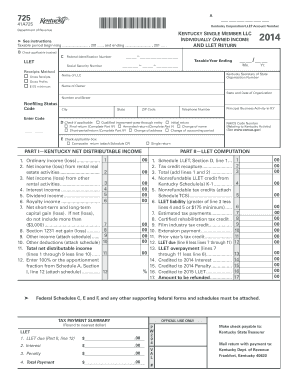
It...................... 11 00 12. LLET due (line 6 less lines 7 through 11). 12 13. LLET overpayment (lines 7 00 through 11 less line 6)..................... 13 14. Credited to 2014 Interest................ 14 15. Credited to 2014 Penalty................. 15 % 16. Credited to 2015 LLET..................... 16 17. Amount to be refunded.................. 17 Federal Schedules C, E and F, and any other supporting federal forms and schedules must be attached. TAX PAYMENT SUMMARY OFFICIAL US.
Loading
Open form follow the instructions
Easily sign the form with your finger
Send filled & signed form or save
How to fill out the KY DoR 725 (41A725) online
Filling out the KY DoR 725 (41A725) online is an important task for owners of single member limited liability companies in Kentucky. This guide provides clear, step-by-step instructions to help you successfully complete the form with confidence.
Follow the steps to accurately complete the KY DoR 725 online.
- Press the ‘Get Form’ button to access the KY DoR 725 (41A725) form and open it in your chosen online editor.
- Enter the taxable period by filling in the beginning and ending dates for the tax year in the designated fields.
- Check the appropriate box under section B to indicate whether you are using the gross receipts or gross profits method for your income calculation.
- Provide your Federal Identification Number in the specified section. This is essential for identification and processing.
- Complete the fields for your LLC name, Kentucky Secretary of State organization number, and the name of the owner, entering the required information clearly.
- Check if any initial, amended, final, or address change applies by selecting the appropriate box in section D.
- Input your Principal Business Activity in Kentucky and the associated NAICS Code Number in section E.
- Accurately report your ordinary income, rental income, interest income, and other income sources in Part I of the form.
- For Part II, carefully calculate your LLET liability, using the provided lines and making sure to attach any required schedules.
- In Part III, determine your LLET credit for members if applicable, filling in all required calculations.
- Complete the explanation sections for final or amended returns in Parts IV and V, where necessary.
- After filling out all sections, review your entries for accuracy and completeness before saving your changes. You can then download, print, or share the completed form as needed.
Start filling out your KY DoR 725 (41A725) online today for a seamless filing experience.
Experience a faster way to fill out and sign forms on the web. Access the most extensive library of templates available.
Related content
Declaration of preparer (other than taxpayer) is based on all information of which...
Get answers to your most pressing questions about US Legal Forms API.
What is form 725 in Kentucky?
Form 725 is the Kentucky individual income tax return form used for reporting state income for residents and certain nonresidents. It allows taxpayers to calculate their tax liability and claim any available credits and deductions. Filing with the KY DoR 725 (41A725) is essential for ensuring accurate reporting and compliance with Kentucky tax laws.
How do I check the status of my Kentucky refund?
To check the status of your Kentucky tax refund, visit the Kentucky Department of Revenue's website and navigate to their refund status section. You will need to provide your personal information, such as your Social Security number and the amount of your refund. This process can help you gain quick insights about your refund status without hassle, especially if you filed using KY DoR 725 (41A725).
Can KY form 725 be filed electronically?
Yes, KY form 725 can be filed electronically, which simplifies the process for many taxpayers. E-filing through the official Kentucky Department of Revenue website or authorized software can expedite your submission and minimize errors. Leveraging the KY DoR 725 (41A725) for electronic filings offers a more efficient way to manage your tax responsibilities.
What is a form 720 payment voucher in Kentucky?
Form 720 is a payment voucher used for making tax payments to the Kentucky Department of Revenue. This form can be used by individuals and businesses to remit payments associated with various taxes. By using KY DoR 725 (41A725), you can streamline your tax submission process and ensure your payments are processed correctly.
What retirement income is exempt in Kentucky?
In Kentucky, certain retirement incomes are exempt from state taxes, including benefits from Social Security, pensions, and annuities. If you qualify under the KY DoR 725 (41A725), you can potentially exclude some retirement income, which may lower your overall tax burden. Keeping up to date with exemptions can greatly benefit your financial planning in retirement.
Does Kentucky have an e-file authorization form?
Yes, Kentucky provides an e-file authorization form that allows tax professionals to submit your KY state tax returns on your behalf. This form is essential for ensuring that your KY DoR 725 (41A725) is filed accurately and on time. It is especially useful for those who prefer assistance with their tax filings. To make this process seamless, check out uslegalforms for authoritative resources and forms.
Who must file KY form 725?
You must file the KY form 725 (41A725) if you are a Kentucky resident or a part-year resident with taxable income. This form is designed for individuals and entities who owe Kentucky state taxes. It’s important to review your financial situation annually to determine your filing requirement. Utilizing resources like uslegalforms can help clarify your obligations and ensure compliance with state tax laws.
How do I file my KY state taxes?
To file your KY state taxes, first, gather all necessary documents including your W-2 forms and any other income records. Then, complete the KY DoR 725 (41A725) form, which is essential for reporting your taxable income. You can choose to file by mail or online, depending on your preference. Platforms like uslegalforms provide clear guidance and templates to streamline your filing process.
How do I get a KY state tax ID number?
To obtain a KY state tax ID number, you'll need to register with the Kentucky Department of Revenue. This process can typically be completed online, where you’ll fill out the appropriate application form. KY DoR 725 (41A725) can facilitate this registration, making sure you provide all necessary details effectively. Once registered, you’ll use this number for various state tax obligations.
Is an EIN the same as a tax ID?
An Employer Identification Number (EIN) is indeed a type of tax ID, but they are not synonymous. While an EIN is specifically assigned to businesses for tax purposes, a tax ID can also refer to Social Security Numbers (SSNs) for individuals. If you plan to operate in Kentucky, knowing the difference can help you ensure compliance with KY DoR 725 (41A725). Make sure you apply for the correct ID based on your needs.
Use professional pre-built templates to fill in and sign documents online faster. Get access to thousands of forms.
If you believe that this page should be taken down, please follow our DMCA take down process here.
This form is available in several versions. Select the version you need from the drop-down list below.